I was updating 1Password on my Mac this morning and took the occasion to look at the “About 1Password” dialog:

Screen shot of the 1Password about box.

I was intrigued by that long list of places: it seemed to suggest that 1Password is maintained entirely by remote workers. And, sure enough, it turns out to be true; from the 1Password jobs page:

Work remotely, from anywhere, flexibly. You could be in a sweet home office, then a café for part of the day, and even in your camper on a caldera – so long as there’s a reliable Internet connection. We’ve got folks in over 30 cities, from New Zealand to Germany to our office in Toronto.

I pasted that list of places into MapCustomizer.com to generate a map of all of them; here’s what I got:

Map of 1Password workers (from MapCustomizer.com)

It turns out that a good number of those workers are in southern Ontario, not surprising as it’s a Toronto-based company:

Map of 1Password workers in southern Ontario.

I see they have workers in Burlington (where my parents live) and Brantford (where my grandparents lived) and Peterborough (where Catherine and I used to live).

I like being about to put a geography to my software creators, especially those that create software that’s as mission-critical to my everyday as 1Password is.

🗓️
1Password  •  Maps  •  Geography  •  Jobs

I just made a donation to John Andrew’s Green campaign for the deferred election in District 9.

Everything I’ve learned about John over the past month has shown him to be a thoughtful, intelligent, universally well-regarded person with a deep connection to his home, his watershed and his district.

John is never going to win points for theatricality. I wouldn’t look to him for a disabling political barb levied at his opponents.

But we’re not casting a drama, we’re hiring someone to help solve gnarly problems, and John’s had a career of doing that. He is the right person for this job.

And if that isn’t enough, the view from his back porch is about the greenest possible view you can imagine.

Andrews Pond from John Andrew's House

🗓️

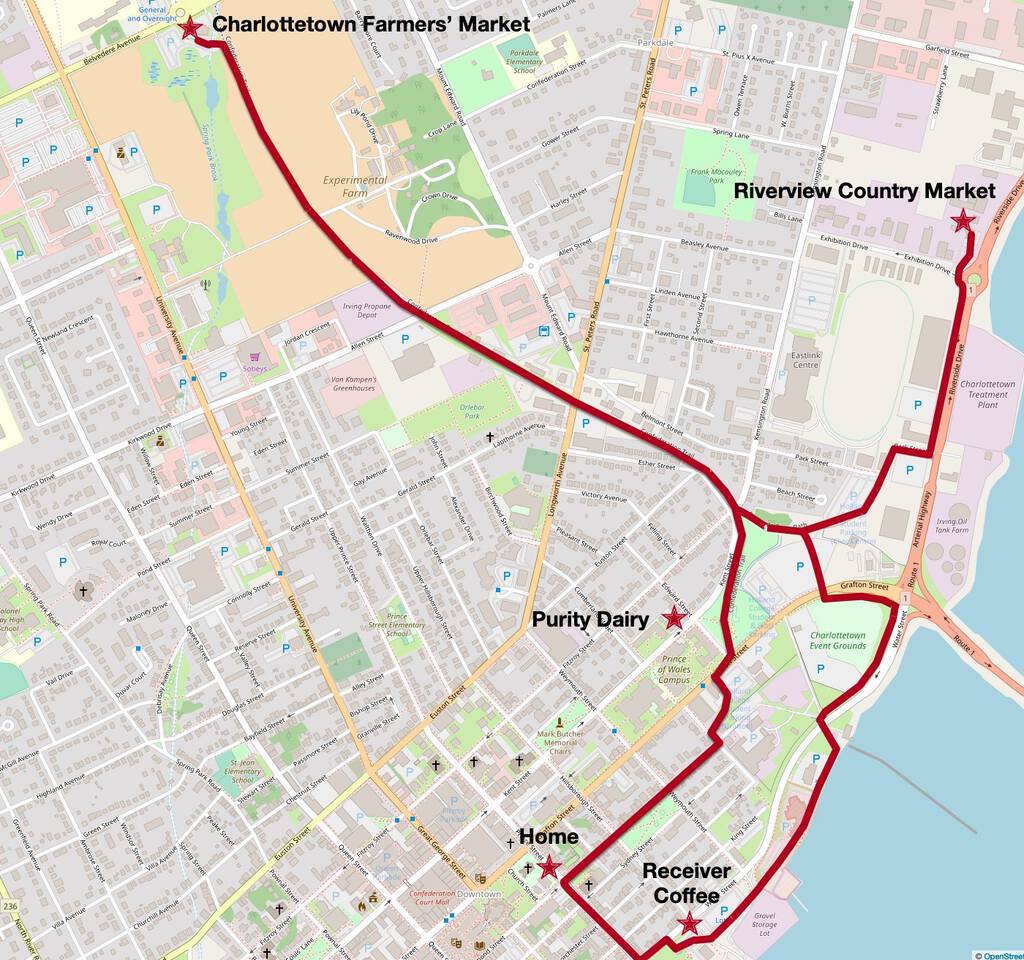
If you’re at Receiver Coffee on Victoria Row this summer, and Joel is behind the bar, order up “The Joel” for a delightful iced summer drink.

Speaking of Receiver: they’re about to open a third location, out on the North River Causeway, and roasting and baking operations will be relocated out there. They’re still casting about for a name; I’m advocating for Receiver Underwater, as a tip of the hat to climate change, but it’s not garnering much support.

Caledonia House Coffee at the Charlottetown Farmers’ Market has a perpetual summer problem, as the newly-arriving hordes of irregulars clog up the coffee line. Bret is working to mitigate this issue by opening up a second coffee stand, outside in the trailer formerly occupied by 4S. The coffee’s just as good, and the line–at least for now–a lot shorter.

Speaking of the market: don’t forget that it’s now open on Wednesday–in addition to the regular Saturday–for the summer. It’s a lot less busy, but there’s still a good complement of vendors, and it’s a great place to stop for lunch.

The best thing ever to happen to the downtown Sunday flea market in Charlottetown has been to close Queen Street below Grafton: the result is that the vendors are now facing in to the street rather than out to the sidewalk, rendering the sidewalks clear and the street a pleasant place for a car-free stroll. I had a very nice rajmah chawal from The Great Indian Curry for lunch today.

If you’re a fan of the A&W Beyond Meat burger, you can now get a similar vegetarian concoction at Tim Horton Donuts, the Beyond Sausage. It appears to be popular–or at least more popular than anticipated–as I’ve encountered a couple of situations where a outlet doesn’t have any stock. And don’t let them tell you that you need to order it with egg: the Beyond Sausage Lettuce Tomato is just that; this hasn’t been internalized by all staff yet.

A reminder that, as reported earlier, Riverview Country Market now has a Downeast Soap refilling station. I’ve started to regularly buy our hand and laundry soap there and not only is it great to not be buying new plastic bottles every time, but the price is significantly less than buying a brand new bottle at Sobeys.

And, finally, my annual recommendation for The Best Thing Ever, the Factory Coffee at Island Chocolates in Victoria. It’s the one regular concession I make to avoiding sugar and it is fantastic.

Factory Coffee at Island Chocolates

🗓️

Thanks to a helpful post by William Denton, I remembered the Android utility Tasker, and realized that I could use it to automate the gluing together of my Android phone and my Mac.

Here’s what I did.

First, I installed Tasker on my phone from Google Play and then the Termux:Task add-on from F-Droid.

Next, on my phone I launched Termux, created a directory ~/.termux/tasker, and created two scripts there.

The first, start-ssh, to start the SSH server on the phone (after killing it first, in case it was running already):

#!/bin/bash

pkill sshd
sshd

The second, mount-phone-on-mac, to mount the phone on the Mac (by SSHing to the Mac and doing the mount from there, unmounting it first in case it was already mounted):

#!/bin/bash

ssh peter@192.168.2.2 "umount ~/motog7"
ssh peter@192.168.2.2 "/usr/local/bin/sshfs phone:/storage/emulated/0 ~/motog7 -o volname=motog7 -p 8022"

To allow this second script to work properly, I had to do a couple of things.

First, in System Preferences on the Mac, I had to check the “Remote Login” box on the Sharing sheet.

Second, on the phone, in Termux, I had to create an SSH keypair:

ssh-keygen -t rsa -b 2048 -f id_rsa

This left me with a public key file ~/.ssh/id_rsa.pub that I then added to the end of ~/.ssh/authorized_keys on my Mac.

I made these two scripts executable with:

chmod +x ~/.termux/tasker/*

I then tested them out to make sure they worked.

Next, I set up Tasker.

I created a new Profile called Reinventorium with the trigger of State > Wifi Connected and the SSID of my office’s wireless network:

Screen shot of Tasker Profile

I added a new Task called Mac to this Profile, and added two Actions to that Task, one for each of the two scripts I created above, selecting Plugin > Termux:Task from the Action category and entering the name of the script:

Screen shot of Tasker Task

With all of this in place, every time I come into the office with my phone and it connects to the office wireless network, it automatically launches its SSH server, and tells my Mac to mount its storage.

🗓️
Tasker  •  Termux  •  Android  •  macOS

Following a link on Frank’s blog, I learned about an innovative mortgage product from the Dutch Triodos Bank, the sustainable mortgage:

With the Triodos Mortgage you get a discount on the interest when your house becomes more sustainable. We offer the Triodos Energy Saving Loan for the renovation. With this loan you can finance up to 25,000 euros in sustainable adjustments to your home. The great thing is that the interest on this loan is only 50% of the interest on your mortgage.

This is an excellent idea.

🗓️
Mortgage  •  Netherlands  •  Energy

Back in 2012 I booked a flight to Berlin that was scheduled to land at the new Berlin Brandenburg Airport. Before I flew, however, I received a message from the airline telling me that the new airport’s opening was delayed and that I’d be landing at the venerable Berlin Tegel instead.

Remarkably, Berlin Brandenburg still has yet to open, and the reasons behind this are the subject of the four-episode podcast, How To Fuck Up An Airport, from Radio Spaetkauf:

Every Berliner knows the new airport is late. Few know exactly why. We’re here to explain. BER is the international airport code for Berlin Brandenburg Airport, nickname Willy Brandt. It has also become a signifier of failure, incompetence, corruption and Berlin’s general inability to get its act together.

If you’ve flown to Berlin Schönefeld Airport in the last few years, you’ll have seen BER as your plane taxied along the runway. But despite outward appearances, BER is far from finished. It has been under construction for 11 years, blown through six opening dates, three general managers and two state leaders. Costs have ballooned from around €1 billion to at least €5.4 billion.

Across this series, you’ll learn why the escalators are too short, why the lights are always on, and why the rooms seemed to be numbered by bingo. We’ll interview insiders and disgruntled workers, chase ghost trains running to the terminal, and go inside the unfinished airport.

🗓️

Because I was raised in an era when we were willing to conceive of mobile devices as servers as much as clients, it’s always bothered me that the ability to mount an Android phone’s storage on a desktop PC or Mac disappeared when Google removed USB Mass Storage Mode from its operating system.

My phone is a powerful sensor array, it can have a Linux command line, making it a programmable mobile powerhouse. Not being able to easily transfer files to and from its storage is disabling.

But there’s a solution for this.

On the Phone

For greatest ease, assuming your version of Android supports it, assign your phone a static IP address on your wifi network; on Android Pie you’ll find this under the “Advanced” settings for your wifi connect:

Android screen shot showing setting a static IP address

Install Termux, either from Google Play or from F-Droid.

Once it’s installed, start the app, and start an SSH server with:

sshd

On the Mac

For greatest ease, add an entry in /etc/hosts for your phone like this:

192.168.2.8	phone

You can do this with:

sudo nano /etc/hosts

Next, assuming you already have Homebrew installed (look here if you need to install it):

brew cask install osxfuse
brew install sshfs

This will install SSHFS, which you’ll use on your Mac to mount the Android storage.

Once it’s installed, create a directory where you’d like to mount the phone storage, and do the mount:

mkdir motog7
sshfs phone:/storage/emulated/0 ~/motog7 -o volname=motog7 -p 8022

In that sshfs command:

  • phone is the name I assigned to my Android phone’s static IP address in /etc/hosts
  • /storage/emulated/0 is the Android path I want to mount on my phone
  • ~/motog7 is the directory I created on my Mac for the mount
  • -p 8022 sets the SSH port to use for the mount as 8022, which is what Termux uses by default

You might get a warning dialog “System Extension Blocked” when you attempt the mount; you can allow this to proceed under System Preferences > Security & Privacy.

Use your new superpowers…

Assuming all went according to plan, you now have the Android’s storage mounted on your Mac.

It will show up in the Finder:

Screen shot of Mac Finder showing mounted Android storage

And it will be accessible from the command line:

macmini:~ peter$ ls ~/motog7
Alarms		Download	Recordings	bluetooth
Android		Movies		Ringtones	osmand
BROTHER		Music		Signal		osmdroid
Cardboard	Notifications	Telegram	osmtracker
DCIM		Pictures	Vespucci
Documents	Podcasts	alt_autocycle

You can treat it like another disk drive.

To Unmount

To umount the phone:

umount ~/motog7

You may find that the mount kills itself if the Termux app on your phone is terminated by Android.

🗓️
Android  •  macOS  •  SSHFS

Me: Oliver, do you have your Spotify playlist ready for tonight?

Oliver: No. I’m watching Beto O’Rourke.

Me: Okay.

🗓️

This is a post about gluing some things together, and about the IndieWeb. It started, however, with a photo of a child on a bicycle.

I liked that photo, and I wanted to express that somehow in a public fashion.

I didn’t want to leave a comment on that blog post, as my aspirations were simply to express admiration for the photo and its subject; I was looking for something more “hej!”

It turns out that there’s IndieWeb for that.

One way of thinking about the IndieWeb is “all the plumbing of corporate social networks, without any of the corporate social networks required.”

In other words, in this case, “a like button for the web.”

Another way of thinking about the IndieWeb is to focus on the Indie: it’s a decentralized jam that allows us all to bring our own tools to the table, but to interoperate.

In my case the tools I needed to glue together are FreshRSS (the RSS feedreader where that bicycle photo originally caught my eye) and Drupal, which I use to write this blog.

Click the Star in FreshRSS

The way I decided to make this all work is to wire up “favouriting” a post in FreshRSS to sending a Webmention.

So I do this:

and I cause this to happen:

A Like on Elmine's blog

Pull The Favourites

My original approach was to try to code up a FreshRSS extension that would make this all happen in real time; I quickly decided that I didn’t want to have to grok a new MVC framework to make this happen, and that real time liking didn’t really need to happen.

I decided, instead, to simply extract favourites from FreshRSS on a regular schedule and to create new Drupal posts for new ones I encounter.

FreshRSS’s “entry” table makes this easy, as there’s a boolean field for each entry called is_favorite:

FreshRSS entry marked as a favourite

I only want to create a post in Drupal once, so I created an additional table, favourites_rss, to track those I’ve already processed. The result is that I can extract the details of new favourites by this bit of SQL:

SELECT en.id,title,link,date,website,name 
   from freshrss_peter_entry en,freshrss_peter_feed 
   where 
     (freshrss_peter_feed.id = en.id_feed) and 
     (is_favorite = 1) and 
     en.id not in (select fav.id from favourites_rss fav)

This returns me all the information I need about each favourite:

  • The title of the post
  • The link to the post
  • The date of the post
  • The title of the blog where the post lives
  • The link to the blog

Post the Favourites

I created a new Drupal content type called Favourite with fields for each of these pieces of information:

The Favourites content type in Drupal

With that in place I can programmatically add new favourites in Drupal like this, in PHP:

foreach($favs as $key => $row) {

	$node = new stdClass();

	$node->type = $nodetype;

	node_object_prepare($node);

	$node->language = 'und';
	$node->title = html_entity_decode($row['title']);
	$node->uid = 1;
	$node->status = 1; //(1 or 0): published or not
	$node->promote = 0; //(1 or 0): promoted to front page
	$node->comment = 0; // 0 = comments disabled, 1 = read only, 2 = read/write
	$node->field_feed_title[$node->language][0]['value'] = html_entity_decode($row['name']);
	$node->field_website[$node->language][0]['url'] = $row['website'];
	$node->field_website[$node->language][0]['title'] = html_entity_decode($row['name']);
	$node->field_link[$node->language][0]['url'] = $row['link'];
	$node->field_link[$node->language][0]['title'] = html_entity_decode($row['title']);

	if($node = node_submit($node)) { // Prepare node for saving
		$node->created = $row['date'];
		node_save($node);
		webmention_send($node->nid);
	}
}

The post that got created for the bicycle photo is here; if you look at the HTML of that post, you’ll see that the link includes the CSS class u-like-of:

<a href="http://infullflow.net/2019/06/naar-het-park/" class="u-like-of">Naar het park</a>

The call to webmention_send() is the secret sauce that sends a Webmention to the original favourites post, a Webmention that signals “I like you” because of that CSS class.

Release the Favourites!

With all my favourites now safely tucked away in Drupal posts, with Webmentions sent to their hosts, I can also expose everything I’ve favourited to all-comers.

Drupal makes this easy using Views, which I used to create this Favourites page, that lists them all, in reverse chronological order; I also used Views to create an RSS feed of my favourites that you can plug into your RSS reader, should you like (and to allow the river of love to overflow its banks ever further).

Although it took some fiddling to make all this happens, now that the fiddling is fiddled, it just works: I click the star in FreshRSS and the favourite appears on this list, in this RSS feed, and, should the blog I favourited the link from support Webmentions, as a “like” on the original post.

🗓️
FreshRSS  •  RSS  •  IndieWeb

The Plastic Bag Reduction Act comes into force here on PEI next week.

My favourite part of the legislation—other than the “no more plastic bags” part—is that there’s an exemption to allow plastic bags to “transport live fish.”

“Hold on, Marv, what about goldfish?!”, one can imagine the engaged public servant exclaiming during the drafting of the bill.

Which causes me to recall a song I wrote for Catherine during our early courting:

I don’t like your fish, I don’t like them very much.

I don’t like the way they look at me, and talk about such and such (and such and such).

I don’t like your fish, I don’t like them one bit.

I don’t like the way they swim around, and I don’t like the way they shit (all over the place).

Chorus:

But I sure (sure) do like you. Yes I do.

Not the best wooing song, perhaps. But it worked.

🗓️
Fish  •  Catherine  •  Environment  •  Legislation

About This Blog

Photo of Peter RukavinaI am . I am a writer, letterpress printer, and a curious person.

To learn more about me, read my /now, look at my bio, listen to audio I’ve posted, read presentations and speeches I’ve written, see things I’ve favourited elsewhere, or get in touch (peter@rukavina.net is the quickest way).

I have been writing here since May 1999: you can explore the 25+ years of blog posts in the archive.

You can subscribe to an RSS feed of posts, an RSS feed of comments, an RSS feed of favourites elsewhere, or a podcast RSS feed that just contains audio posts. You can also receive a daily digests of posts by email. I also publish an OPML blogroll.

InstagramYouTubeVimeoORCIDOpenStreetMapInternet ArchivePEI.artDrupalGithub.