Our rabbit arrived this week from ThingGeek via DHL courier.

It actually arrived at our house at around 1:30 p.m. on Thursday afternoon, but Catherine was out, and she found the DSL “door knocker” on our front door when she returned.

I followed the instructions on the door knocker and went to the DHL website, entered the “door knocker number” and requested delivery on Friday to my office.

When nothing had arrived by Friday at lunch, I called the DHL toll-free number to confirm that my request had “taken.” After a transfer to the Canadian operation, an agent confirmed that there was no record at all of my web request; he submitted it manually, and said it could be Monday before my rabbit arrived at the office.

With no rabbit at the end of business on Friday, on a lark I called DHL back and spoke to a much more helpful agent who gave me the address of the local DHL station here in Charlottetown and told me I could simply try going there to see if my package was there.

It turned out that the station is located at 7 Mount Edward Road (although you won’t find any record of this in Google) in behind K&M Home Heating and next door to the old Wizard store. It’s only open two hours a day, one in the early morning and one in the afternoon, and it’s not really set up at all for customers to just “drop by” as it’s only a warehouse.

That said, I found two very helpful drivers unloading packages from a cube van, and they quickly located my rabbit. I paid the COD with a credit card, and I was off.

🗓️

I bought an Apple Mighty Mouse a year and half ago, one in a long series of pointing devices I’ve owned over the years.

Until recently I’d been completely happy with the mouse: it’s compact, fits nicely in my hand, and it’s “scroll nub” works well.

That is, until recently. For the last month I’ve been battling my Mighty Mouses’ scroll nub’s tendency to not want to scroll “down.” It would scroll up just fine, but some days it would just plain refuse to scroll down. Word on the street is that this is a simple matter of “gunk in the works” and so I followed the office Apple cleaning instructions. And, indeed, this worked for a while.

But the situation got progressively worse over the last couple of weeks, to the point where no amount of rolling and blowing and sucking could make my mouse happy.

On Friday, in desperation, I turned to the well-illustrated Mighty mouse gutting and cleaning page, and proceeded to tenderly rip my mouse apart.

Inside the works I did, indeed, find some gunk. Not loads and loads of gunk, but perhaps enough to explain the no-scrolling problem.

After a thorough cleaning, I put things back together.

And the mouse no longer worked.

Although I have aspirations to electronics nerd-dom, I can seldom pull it off very effectively (I recall an unfortunate incident in my Datsun 510 wherein green smoke filled the cabin after I attempted to self-install a cassette player). So obviously somewhere in my mouse gutting I took a wrong turn, lopped off an important nerve, and rendered the mouse dead.

Angry at Apple for selling me a seemingly uncleanable product, I exacted revenge by driving out to Staples and buying an Microsoft Wireless Laser Mouse 5000. It was easy to install, and I used it for the following 24 hours.

Unfortunately, in addition to lacking a snazzy pop-culture-referencing name, the 5000 felt like driving an Armoured Personnel Carrier to work: it didn’t fit in my hand, its scroll wheel felt like weightlifting compared to the scroll nub, it didn’t glide well across my desk, and the giant radio receiver it required took up valuable desk real estate. I had to stop using it after a day simply because my hand started to hurt and I couldn’t go on.

Having now forgiven Apple (or being sucked back inside the reality distortion field), I returned the Microsoft mouse to Staples and picked up the snazzy new Bluetooth version of the Mighty Mouse at Little Mac Shoppe for $30 more.

I paired it up with my MacBook and it worked right away. It felt like coming home: smooth scrolling, easy-glide action, comfortable in my hand.

I’ve no doubt that this mouse will gunk up after a while. And its wirelessness means that I may end up throwing it across the room in frustration when and if that happens. But in the meantime I’ve got my groove back.

🗓️
Hardware  •  Mac OS X  •  Mighty Mouse

Dan Misener reports on how to keep your glasses from fogging up. I haven’t tried this yet, but if it works it will be a tremendous improvement to my daily routine: every weekday morning I walk into some coffee shop or another and spend the first 5 minutes virutally blind from the sudden fog-up of my glasses due to the near-tropical conditions maintained in said shops (it’s the radiant heat from all those muffins, I suppose).

I came to glasses-wearing relatively late in life, and I still don’t actually consider myself a bona fide glasses wearer (even though I can no longer function without them). So tips like this, which perhaps those that wore glasses from childhood figured out, are very helpful to me.

🗓️
CBC  •  Design

They used to say that you could tell a lot about the Clinton administration by the flow of after-hours pizza deliveries to the White House.

Well this morning on the way to work I ended up walking along behind Shawn Murphy, MP for Charlottetown and an assistant on their way into the office following a stop at Tim Hortons:

Shawn Murphy Shows Up With Coffee

Shawn was carrying a box of Timbits and the man walking beside him was carrying 8 cups of Tim Hortons coffee stacked up in two trays.

With that much coffee and sugar being pumped into the office, obviously something’s afoot. Watch out Stephen Harper: Shawn’s bunch are on your tail.

🗓️
Charlottetown  •  Coffee  •  Food  •  Politics

If you’ve got an Eastlink business telephone line, and want to know how to activate the various Centrex features, here’s the PDF of the Centrex User Guide — it’s hard to find on their website.

🗓️

I went into the post office this morning on the way to work to buy a book of ten stamps. The postal clerk sold me a book of 51 cent stamps, even though the official cost of mailing a letter is now 52 cents. He assured me that Canada Post will honour these old, less expensive stamps, for the rest of 2007. There’s some discussion of this here.

🗓️

It’s been a month an a half since I launched my new morning cappuccino regime. Surely you’ve been asking yourself “how’s it going so far, Pete?” (assuming that you are Ann Thurlow, Catherine or Oliver, the only three people in the world who call me Pete).

For about the last month I’ve settled into a comfortable routine of alternating back and forth between Beanz and Timothy’s, with a Saturday diversion to the Farmer’s Market.

And so on Monday, Wednesday and Friday mornings around 7:30 a.m. you’ll generally find me at Beanz, perched on a stool in the front window. And on Tuesdays and Thursdays you’ll find me at Timothy’s, sitting at a table for two along the wall.

I am nothing if not a creature of habit, so I order the same thing in both places: regular cappuccino and a toasted sesame bagel with swiss cheese and tomato.

The cappuccino isn’t world class in either place, but it’s somewhere between “okay” and “acceptable” and I’ve decided that’s got to be good enough for me. I’ve even gotten used to the fey glass mugettes at Beanz.

The bagel with swiss and tomato is a throwback to my youth: every morning during the summer of 1985 I would take the GO Train into Toronto, get off at Union Station, walk across to the food court under the CIBC skyscraper, and order swiss tomato bagel and an apricot nectar. I’d then walk over to the subway and ride up to the Museum station where I’d split my days between volunteering at the Royal Ontario Museum and the Athenians project.

Beanz and Timothy’s are study in contrasts.

At Beanz my order is exactly the same every time: same bagel, same cappuccino, always served with a teaspoon and a napkin, always the same price. And I always have to get my own sugar.

Timothy’s is more improvisational: the cappuccino’s always the same, but the bagel comes out different every time (sometimes more cheese, sometimes less; sometimes open faced, sometimes not), and the price seems to vary between about $3.00 and about $5.00 depending on the day and the server. And I always have to get my own sugar, and reach around behind the counter to get a teaspoon.

Each place has its own attractions, which is why I alternate back and forth.

Interestingly, my standard order was recognized as “your usual” on two successive days at each place, suggesting that it takes about a month of regular morning visits to be recognized as “a regular” at a Charlottetown coffee shop.

🗓️

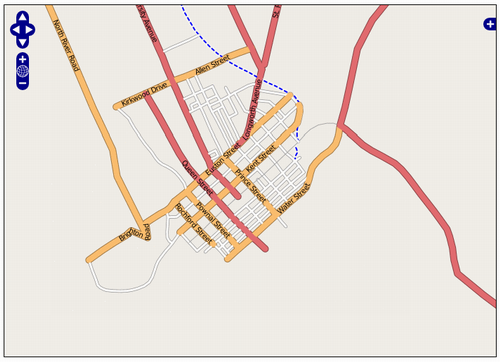
With recent updates to the front end “slippy map” at OpenStreetMap, all that cycling around with a GPS receiver in my pocket last summer now has a much more impressive gateway to the world. This map of downtown Charlottetown, for example — the results of my cycling labours — has colour-coded streets, street name labels, different rendering for the Confederation Trail and it works very “Google Maps-like” in that you can pan by dragging the map around. Neato.

OpenStreetMap Screen Shot
🗓️

An item in my weekly Air Canada email newsletter caught my eye this morning:

Excerpt of Air Canada email newsletter

This is all very well and good, but it would be helpful if the newsletter actually told us which new terminal Air Canada is moving to tomorrow. There’s information on neither Air Canada’s nor Logan Airport’s website about the change, and it took a call to the airline’s toll-free number to find the answer: they’re moving to Terminal B.

For those of us who fly in and out of Logan on Air Canada a lot, this is a Big Change. Their old home at Terminal C was moribund once you got through security, with a tired old Burger King as the only restaurant and a couple of cramped waiting rooms. The indignities of Terminal C were compounded by the fact that Air Canada moved there from the forever-being-renovated Terminal E just as the renovations were completed. Terminal E’s departure lounge had sushi and rocking chairs.

We flew out of Logan’s Terminal B last year on US Airways on our way to Dublin, and I recall it is being a might better resourced (and much brighter looking) terminal. I’m due to head south sometime this season and I’ll report back on what Terminal B means for Air Canada passengers.

By the way, Terminal E, the international terminal at Logan, is to be renamed Terminal D sometime this year; the gates at the old Terminal D were amalgamated into Terminal C last year.

In other Air Canada news, here are the special webSaver deals from Charlottetown for this week:

Screen Shot of Air Canada Website

Not that I turn my nose up at travel to Peru or Australia, but it does seem like an odd combination of destinations to put on sale given all the other places in the world they fly. The fares don’t seem that fantastic, either: in classic Air Canada style, they are “sample low one-way fares” so if you want to get back from Lima or Sydney you have to double them and add taxes and fees.

And finally, something I missed when it was announced earlier this month: Air Canada is starting up flight from Halifax to New York again. Starting April 1, 2007 they’ll have a daily flight, on a 50-seat CRJ, leaving Halifax at 11:45 a.m. and arriving New York LaGuardia at 12:30; the return flight leaves LaGuardia at 1:00 p.m. and arrives Halifax at 3:40 p.m. The late-morning departure should mean that it’s possible to string together flights to LaGuardia from Charlottetown with a change of planes in Halifax with little problem; and indeed a look at the schedule for April 1 shows this to be true:

Screen Shot of Air Canada website

Looking at some sample fares for April, it looks like the YYG to LGA return fare will be about $575 with all taxes and surcharges in. Oddly, it looks like it’s almost always cheaper to fly to New York via Toronto, Montreal or Ottawa than it is to fly via the new Halifax flight; seems you can save about $50 this way.

🗓️

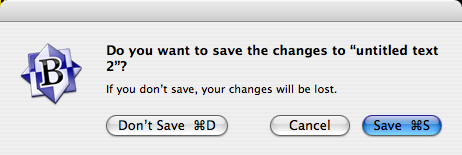
Every once in a whole I stumble across an aspect of the excellent BBEdit text editor for Mac OS X that’s new to me. This morning, for example, the following dialog box popped up:

Screen Shot of OS X Dialog Box

I noticed that if held down the “Command” key (the one with the Apple on it on a genuine Apple keyboard), the buttons in the dialog box changed so that their keyboard shortcuts were displayed:

Screen Shot of OS X Dialog Box

As near as I can tell this isn’t standard OS X behaviour. Maybe it should be?

🗓️

About This Blog

Photo of Peter RukavinaI am . I am a writer, letterpress printer, and a curious person.

To learn more about me, read my /now, look at my bio, listen to audio I’ve posted, read presentations and speeches I’ve written, see things I’ve favourited elsewhere, or get in touch (peter@rukavina.net is the quickest way).

I have been writing here since May 1999: you can explore the 25+ years of blog posts in the archive.

You can subscribe to an RSS feed of posts, an RSS feed of comments, an RSS feed of favourites elsewhere, or a podcast RSS feed that just contains audio posts. You can also receive a daily digests of posts by email. I also publish an OPML blogroll.

InstagramYouTubeVimeoORCIDOpenStreetMapInternet ArchivePEI.artDrupalGithub.