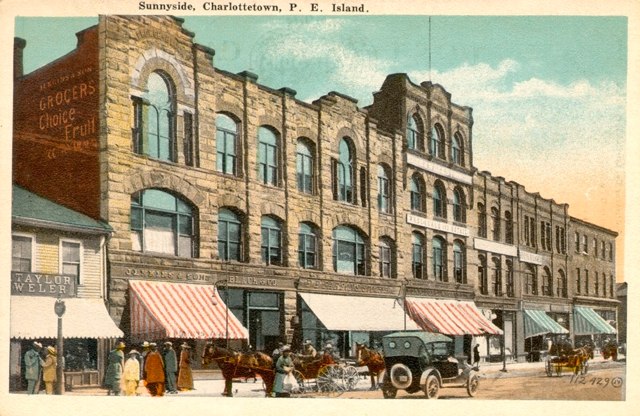
Here’s an undated postcard from Charlottetown (from from here via here, originally from Doug Murray, Postal Historian), showing “Sunnyside,” along Grafton Street between Queen and University:

Sunnyside Postcard

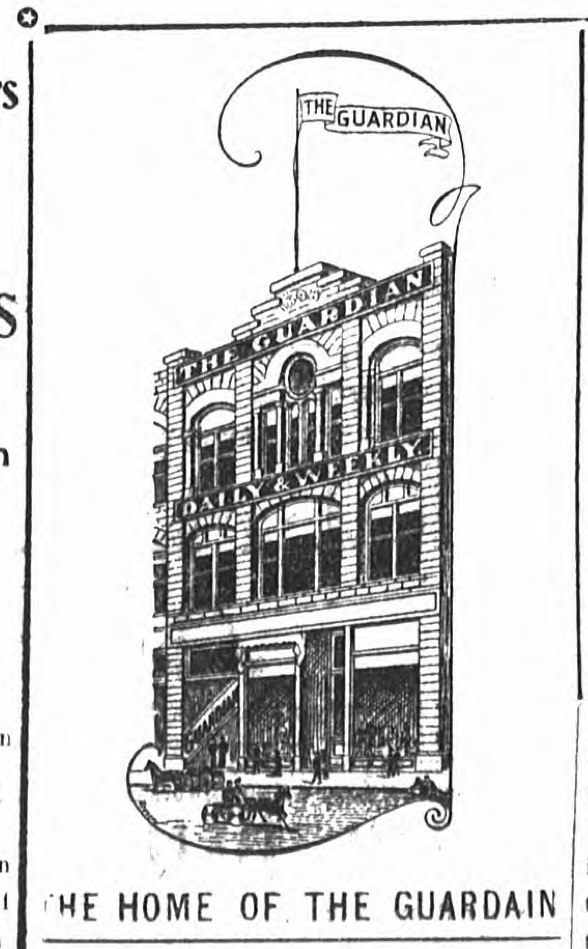
And here’s a front-page illustration from the September 28, 1904 issue of The Guardian, showing the paper’s home on the occasion of the installation of a new press (a Cox Duplex Angle-Bar Press).

It is ironic that, in a front page story celebrating a new generation of printing technology, the newspaper spelled its own name wrong.

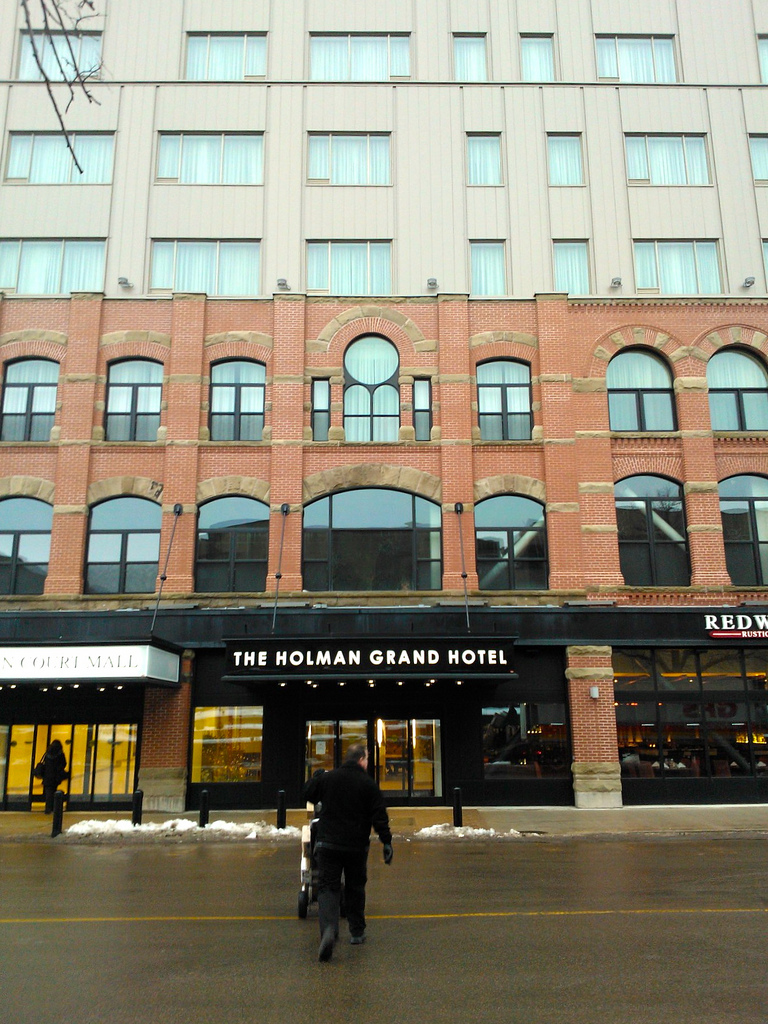
The Guardian is the middle building in the postcard above, later the home of Holman’s, which was later torn down to make the Grand Homburg Hotel. While generally destroying the block and “preserving” the Holman building in only the weakest sense, the Grand Homburg did maintain the general structure of the windows you see in Guardian illustration:

The Grand Homburg Hotel

🗓️
The Guardian  •  Homburg  •  History  •  Charlottetown

We tracker down an old digital camera, the one that Catherine tool to Iceland in the fall of 2008, and I found 338 photos on it that I thought had been lost. Among them is this one, taken on a September afternoon, at Þingvellir.

Oliver, aged 7 (almost 8) and I are running through the rain, a sudden unexpected downpour, as a double rainbow forms in the background (I don’t think we’d seen it yet; clearly Catherine had).

Rain, Son, Father, Rainbow, Iceland

🗓️
Iceland  •  Travel

In a somewhat irrational move, back in 2004 I migrated from using Flickr to share my photos to using an installation of the open source Gallery project. In theory this should have been a perfectly fine migration, except that, at least at the time, Gallery wasn’t really satisfying in any way other than being not Flickr, and so, after a while, I abandoned it. And, a while after that, the Gallery install didn’t survive the transition to a new machine, and so the content was lost.

This wouldn’t have been a serious issue but for two things: first, the photos involved were, at least emotionally, valuable to me, as they were of a trip I took with my brother Mike to the U.S. southwest and of my exploits as a blogger during the 2004 U.S. election, including photos from the Democratic National Convention. There are links over that summer to those photos from posts here that have been broken for almost a decade, and I decided that I wanted to fix that.

Fortunately, the Wayback Machine has a complete copy of the site in its archive and so all that remained was getting the images out of that archive and into somewhere — likely Flickr — less susceptible to decay.

And, more fortunate still, there’s a handy tool called Warrick designed to do just that — to resurrect websites from archives like the Wayback Machine so they can live another day.

Warrick is working its way through scraping the site out of the Wayback Machine as I type, but should you wish to resurrect your own dead site from the past, here’s a quick summary if how I got it working.

  1. To ensure I had a relatively modern version of Linux at hand, I started up an Amazon EC2 instance, using the stock Amazon Linux AMI.
  2. Installed some missing parts inside the instance:
sudo yum  -y install
sudo perl -MCPAN -e 'install HTML::TagParser'
sudo perl -MCPAN -e 'install HTML::LinkExtractor'
  1. With these in place, then it was simply a matter of:
chmod +x ./warrick.pl
./warrick.pl "http://photos.reinvented.net"

The result is the Warrick starts up and pulls a complete mirror of the archived site from the Wayback Machine and dumps on on the local disk. From there I can pull the full-sized JPEGs out of the Gallery installation, and upload them wherever I like.

🗓️

One of my longtime interests has been “personal telemetry,” or, in the current vogue, “the quantified self.” Since my early involvement with the Plazes project I’ve had a particular interest in “geopresence” – the record of where I’ve been, when. My breadcrumbs, in other words.

Over the years I’ve been dropping digital breadcrumbs in a variety of ways that I hope to aggregate, archive and develop tools for the exploration of:

  • 10,973 Plazes check-ins from 2004 to 2012.
  • 2,176 Foursquare check-ins from 2009 to present.
  • 6,245 Google Latitude records from 2010 to present.
  • Some proportion of the 20,010 tweets I’ve posted to Twitter (tweets where my Twitter client has added geolocation data).
  • Some proportion of the 34,839 photos in my iPhoto library (photos with geolocation in the EXIF data).
  • Some proportion of 60 months worth of Metro Credit Union bank statements (transactions that I can attach to a specific place).
  • Some proportion of 48 months worth of personal MasterCard statements (transactions that I can attach to a specific place).
  • Some proportion of 60 months worth of corporate Visa statements (transactions that I can attach to a specific place).

As a starting point, I’d like to work to convert all of these streams into KML Placemarks, which seems like a nice widely-adopted XML standard that can capture both the time and location of a “geopresence.” Here’s my first Foursquare checkin, for example, as a Placemark:


    Reinvented HQ
    
      Not sure that I completely understand
      Foursquare - seems like Plazes,
      but harder to use
    
    Mon, 26 Oct 09 18:12:56 +0000
    Mon, 26 Oct 09 18:12:56 +0000
    1
    
        1
        relativeToGround
        
            -63.12968790933351,46.236265592340494


This was easy to grab because Foursquare has a handy page that will export all your checkins directly into a KML file. Twitter appears poised to release the entire back-catalog of tweets for each user any day now – there were tests of this in the wild in late 2012. When Nokia shut down Plazes they allowed Plazes users to export their complete history as delimited ASCII. Google Latitude provides for of history as KML (albeit via a little URL hacking to get the date range right). The other streams will require some PDF file parsing and some intellligence to convert credit card and bank statement description lines into georeferenced locations.

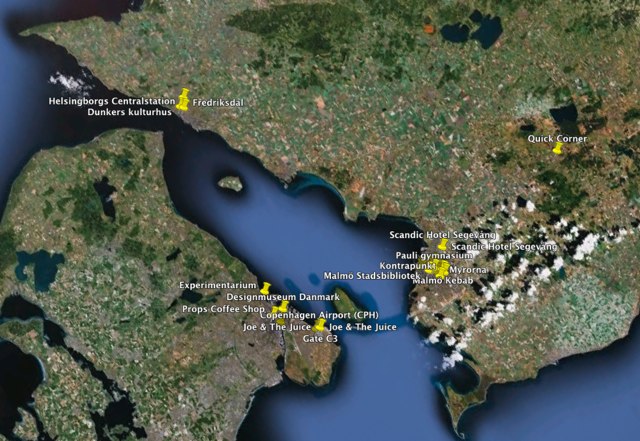
My Foursquare location history in Sweden and Denmark.

🗓️

When it came time to choose a location for my office in Robertson Library I had two options: joining Peter Lux in a relatively cavernous sunlight space formerly occupied by various technicians and programmers, and, around the corner and down a hall, a decidedly uncavernous, non-sunlit 50 square foot research cubicle. I choose the tiny cubicle because, despite the obvious advantages of proximity to Peter, to say nothing of the advantages of sunlight, I wanted to ensure that I could establish a “sense of place” for my base of operations, and that’s something that’s hard to do in an open-plan “bullpen”.

Given that my focus as Hacker in Residence is going to be primarily digital, you might very well ask why I need an office in the library at all. I’ve certainly asked myself this question, as the logistics of slogging myself up to campus, laptop in tow, from my already-rather-comfortable perch in my day-job Reinventorium are, given that my life is otherwise restricted to a small 3-block area downtown, somewhat onerous.

But I decided that it was important to be as much physically embedded as digitally embedded: I want to be able to work among the librarians, technicians, researchers, staff and students, and to be able to listen to and observe what they do, I want to understand more about what value having a physical library brings in a digital age, and I don’t want to limit myself only to the digital realm in my various experiments and enlivenings.

And so I’m set up in Room 322, tiny and, to my mind, perfect.

The office is just down the hall from the stacks, specifically the shelves that hold books from Library of Congress classification LB “Theory and practice of education” to ML “Literature on music.” Which is not a bad intersection at which to carve out a niche.

One of the other great benefits of being physically embedded is daily exposure to the eccentric collection of physical artifacts adorning the walls of the library. There are maps and plaques and new book displays and, around a corner here and a corner there, unusual bits of art like this uncredited work installed in a break in the concrete.

Taking a page from my father’s book – he is a great maker of maps and diagrams – one of my first acts, upon getting settled in my new office, was to borrow a measuring tape and take measurements, and then to use these to make a Sketchup model of the office. You can see a rendering below, or grab the Sketchup file itself if you want to walk around it yourself.
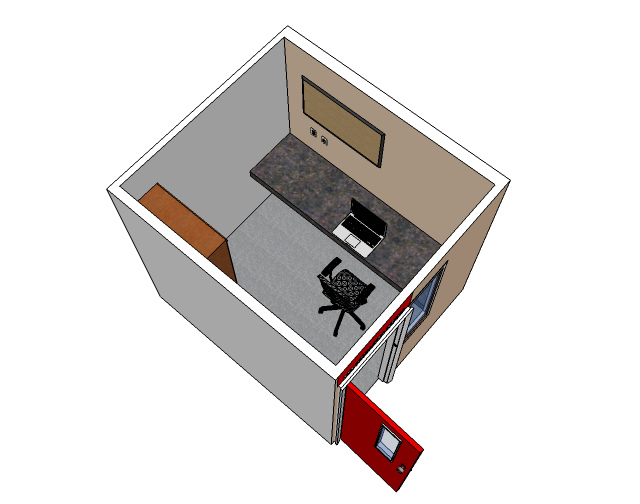
Room 322, Roberston Library

🗓️

Former Director of Computer Services at the University of PEI, Jim Hancock, appeared on Island Morning today to talk about the 25th anniversary of the upei.ca domain.

🗓️
CBC  •  Island Morning  •  UPEI  •  Technology

IslandNewspapers.ca, and particularly its digitizing of archival issues of The Charlottetown Guardian, is one of my favourite projects of Robertson Library, partly because I find it incredibly useful (especially in the about-to-be-released version that contains many more issues of the newspaper), and partly because the project first took root in a conversation I had with Mark Leggott, University Librarian, back in 1994 (an event memorialized in my Working for Free talk).

As proof-positive that projects like this take a long time to germinate, here’s a post from November 17, 1994 – 19 years ago! – where I asked the readers of the comp.text Usenet group for the lay of the digitization land:

I’m interested in hearing from anyone who knows anything about converting microfilmed archival newspapers and converting them to digital information through some sort of optical character recognition process.

All these years later, thanks to the hard work and dedication of many people who aren’t me, this project has come to fruition, and it will soon be possible to browse almost any historical issue of The Guardian from the comfort of your couch (to say nothing of the myriad research possibilities afforded by the ability to search the archive).

It’s interesting to look at the headers of the original source of that comp.text posting:

Path: nntp.gmd.de!xlink.net!howland.reston.ans.net!spool.mu.edu!torn! \
news.unb.ca!upei.ca!peinet.pe.ca!peinet.pe.ca!not-for-mail
From: peicr...@bud.peinet.pe.ca (PEI Crafts Council)
Newsgroups: comp.text
Subject: OCR from microfilm: how?
Date: 17 Nov 1994 12:01:42 -0400
Organization: PEINet Inc, Charlottetown, PEI Canada
Lines: 9
Message-ID: <3afup6$2ah@bud.peinet.pe.ca>
Reply-To: i...@crafts-council.pe.ca
NNTP-Posting-Host: bud.peinet.pe.ca
X-Newsreader: TIN [version 1.2 PL2]

From there we can learn some interesting historical tidbits:

  • My email address at the time was peicraft@bud.peinet.pe.ca, as the PEI Crafts Council, where I was working, used PEINet’s email service at the time. The machine name “bud” was one I knew well, as it later went on to be the home of the first iterations of the www.gov.pe.ca website.
  • Usenet was a “store and forward” network: you sent a message to your local network, which sent it “upstream,” in this case from PEINet to the University of Prince Edward Island, to the University of New Brunswick, to the University of Toronto (torn), to Marquette University in Milwaukee, through ans.net and xlink.net to nntp.gmd.de, a host at an institution that, apparently, no longer exists.
  • I was using the Usenet “newsreader” software called “tin” (which is still around today; indeed you can download an archive of the same version 1.2 PL2 that I was using).
🗓️

After a good afternoon on campus yesterday afternoon, I’ve been doing a little work around the edges from my downtown office.

  • I got my authorization from IT Support & Services for VPN access to my virtual server. The instructions they provided for setup on Mac OS X were clear and concise, and worked without issues: connecting is now as simple as setting up a VPN tunnel via Tunnelblick and then SSHing in as I normally would to a remote host.
  • I did a little aesthetic finessing on this site, installing the Premium Responsive theme to experiment with and throwing together a preliminary visual identity for the Hacker in Residence project (aided by the Integrated Communications Visual Identity Download Centre).
  • Used Integrated Communications’ business card ordering site to order some Hacker in Residence business cards; then asked for permission to order business cards (and offered to pay the $60 cost myself if permission wasn’t granted; fortunately, it was).
  • Ran into some issues with the virtual server and permissions: I wasn’t able to create files in my home directory (/home/prukavina), which meant that I couldn’t set up passwordless SSH authentication. Contacted Peter Lux at Robertson Library Systems and he corrected some issues with mounts to make it work.
  • In response to my query to Chartwells about the lack of espresso on campus received a helpful reply: Currently there is no espresso machine on campus, but we have one on order with Vanhoutte, it will be put in Samuels sometime next month. I hope against hope that they’re talking about a bona fide coffee machine, and not a “cappuccino in a box” Irving gas station-style instant coffee maker.
  • Finally, last night I went out to Staples and bought another trusty Microsoft Natural Ergonomic Keyboard 4000 for my UPEI office: I couldn’t handle another day of typing on my tiny MacBook Air keyboard.  Also picked up a 32GB Lexar USB stick (on sale for $19.99) to let me use the various USB-stick-requiring devices in the library.
🗓️

My second afternoon on campus.

  • Picked up a key to room 322 from the Facilities Management across campus; very friendly and efficient service there.
  • Tried out my campus card on the Shipping & Receiving door at the back of Robertson Library and confirmed that it works, so I can get 24/7 access to the library now.
  • Found that the Ethernet jack on room 322 (labelled B-2-28) isn’t working; sent in a request to have this looked at. Will use the wifi, which just barely stretches in here, for the time-being.
  • Got myself a PIN so that I could using the Campus Login system to change my campus network password.
  • Talked to Peter Lux about getting a virtual server set up and he sprang into action and got me set up with a nice Drupal 7 installation (which is where I am typing now).
  • Walked around campus handing out and posting cards marking the 25th anniversary of UPEI.ca’s registration. Met Blair Vessey for the first time face-to-face, and dropped in on Integrated Communications.
  • Did a tiny bit of configuration on this Drupal installation, which I’ve pegged to hack.ruk.ca while awaiting an official upei.ca subdomain.
🗓️

One of the unsung aspects of the University of Prince Edward Island is its pioneering involvement in the early Internet: under the leadership of Jim Hancock (Director of Computer Services from 1972 to 1997), UPEI, among other things, participated in the NetNorth, CA*Net and CANARIE initiatives, hosted Prince Edward Island’s first connection to the Internet, and registered the country’s first “.ca” domain, upei.ca, in 1988.

The upei.ca domain name registration’s anniversary is coming up on Sunday: 25 years ago, on January 12, 1988, the domain was registered with John Demco at the University of BC, a name well-known to any of us involved in the early Internet in Canada, as he was the go-to guy for all .ca domain name registrations for many years (back when they were free, but encumbered by many restrictions; that’s how I ended up, for a time, with the domain name digitalisland.kingston.pe.ca).

While the university’s work in this regard had tremendous benefits for the institution itself, it benefited Prince Edward Island as a whole in many other ways. In my case it made for my first contact with PEI when I was applying for a job here – an email from Morley Pinsent using the CA*Net email system hosted by UPEI that was free to any Islander who asked – and, once I relocated here, it was my conduit to the greater world through my email address caprukav@atlas.cs.upei.ca (I still remember the day in 1993 when, as a meek 27 year old, Earlene Gallant handled the paperwork to sign me up for this).

UPEI’s work led to PEINet, which became (via a 14.4 kbps leased line connection) the conduit for the first webserver on PEI, at the PEI Crafts Council, to join the network; later, it was on PEINet’s web host that I created the first versions of www.gov.pe.ca. Through this all, the counsel of Jim’s successor as Director of Computer Services, Dave Cairns, was extremely valuable (the best piece of advice Dave ever gave me: hard drives will always fail, eventually, and maybe tomorrow).

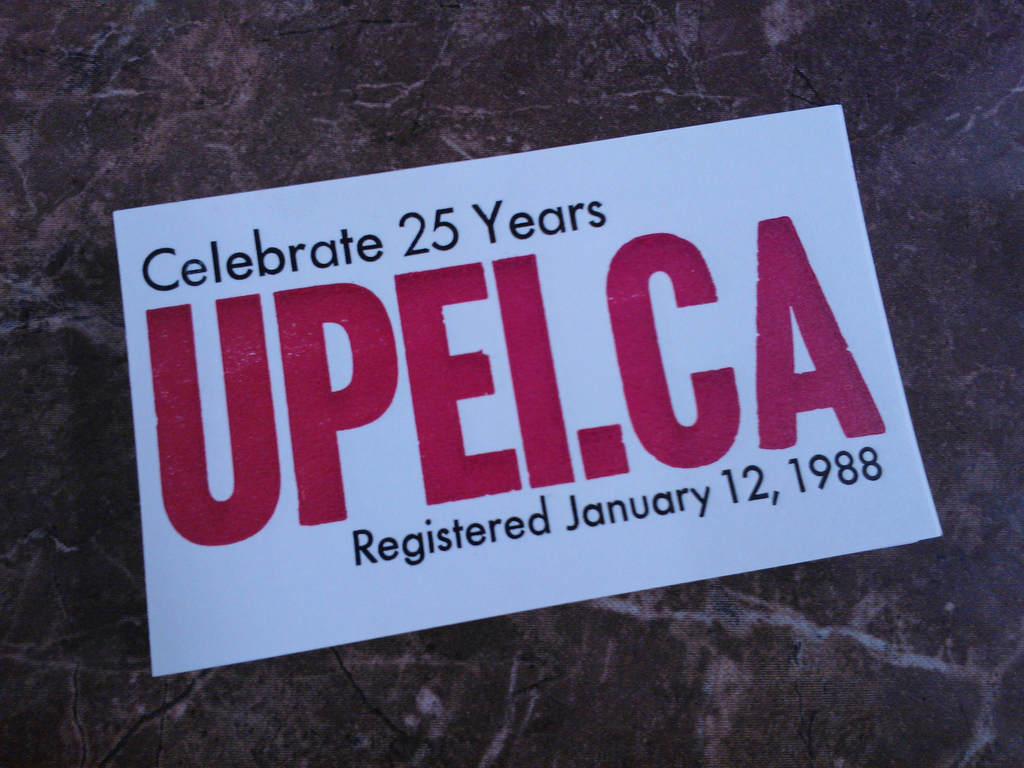
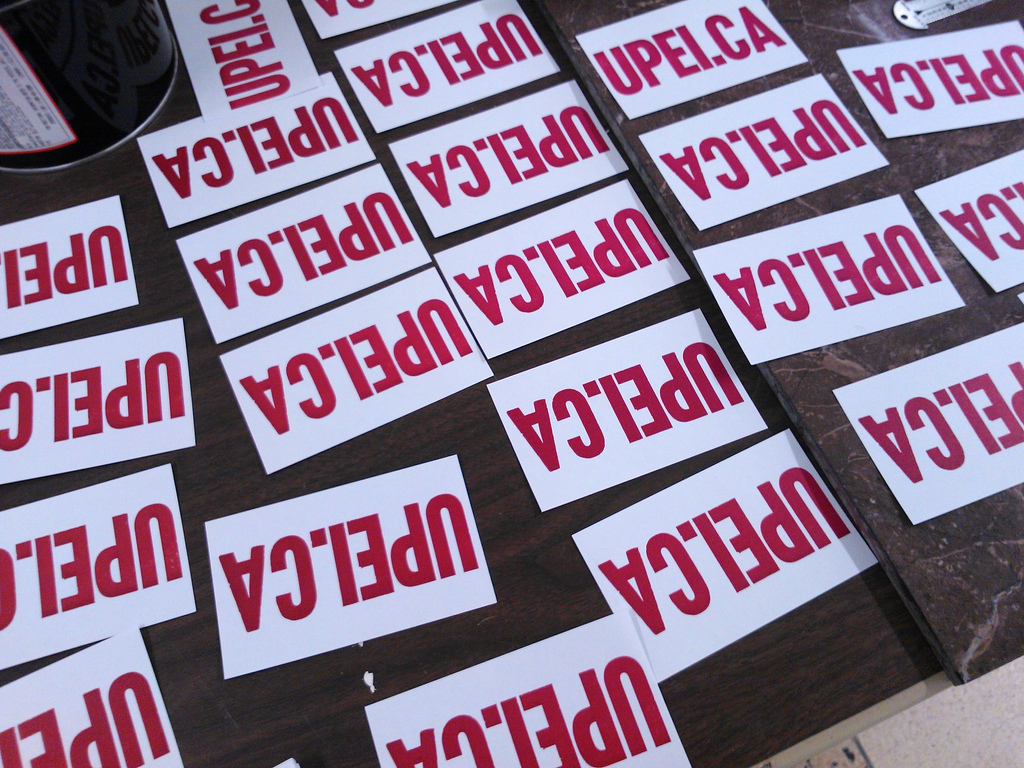
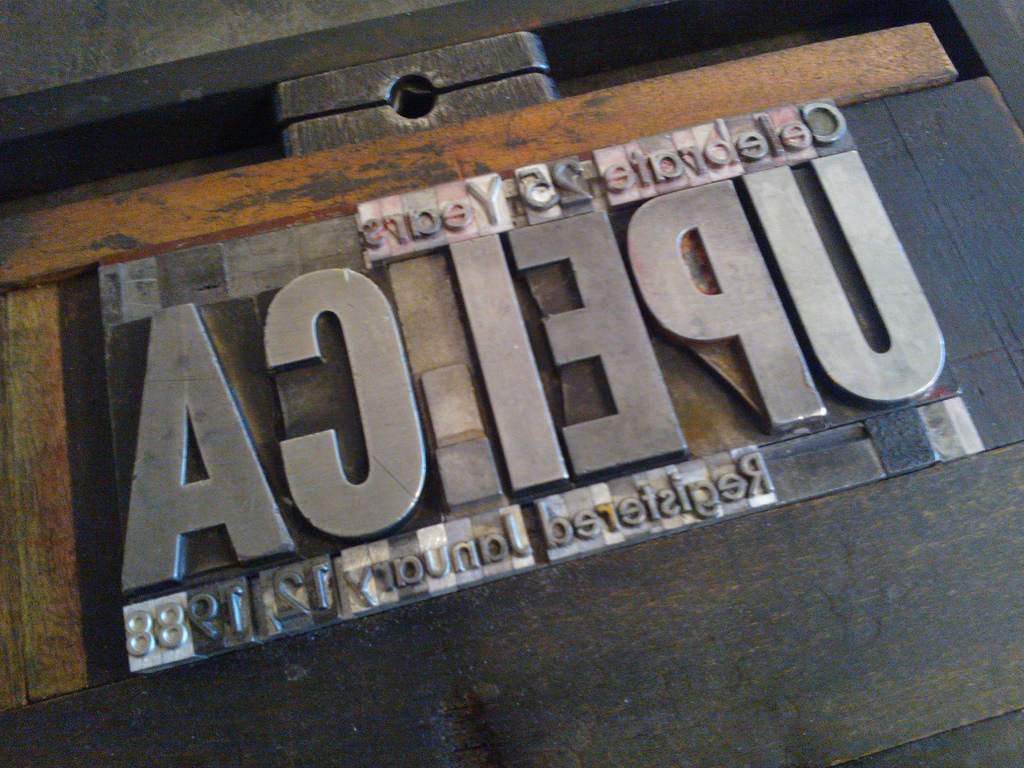
All Islanders owe a great debt to the University of PEI for its vision in this regard; to help mark the occasion, I printed up a ceremonial poster on the letterpress this afternoon, and I’ll stick them up around town and campus over the next few days:

Celebrate 24 Years of UPEI.CA Poster

Celebrate 24 Years of UPEI.CA Poster

Celebrate 24 Years of UPEI.CA Poster

🗓️
University of PEI  •  Internet  •  History

About This Blog

Photo of Peter RukavinaI am . I am a writer, letterpress printer, and a curious person.

To learn more about me, read my /now, look at my bio, listen to audio I’ve posted, read presentations and speeches I’ve written, see things I’ve favourited elsewhere, or get in touch (peter@rukavina.net is the quickest way).

I have been writing here since May 1999: you can explore the 25+ years of blog posts in the archive.

You can subscribe to an RSS feed of posts, an RSS feed of comments, an RSS feed of favourites elsewhere, or a podcast RSS feed that just contains audio posts. You can also receive a daily digests of posts by email. I also publish an OPML blogroll.

InstagramYouTubeVimeoORCIDOpenStreetMapInternet ArchivePEI.artDrupalGithub.