My father, in recent years, has been rediscovering the popular music of the twentieth century. Or rather discovering the popular music of the twentieth century as it seems that he somehow managed to miss most of it the first time around.
And so, every once in a while, we boys will get an excited email from Dad saying something like “Have you heard about this great group called The Eagles?!”
My own small contribution to this comes from the albums, cassettes and CDs that I’ve left at my parents’ home over the years.
So in recent years my father has, for example, discovered Jane Siberry. And, this Christmas, David Ramsden. He came across a copy of David’s Quiet Please! There’s a Lady on Stage cassette in a closet, a cassette I’d thought long-lost. He digitized the cassette to MP3s and offered to burn me a CD of it, an offer I enthusiastically took him up on.
When I lived in Peterborough, Ontario in the late 1980s and early 1990s David was a fixture of the local music scene, both there and in Toronto. I encountered him in many venues and in various combinations and permutations, both as a musician and an actor (he was a sometime member of the cast of the infamous “East City” soap that played late nights at Artspace).
Quiet Please! There’s a Lady on Stage was a project David launched with some of Canada’s most talented female vocalists, singers like Rebecca Jenkins, Jane Siberry, and Theresa Tova. The combination of David’s piano and vocals with these voices was remarkable, and the cassette Dad found in the closet was the only surviving evidence of it. One of my favouite tracks on the cassette is Come Inside, which David sang with Rebecca Jenkins (still one of Canada’s great vocal talents). This digitlzed version is a little wobbly – it comes from a 25 year old cassette tape, after all – but it still captures the potent combination of the two voices:
David and I ran in the same circles in Peterborough, and although I’m not sure we ever sat down and had a conversation, we knew who the other was (I knew David’s brother Ken, mayoral candidate and leader of Reverend Ken and the Lost Followers a little better).
I don’t use Facebook frequently – every time I check in there seem to be long-unread 2 or 3 messages from old friends that were sent months ago – but in recent weeks I’ve been using it more because I had a visit from a friend through which Facebook was the only way of communicating. And so it was that I noticed, out of the corner of my eye when I logged in on Tuesday, that David was in New Brunswick, eating a bad lobster sandwich:
McLobster made me McSick. Honestly I arrived so late here in Saint John last night that it was the last place open. I should have Mcknown better.
On a lark, I sent him a Facebook message (only the second one I’ve ever sent to anyone) offering to treat him to the excellent lobster roll at Youngfolk & The Kettle Black here in Charlottetown as an antidote should he ever find himself in the city.
To my surprise and delight it turned out that he received the message as he was sitting in his hotel down the street from me in Charlottetown and graciously took me up on my offer.
Regular readers may recall that I am rather shy, and it’s quite unlike me to extend invitations to lunch to people I only vaguely know, especially people whose talents I’ve been in awe of for so long. But an invitation is an invitation, and so yesterday afternoon David and I found ourselves renewing our ties over an (excellent) lobster roll on Water Street.
David was as delightful a person as I recall – more so, even. We had a very pleasant chat, found we had more people in common that we both thought. I sent him on his way with a list of must-see places on PEI (Yankee Hill cemetery, MacAusland’s, Landmark Café, The Pearl, etc.) and before he left David went back to his car and pulled out a copy of his new album to give to me (“new” in the sense of “most recent” – it was released 13 years ago). The album was an unexpected treat – I didn’t know he’d recorded it – especially for the inclusion of a new version of Come Inside with Rebecca Jenkins:
I post this here simply because finding a notary public in Prince Edward Island has always been a mystery to me, and the answers that Google gives are unsatisfying link-bait. I know that all lawyers are notaries by virtue of their office, but in other countries there are other people “deputized” to be notaries and I wondered if the same is true of of PEI.
I stumbled upon the fact that the Prothonotary of Prince Edward Island, a public official who is, roughly, the “Clerk of the Supreme Court,” will act as a notary at no charge: he just notarized a document for me. It took 5 minutes. He was friendly.
I confirmed with his office that he’s available to do this for any Islander; just contact his office to make an appointment: (902) 368-6067.
(The only downside to having the Prothonotary notarize something for you is that you need to go through airport-style metal detectors to visit his office; the staff there are friendly enough, but it’s still an added inconvenience).
I’ve been using a Geeksphone Peak, runnning the nascent Firefox OS, as my everyday mobile phone for more than a month now. I tweet with it, I update Foursquare with it, I check my email with it, I search the web with it, I use maps with it.
In many ways it feels like 1993 all over again, back when we ran Linux 0.93 on IBMPCs and it sort of worked.
Through one lens Firefox OS is a technical triumph: an open mobile operating system conjured up in two years by a not-for-profit organization.
Through another lens running Firefox OS is like running Linux on an IBMPC in 1993: it sort of works; sometimes it crashes, sometimes the wifi mysteriously shuts itself off, and while it does a lot, and is capable of a lot more, right now it does much less than an iPod touch, if only because the ecosystem of open web apps to run on it is only just beginning.
But under the hood and, indeed, infused into almost every pore of its being, it is open. This means so many things and means so much.
It means that you can find out if the bug you’ve found is being worked on, because the bugtracker is open.
What it means most of all, though, is that Firefox OS is being developed by real people to solve real problems; it’s not built to sell you more apps or get you to buy more songs or to show you more ads more targeted at your consumer behaviour. It’s being built by people like you for people like you.
So I’m willing to put up with the disappearing wifi and the fact that I can’t (yet) upload photos to Flickr because I believe in Firefox OS under-the-hood and I want it to succeed.
To this end, I’ve been sitting down and learning about the ins-and-outs of developing for the OS. Much of the terrain is familiar, because Firefox OS apps are just HTML + CSS + JavaScript, and that’s a world that’s been my technical home for 20 years. And it’s also familiar because I’ve been developing mobile apps for iOS and Android in the same style, wrapping them up in PhoneGap for their respective app stores. But there are new APIs to learn and a new UI toolkit to flesh out.
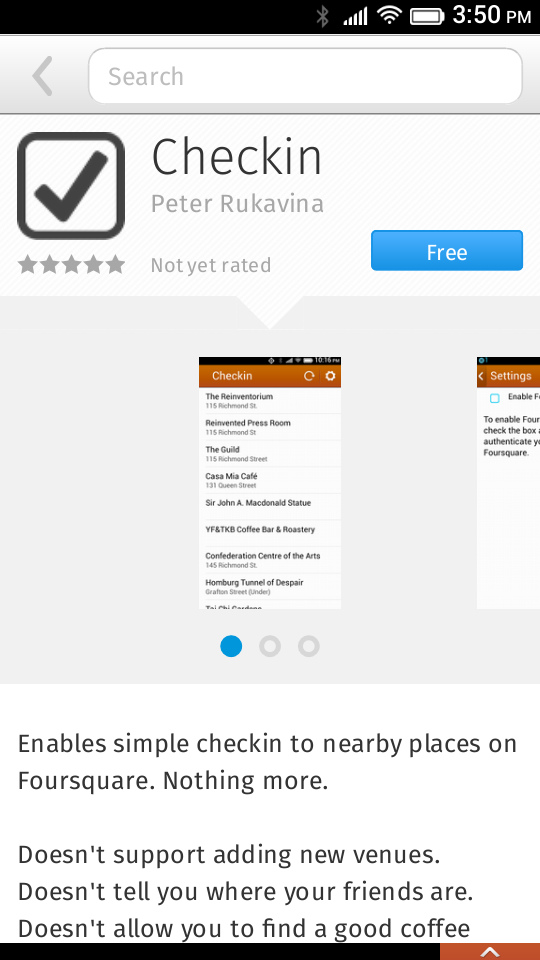
The best way to learn is to scratch a personal itch and I decided to write an app that would let me check in to Foursquare.
I’d been using Foursquare’s mobile website to do this and found it frustrating: it doesn’t know about my location, so it can’t provide me with a list of nearby places and so every time I checked in I had to manually key in the name of the place on a tiny phone keyboard.
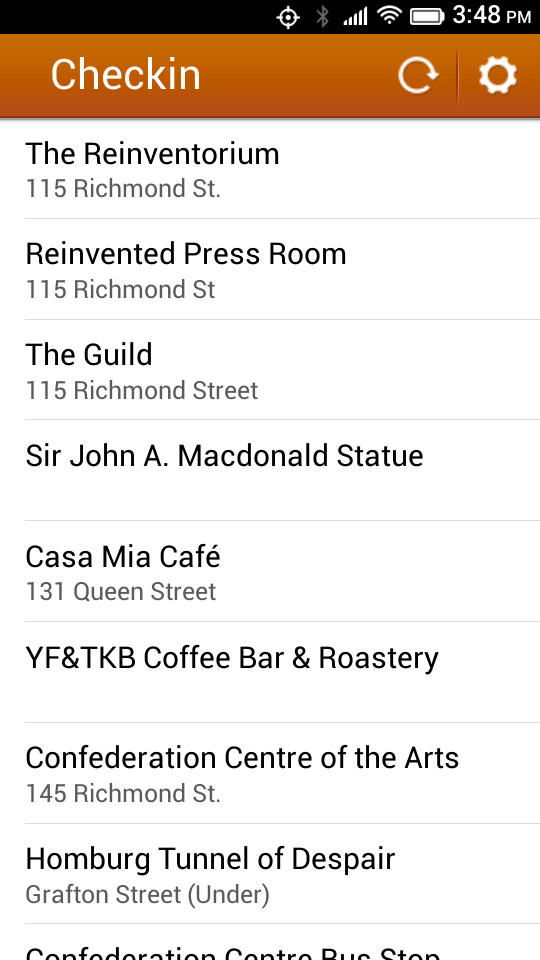
I’ve been a Foursquare user for many years, mostly using Foursquare’s own mobile apps on my iPod Touch and iPad, and I’ve always found them filled with too many features I never use: I look to Foursquare primarily as a repository for my geolocation history, and so what I really want is an app that shows me a list of nearby locations and allows me to checkin with a single tap.
I wrote the app to scratch my Foursquare itch, yes, but also to get code out there for others to build on and criticize, especially code that authenticates by OAuth to an external API (Foursquare). So you’ll also find the source code in Github (you’ll find the tricky Foursquare OAuth bits here).
A few notes about the development process, from back to front:
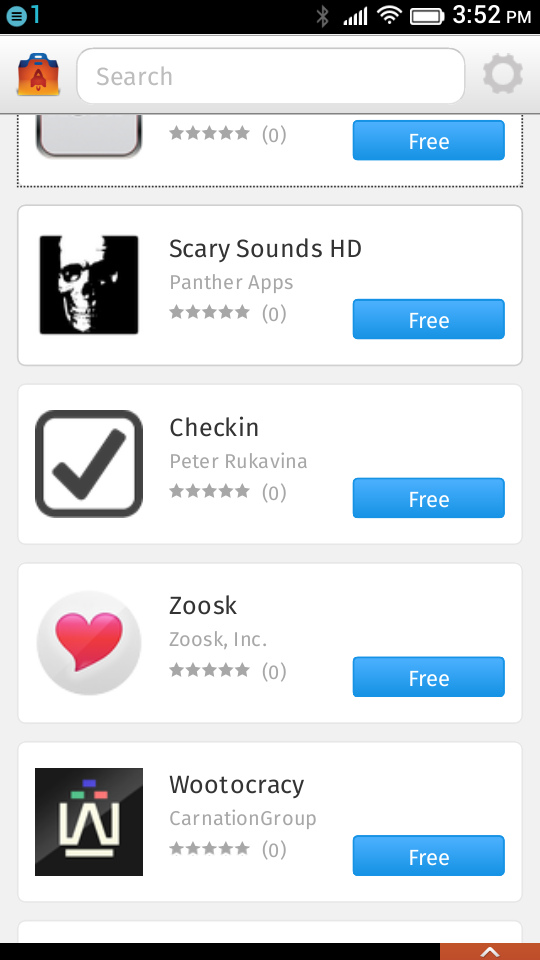
Reviewed!? Didn’t you just say that Firefox OS is open? Yes, the OS is open. But the Firefox Marketplace – intended, ultimately, to be just one of many places to get packages Firefox OS apps – requires that all apps calling so-called privileged APIs be reviewed, the idea being that APIs that provide access to “sensitive” capabilities need to be approved by someone before being installable. In the case of Checkin, as you can see in the app’s manifest: the app requires the systemXHR, and browserAPIs, both of which are “privileged,” and the “geolocation” API, which isn’t. I submitted the app on June 30, 2013 and it was approved today, so it took 10 days, which is about what it takes an app approved in the iOS app store.
That all said, using Firefox on the desktop and the Firefox OS Simulator you can grab the source code for the app and install it without the Marketplace or, indeed, any intermediation.
My original intention was to build cellular network cell-site detection into the app, using OpenCellID.org to retrieve approximate latitude and longitude of the device. Unfortunately Mobile Connection API falls into another even-more-sensitive class of APIs, “certified,” a class that, at least right now, “must be approved for a device by the OEM or carrier in order to have this implicit approval to use critical APIs”. So if I wanted my app in the Marketplace, I needed to leave that functionality out. I think that’s a bad thing, or at least an unfortunate one, and I’ve proposed that at least some of what the Mobile Connection API offers – namely the cell ID, LAC, MNC and MCC – be exposed more freely.
Because I don’t have a way of determining the location of the device other than via the Geolocation API, the app is really only useful when the device can see GPS, which, at least for my Geeksphone Peak, means outside. Android and iOS devices have access to non-public APIs that use a combination of GPS, cell site and wifi to derive location, which is why the Foursquare app on my iPad can figure out that I’m at Casa Mia even when I’m deep inside Casa Mia out and out site of satellites.
For the UI building blocks of Checkin I used excellent Building Firefox OS resource, which documents the building blocks used for the core Firefox OS apps. It’s not quite a mobile UI framework like jQuery UI, but it’s pretty good for simple apps like mine, and CSS transitions handle simple page transitions without the additional complexity a framework would bring (for the curious, the “main” and “settings” screens of the apps are just absolutely positioned divs that get their z-position changed to become foreground or background; I didn’t invent this, just copied from elsewhere).
The OAuth authentication to the Foursquare API turns out to be actually quite simple, despite OAuth’s reputation (and my own previous experience) that it was a Darién Gap for mobile devlopment: the app opens up a full-screen IFRAME (hence the need for the Browser API, which enables this), sending Foursquare the client ID I set up in the Foursquare developer site along with a “redirect URI” of Foursquare.com itself; when Foursquare redirects after login and authentication the app uses a mozbrowserlocationchange event to look for an access token in the redirected URL and proceeds. Using mozbrowserlocationchange this way is another reason for the Browser API, for it’s not supported otherwise (i.e. if I just called window.open to authenticate to Foursquare).
I look forward to the app being out in the wild and to getting feedback from people using it (it’s quite possible that I’m the only person in the world who has a Firefox OS and wants a simple featureless Foursquare checkin app; we’ll see).
Oliver has had a blog, by times, at http://o.ruk.ca/. It’s a Tumblr blog, which makes it easier to update and maintain than other platforms, and it’s well-suited to kids for this reason (that said, it went away for a year because Tumblr updated its IP address for custom domain names and we didn’t update the settings, so some vigilance is required).
The blog is up and running again now, though, helped in part by Oliver having inherited my old iPod Touch, onto which he’s installed the Tumblr App. This makes posting a photo to his blog as easy as tap-snap-annotate-post.
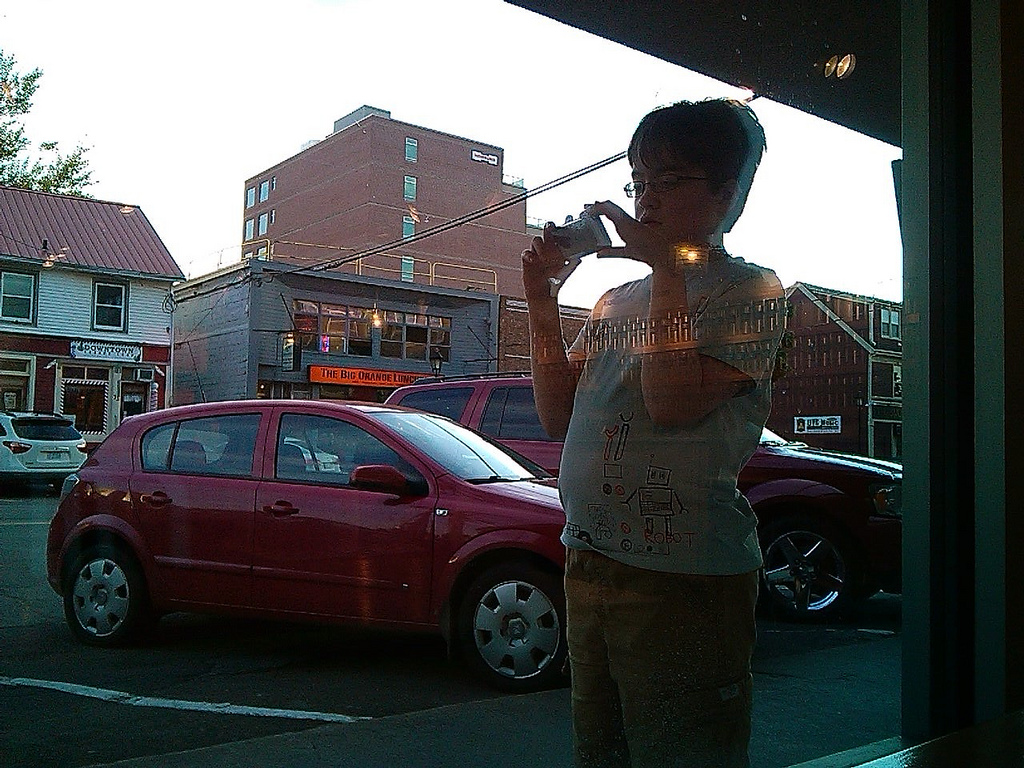
Last night we took this for a ride on a walk around Charlottetown, with Oliver taking pictures of “new” things (Berry Healthy, the new Starbucks on Queen Street, etc.). He jacked into the wifi hotspot on my Firefox OS phone to upload them to the Internet, and so it was almost “live photoblogging” in action. You can see the results here.
Now that all theadultshavestopped blogging, perhaps it’s time for the kids to take over?
Whenever any person is required to take, or is desirous of taking an oath in any court, or of making an affidavit for use in any court, or in any proceeding or matter when an oath is required to be taken or administered, it shall not be necessary to kiss the Book containing the Gospels, it shall be sufficient for the party to place his hand upon the Bible, declaring his intention to tell the truth, and such declaration shall have the same force and effect as if such person had kissed the said Book.
I’ve been waiting for years to have an incident arise that would require me to learn more about the Prothonotary of Prince Edward Island; today was the day. Speaking of which, if I ever get married I am so having the Prothonotary perform the marriage.
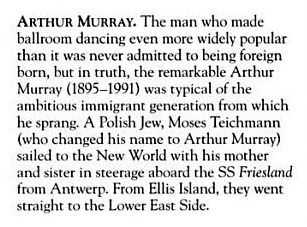
Arthur Murray was born in Galicia, Poland (at the time it was part of Austria-Hungary) in 1895 as Moses Teichman or Teichmann.
Two years later, in the version of June 26, 2009, this got even more specific with the addition of a sidebar that listed his birthplace as “Todhajca, Kingdom of Galicia, Austro-Hungarian Empire”.
This was updated on November 1, 2010 to “Podhajce, Kingdom of Galicia, Austro-Hungarian Empire”, a village that happens to be 100 km from Serafyntsi where my great-grandfather was born two years before him.
His birthplace in Wikipedia has been listed as Podhajce ever since.
Because the Wikipedia edits that changed the birthplace to Galicia were anonymous and without sources, it’s impossible to know whether they are accurate, and there’s certainly evidence from multiple obituaries and well-accepted sources to suggest that his birthplace was New York and not Galicia. But there’s also evidence to the contrary that supports his being foreign-born.
For example, there’s a passenger record in the Ellis Island collection for “Moses Teichman” (Murray’s name at birth) that’s a close match for his circumstances (and perhaps the source for the Wikipedia?):
First Name: Moses
Last Name: Teichmann
Ethnicity: Galicia, Galician
Last Place of Residence: Todhajca
Date of Arrival: Aug 31, 1897
Age at Arrival:  1y    Gender:  M    Marital Status:  S
Ship of Travel: Friesland
Port of Departure: Antwerp
Manifest Line Number: 0019
So where was Arthur Murray born? Who knows. The sources-of-record say one thing, the crowd, and some others, say another.
This is an example either of Wikipedia’s virtues in exposing accurate information where others fail, or in Wikipedia’s failure to properly source and credit facts, depending on your point of view. If nothing else it’s a demonstration of why we need to teach our children to use the “History” feature of Wikipedia to understand the provenance of the “facts” they find there.
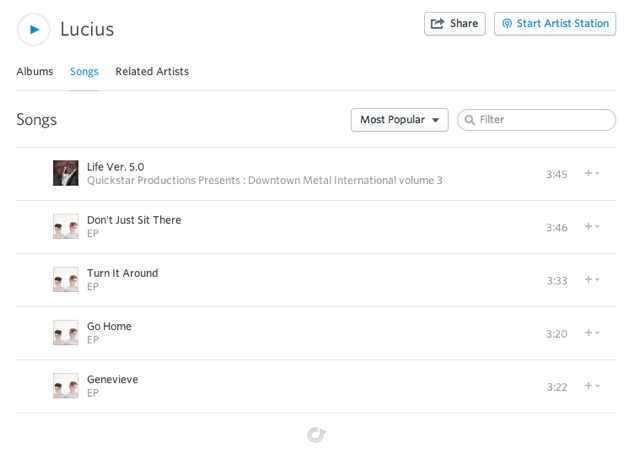
Buried deep inside that episodette you’ll find a song by the Brooklyn band called Lucius. I liked what I heard and so when I got back to Charlottetown I fired up the Rdio and looked them up:
Perhaps music needs to adopt the same conventions as acting and have Professional Name Protection for bands? This would prevent those looking for careful, gentle music from finding violent attack music (and vice versa).
If you’re still in shock from having pressed play on the Swedish aggressive metal, here’s an antidote.
My cousin Sergey was arriving at the airport in Halifax after a few weeks away, and I volunteered to drive over and pick him up.
As an adherent of the religion of “why make a simple trip when you can make a complicated one,” I decided to drive to Halifax via Cape Breton, stopping for lunch on Isle Madame with my old friend George.
I headed off at the crack of dawn on Friday morning toward the Wood Islands Ferry, reservation in hand and convinced that there would be hundreds of cars in line. There were a dozen cars in line. And so I spent 45 minutes in the cool early morning sunshine at the ferry terminal before boarding the ferry and after boarding almost had the cafeteria to myself.
The drive from Caribou to Isle Madame, which seemed like it should take forever, did not take forever, and I was there for 11:30 a.m. and enjoying a tasty lunch by noon. After a pleasant afternoon rambling about the isle, I set off for Halifax at 7:00 p.m., stopping for a moribund supper at “Sense of Japan” in Antigonish (I had such high hopes). I arrived at the Halifax Marriott around 11:30 p.m. and checked into my wasn’t-that-a-deal $75 Priceline room and fell immediately to sleep.
Sergey wasn’t due to arrive at the Halifax airport until 6:00 p.m. so I had the day to myself in the city; here are the highlights:
The Marriott was rather nice. I was asleep most of the time, but the bed was comfortable, the room was clean and the shower was powerful. There was also a copy of the Globe at my door. Usually when I blindly book a “4-star hotel with pool” in Halifax I end up at the Westin, that tired old beast of a hotel at the other end of downtown; this was a much nicer alternative (though it suffers from the “add $20 to your bill per day because you’ve got to park somewhere” problem that all downtown Halifax hotels suffer from, the Westin included).
There’s a new branch of Two if By Sea in the Historic Properties (new to me: perhaps it’s been there for years and I haven’t noticed). I suspect this is the branch where employees from the home office in Dartmouth are sent for punishment, as it had nowhere near the aesthetics of the original, and it would appear, from the brief time I was there, that staff spend their days explaining what an espresso is to confused and hot tourists. Nonetheless, they made me a nice cup of coffee and served me a nice blueberry muffin. And given that it’s right beside the Marriott, the location can’t be beat.
Strange Adventures has moved into a new space at 5110 Prince Street, a space occupied, several occupancies ago, by Charlottetown’s own “Cool as a Moose.” The move has been transformative: whatever the attractions of the old subterranean hovel up the hill, I was always wary of bumping my head and couldn’t shake the persistent claustrophobia. The new space is bright and roomy and the staff seem 200% happier and 300% more helpful. I bought a copy of the new Lucy Knisley book, a copy of The Cartoon Introduction to Statistics and a nice little tract on coffee brewing.
I’m a recent convert to the “sling” style backpack: I received a simple one as a gift for judging the Heritage Fair this year and have loved it but decided I needed something with more nooks and crannies so I dropped in at MEC and bought a Pod Sling Pack which I’ve been trying out in the field ever since. It’s lightweight but well-padded, has two spacious pockets (enough to carry all three Strange Adventures purchases plus two bike lights I purchased at the same time) and it was only $24. Watch for it slung around me as I make my way around town.
One doesn’t want to look a gift bánh mì in the mouth, but the oomph seems to have been drained from the bánh mì at Indochine in the Lord Nelson Hotel annex. It wasn’t that it was bad, it’s jus that it wasn’t as life-affirming as the one I had last year. I don’t unrecommend the place, but I rescind my wholehearted blessing.
Cantina Mexicana, across the hall from Indochine, looked so promising with its “no freezers, no microwaves, no deep frying” advertising on the sandwich board, but it turned out to be no more than a Subway with tortillas, and supper there was uninspiring. Perhaps if I spent some time getting to know and understand their ingredient mix I could end up with a better result, but why wouldn’t I just make tacos at home then?
The Just Us Café on Barrington has moved across the street and, like Strange Adventures, has discovered the joys of whitespace; I grabbed an iced tea there midday to keep out of the punishing heat and it was well-made and the space was nice to hang out in.
Later in the afternoon I had a very pleasant coffee with Gordie at Steve-o-renos and an absolutely horrible, horrible, horrible coffee at the Second Cup later in the day (when all the places serving coffee fit for humans were closed).
Sergey’s plane was delayed by 3 hours, which opened a window for me to see Before Midnight, the third installment of the every-9-years Ethan Hawke-Julie Delpy series. It was playing at the Oxford, Halifax’s only bona fide cinema, a cinema that, being bona fide and all, lacks air conditioning. And thus clientele for a 4:00 p.m. showing on a day when it was 35ºC in the shade. So I saw the movie with a crowd of about 5 other people and it’s a testament to how absolutely fabulous the movie is that I thoroughly enjoyed all two hours of the experience. I will leave it to others more eloquent than me to review the movie; suffice to say that if you enjoyed No. 1 and No. 2 you will enjoy No. 3.
At 7:30 p.m. I drove out to the airport, waited an hour while customs dealt with two planeloads of arriving Europeans, and by 9:00 p.m. we were speeding home, wary of the moose, to the Island. We pulled into our driveway at midnight. A nice short action-packed summer vacation.
There’s a lot to like about HERE Maps (née Ovi Maps, née Nokia Maps), especially, for my purposes, that it runs very well on Firefox OS mobile devices – indeed Mozilla is promoting it as the “maps” application for Firefox OS.
Last year when Nokia finally spun down Plazes, it helpfully offered an option to we olde Plazes users to take our saved collections of “Plazes” – locations we’d checked into – and import them into HERE Maps as points of interest. I did this, and as a result ended up with 802 “unsorted items” my HERE Maps “Collections” section:
Initially this was just an irritant; when I started to use HERE on my Firefox OS phone it became a liability, because opening the “Collections” tab on the device took an awfully long time (in theory because the device had to grab the details of those 802 unsorted items).
I tried to resolve this with some helpful Nokia engineers, but eventually their patience ran out and I was left to my own. Fortunately I managed to figure out a relatively easy – if hacky – way of making this happen.
Here’s what I did.
I logged into here.com with my Nokia account – the account with all those pesky “unsorted items”. Then, using the Firefox Web Developer tool I watched the “Network” tab as I deleted one of the items; it called this URL:
I reasoned that the “fb75b689-2ab5-4ff4-9b7a-03798b4540ae” was a unique ID for the item, and so set about finding a list of all of the IDs of the “unsorted items” attached to my account.
Again using the Web Developer “Network” tab, I was able to determine that the HERE website pulls a JSON representation of all of my Collections, which includes the “unsorted items” as well as items that I’d placed inside named collections, from:
And continued on through all 802 former-Plazes and a handful of other items I’d saved inside HERE. The key here was to extract the “id” of each item. To do this I just copied a text file, used grep to filter for lines with “id”: and then used BBEdit search-and-replace to turn each line into an API call to delete the item.
Now I had a text file with a whole bunch of URLs to hit with an HTTPDELETE request; the final piece of the puzzle was to figure out how to hit this while authenticated to my account. This turned out to be easy: I just used the Web Developer tool to examine the DELETE request that Firefox sent, and then copied the cookie key-value pairs it sent along with the request into the cURL equivalent. What I ended up with was whole bunch of cURL commands, each of which looked like this:
the second line contained each of the cookies I pulled from Firefox, in the format “NAME1=VALUE1; NAME2=VALUE2…”.
With thls in place, I saved the text file with the cURL requests and ran it from the command line on my Mac:
sh delete-here-places.sh
The script stopped unexpectedly after deleting about 400 items (error message “Sorry, there’s a problem on our end.”), but when I ran it again it continued.
The result no “unsorted items” in HERE Maps, confirmed by looking at the JSON:
One important thing to note: if you do what I did, you’ll delete all of the “favourites” you’ve saved in HERE, ones you imported from Plazes and ones you save in HERE itself; beware.
I’ve been a member of the home and school association at Prince Street School since my son Oliver started there six years ago. Oliver’s moving on to intermediate school in the fall, and I’d been searching a way of marking the end of his time at the school; when I heard Mark Leggott sing the praises of the library’s Espresso Book Machine as a community resource at a conference session in May, I decided that “making a book” seemed like a good project to take on.
Literacy is important at any elementary school; there’s a particular focus on literacy at Prince Street, and the school holds a “Young Author’s Night” to celebrate student writing every May; every grade 6 student prepared a piece of work for that night, and, upon hearing of my idea, the school’s two grade 6 teachers, Jo-Anne Parsons and John Macfarlane reasoned that those pieces of writing would make good material to assemble into a book.
Robertson Library’s Espresso Book Machine is an amazing piece of technology: you send it a PDF of the insides of a book and a second PDF of the cover and it spits out bound paperback books that look, well, just like bound paperback books. The machine is available to any individual or group on Prince Edward Island who wants to publish a book; it’s not difficult to do, and I thought I’d outline the process I went through so that others can follow, especially others who want to assemble student writing into a book.
Getting the Writing
The plan was to set aside a single page of the book for a piece from each student. The writing was already typed into a word processor – Microsoft Word on the computers in the school’s lab, stored in the individual students’ personal account.
For John’s class, the technology coordinator at the school, Philip Brown, had the smart idea to use the opportunity to teach the students how to send an email with an attachment to me; as a result I ended up with 17 email messages in my inbox one day, one from each student in John’s students.
For Jo-Anne’s class I received a single Word document with all of her students’ writing, directly from her by email.
I double- and triple-checked the documents to make sure I had something from every student, and asked Philip to double-check every name for spelling.
Assembling a Book
I use the Mac OS X Pages word processor every day, so I decided it was the tool I would use to make the book.
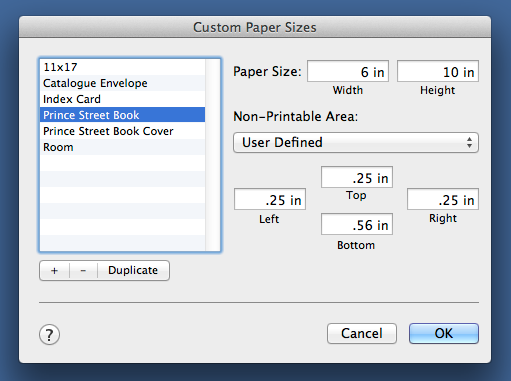
I like books that are tall and narrow, so after playing with some different sizes I decided on 6”x10” for this book (the Espresso Book Machine will print books as small as 4½”x5” and as large as 8¼”x10½”). So to start I set up a custom page size in Pages (File | Page Setup | Paper Size | Manage Custom Sizes) of 6”x10”:
I then opened each of the Word files I received and cut-and-pasted the text into a new Pages document, removing any formatting in the process (Edit | Paste and Match Style) and inserting a page break at the end of each piece.
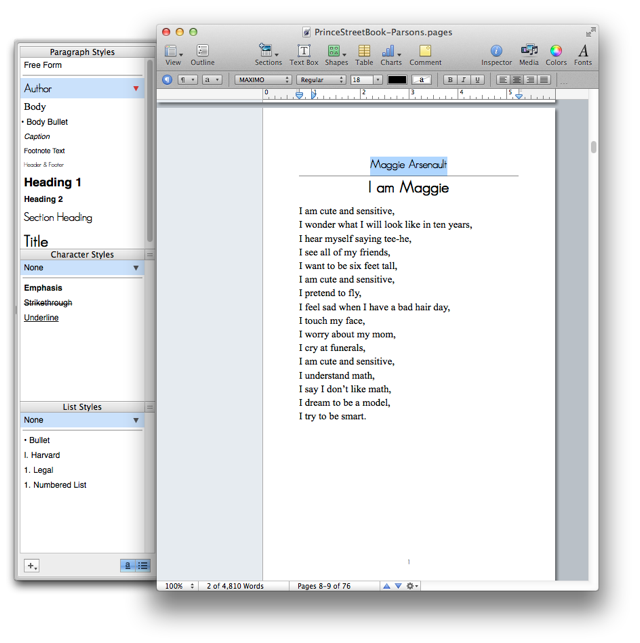
I then created “styles” in Pages for the author’s name (“Author”), for the title of the piece (“Title”), and for the body text (“Body”) and went through the document highlighting text and assigning styles as needed:
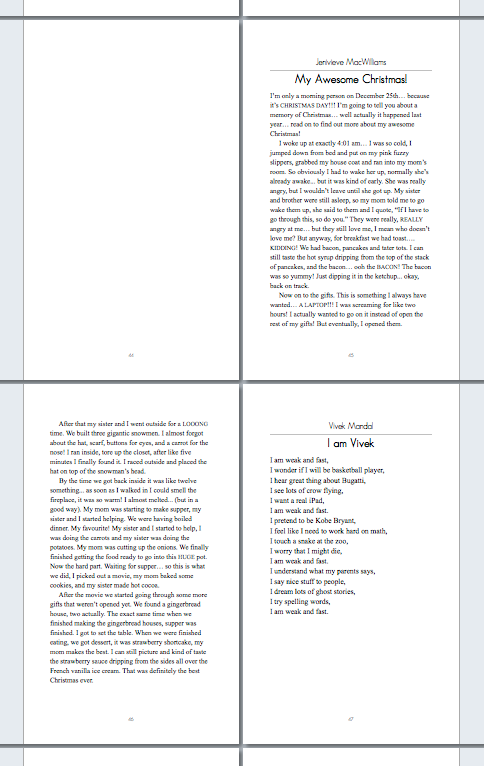
It became apparent that the plan of “one page per student” wasn’t going to work out: some of the pieces were only a paragraph, some were 5 or 6 paragraphs. It turns out, however, that a technical requirement solved this problem for me: the Espresso Book Machine needs books to be 80 pages at minimum, and so I needed to make the book “thicker” and I did this by assigning two pages per student, a right-facing one to start and then, if needed, continuing onto the next left-facing page:
This format made for a nice 76-page book, which was close enough to 80 pages to make it workable for the machine.
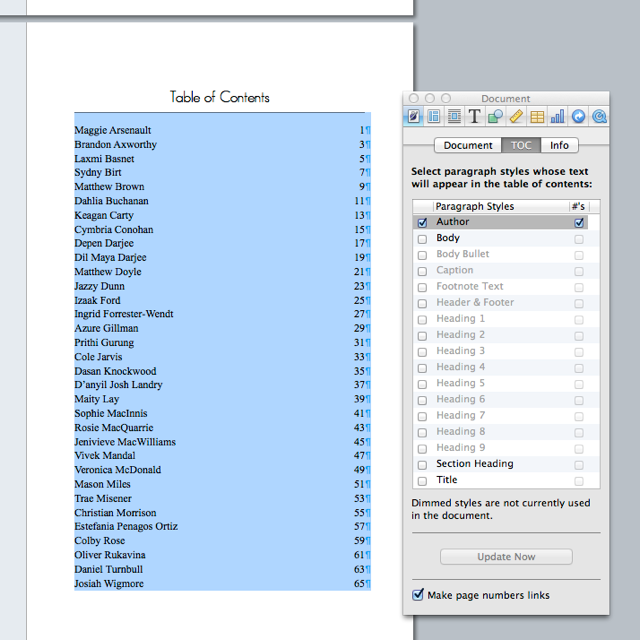
I decided to organize the book by alphabetical last name of students so, with some additional cutting-and-pasting, rearranged the pieces into this order. I then decided that it would be nice to have a table of contents, so I used the “Table of Contents” feature on Pages (Insert | Table of Contents) to do this, setting the “Author” style that I’d already used for formaating to be the paragraph style that defined a table of contents item:
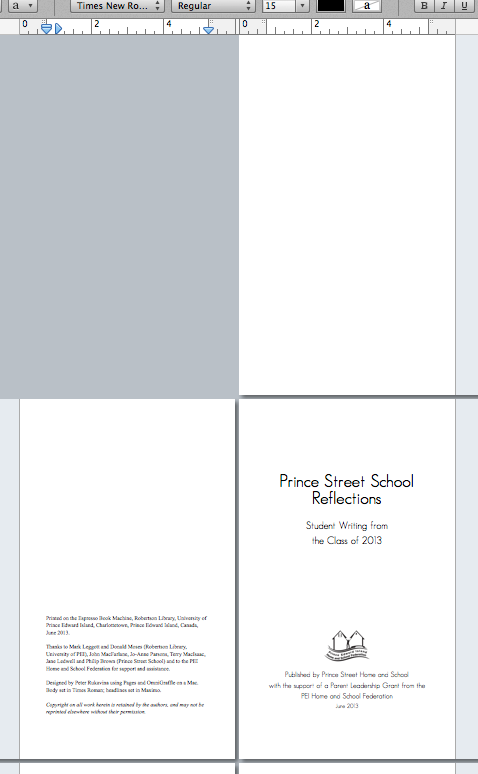
Finally I created the introductory pages of the book, starting with a blank right-facing page, then a “thank you” page with credits, and finally a “title” page:
Making a Cover
My original thought was to use something photographic for the cover (the Espresso Book Machine can print black and white on the inside and full colour for the cover), but I was too late to have time to assemble photos of all the students, didn’t have a good photo of the school itself, and nothing else presenting itself, so I decided to use the students’ names as the cover.
The helpful Creating an EBM Ready PDF prepared by the library has a formula for determing the size of the cover. My book was 6”x10”, so to begin with the cover (back plus front) would be 12”x10”, but there needs to be an allowance for the spine, and this depends on the number of pages and the thickness of the paper. In my case the calculation went like this:
76 pages ÷ 377.3585 = 0.2014 inches
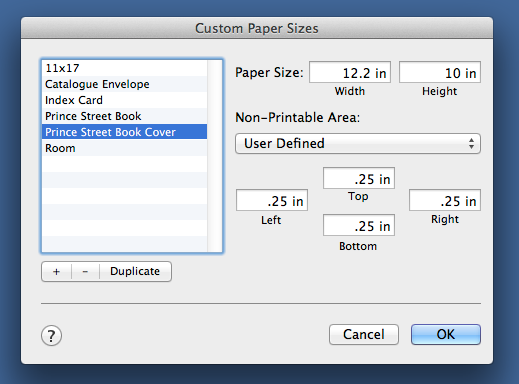
I opened a new Pages document and created a second custom paper size of 12.2014”x10” for the cover:
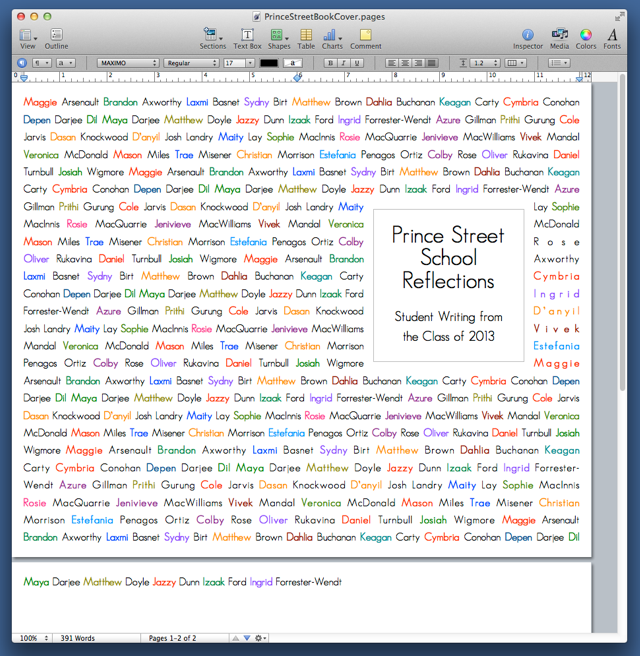
I copied the names of the students from the table of contents in the book into the cover document, removed all of the carriage returns, and then set each student’s last name in a different colour, choosen at random. And then copied-and-pasted the names until they filled up the page and inserted a text box (Insert | Text Box) for the title:
I made sure that the title box was centred inside the right-hand 6 inches of the front cover so that when the book was printed it would be centred.
The names ran over to a second page, but that was fine as when I printed the cover to a PDF I just limited the printing to the first page (having them run over meant that the last line, ending with Dil, was fully justified).
Printing the Book
With the inside and the outside of the book in Pages my final step was to print to a PDF (File | Print | Save as PDF). There was nothing special that I needed to do when I did this; it was just a regular old PDF.
I emailed the two PDF files up to Robertson Library, and the next day was alerted that the was a proof copy of the book ready for me to take a look at. I jumped on my bicycle and was there 30 minutes later, eager to see what the final product look like.
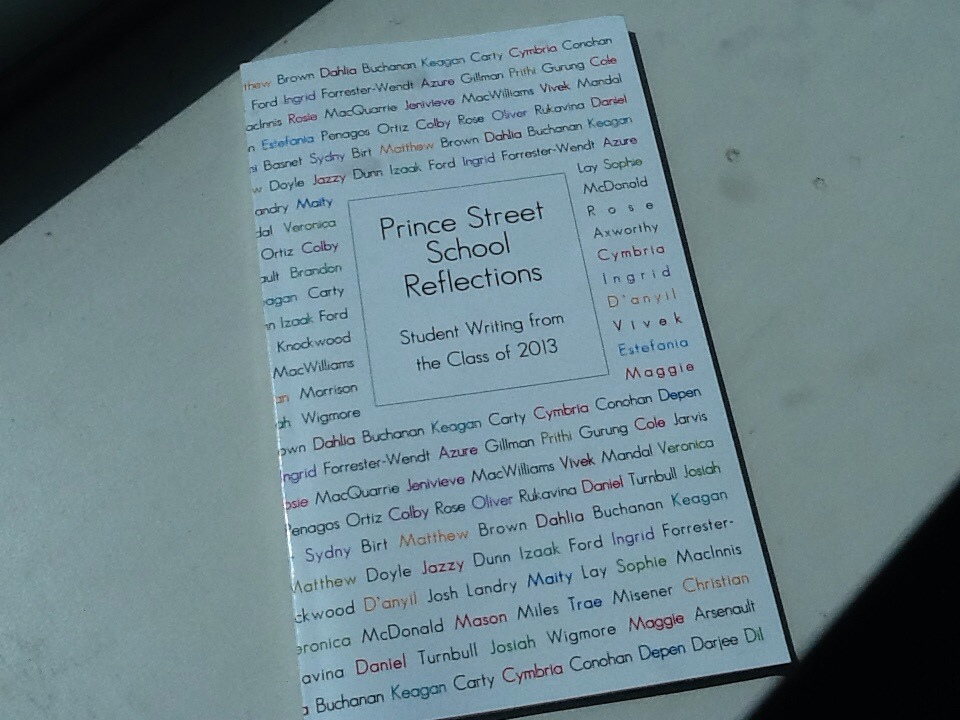
Here’s what the book looks like coming out of the Espresso Book Machine:
And here’s what the printed book looks like:
I read through the proof carefully, didn’t find anything that needed changing, so gave the go-ahead to print 50 copies of the book. By the end of the week they were ready and so I drove up to Robertson Library on Monday morning and picked them up and dropped copies off at the school for distribution – on the second last day of school, as it turned out.
Reaction from the Students and Teachers
I wasn’t at the school when the books were distributed, but fortunately CBC’s Island Morning radio programme sent a reporter up to the school to interview Jo-Anne Parsons and some of her students; I think the piece captures the reaction well, and listening to it made me feel happy that we’d done it.
Distribution of the Book
It was important to me, and to the teachers, that book be available not only to the students – who each received a copy to take home, for free – but also that the book enter the collections of the school, public and university libraries, so copies were sent to each and they’ll be catalogued and available to the public.
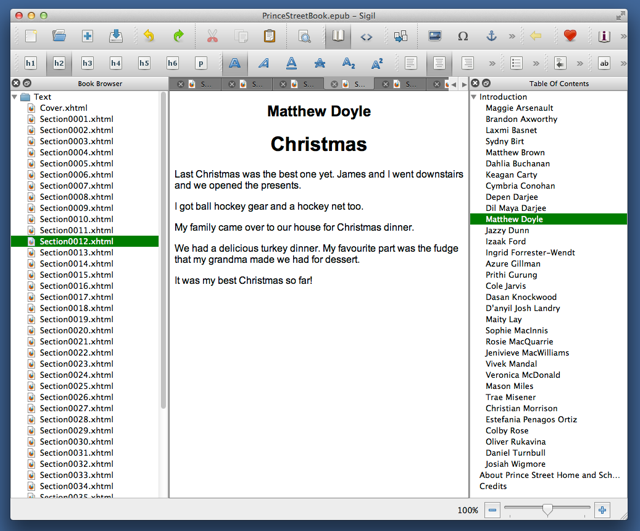
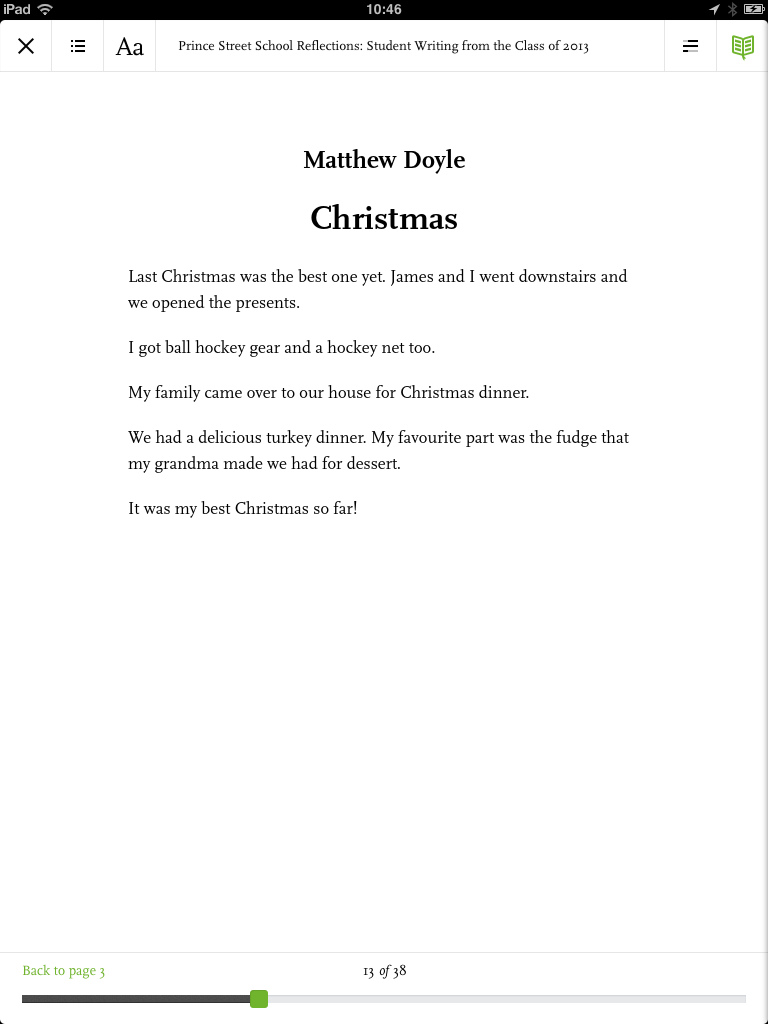
I created using the ePub version of the book with the Sigil open source ePub editor); I’d originally tried Pages’ own “Export as ePub” function, but I found that this resulted in an ePub that was too heavily-formatted to be useful on ereaders, so I started from scratch in Sigil, exporting the text from Pages as “Plain Text” and then cutting and pasting into Sigil with one ePub “section” for each piece. When it was done, it looked like this:


 I am
I am  You can subscribe to an