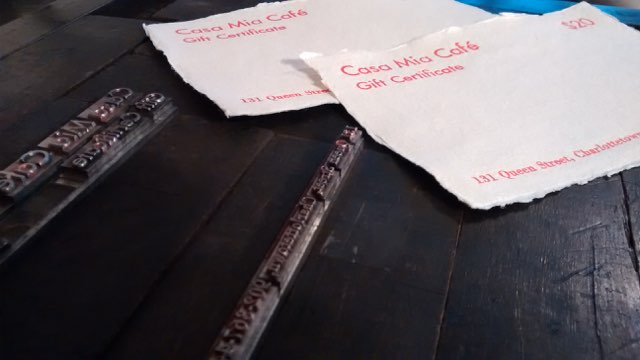
I spent the afternoon printing a new round of gift certificates for Casa Mia Café, to feed the demand for the holidays. They’ll be on sale as soon as the ink is dry.

Casa Mia Gift Certificate Samples along with the type used to print them

They are printed on Indian cotton rag paper from Khadi Papers on my now-99-year-old Golding Jobber № 8 letterpress in Futura 30 pt. and 24 pt. and Bodini 14 pt. They’re available in $20 and $50 denominations.

🗓️
Casa Mia  •  Letterpress  •  Khadi

I have become diverted by an interest in the history of time on Prince Edward Island. To this end, ably aided by Simon Lloyd at Robertson Library, I have begun to explore the relevant legislation.

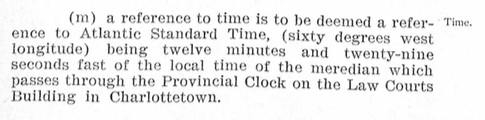
Here, for example, is a snippet from The Interpretation Act of 1939:

Let’s do some checking on the math.

There are 360 degrees of longitude, and 24 hours in a day, so each degree of longitude represents 4 minutes of time.

That means the a difference in time of 12 minutes and 29 seconds, which is the figure in the Act for the difference between the Provincial Clock in Charlottetown and 60 degrees west, would be 3.125 degrees of longitude.

Which, in theory, places the Provincial Clock at 63.125 degrees west.

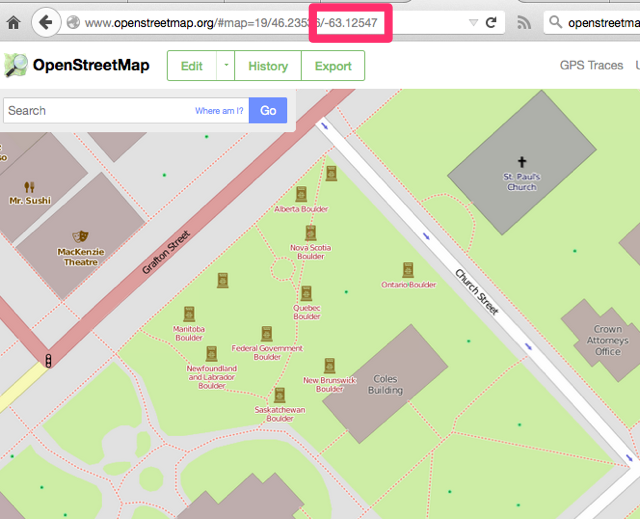
And, sure enough, if I go to OpenStreetMap.org and navigate to the Coles Building – the contemporary name for the Law Courts Building – it is, indeed, at -63.125º.

The Coles Building Location

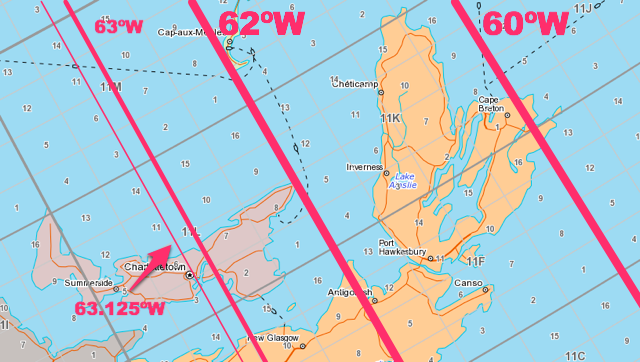
You can see this better-illustrated on the Atlas of Canada, with the NTS grid (National Topographic System) turned on. The major divisions on the NTS grid are spaced at 2º of longitude apart, and the minor divisions are spaced at 0.5º of longitude, so moving 3.125º east of Charlottetown you reach 60º west, which runs through the tip of Cape Breton:

NTS Grid

Another approach to this would be to compare the time of the sunrise in Charlottetown to the time of the sunrise in Glace Bay, Nova Scotia (which sits almost right on top of the 60th meridian). And sure enough, the sun rose in Glace Bay this morning at 7:36 a.m. and in here in Charlottetown at 7:49 a.m., 13 minutes later.

Or, like The Interpretation Act says, 12 minutes and 29 seconds later.

The time in the Atlantic Time Zone is based on the time at the 60th meridian, which is interesting to note because that meridian runs along the very eastern side of the time zone’s boundaries.  This means that although they are in the same time zone, though the sun rose today at 7:36 a.m. in Glace Bay, it didn’t rise until almost a half hour later, at 8:14 a.m., in Edmundston, NB.

🗓️

My colleagues at Robertson Library have been hard at work in recent weeks publishing the audiobook and ebook versions of the Alex B. Campbell biography by Wade MacLauchlan.

Librarians are nothing if not keen to innovate, and so among the various ways you can buy the audiobook is pre-loaded on its very own MP3 player.

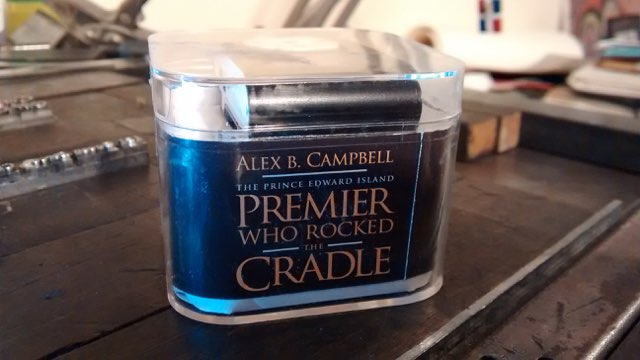
It’s Alex Campbell, in a tiny plastic box:

Alex B. Campell Audiobook on a USB Player

If you’re looking for a more conventional audiobook format, the book is available as a download, on a USB stick, and in a massive CD set.

My small contribution to the effort has been to work to put the ebook and audiobook on sale in iTunes, on Google Play and on Audible. This has turned out to be akin to opening a hornet’s nest full of complicated paperwork and technical requirements, so it’s slow-going. It has born some fruit, however: you can now purchase the eBook from Google Play. Others to follow.

🗓️
Alex Campbell  •  Audiobook  •  MP3

I’m coming up on the end of a 14 year program of resuscitating the old metal window blinds that were in our house when we bought it in 2000. They’re generally in good shape structurally, but the cords have been chewed up by time, and so they need to be taken apart, the old cord extracted, new cord wound through, and new “blind cones” stuck on the end of the cord that hands down and allows them to be raised and lowered.

Which is how Oliver and I ended up roaming up and down aisle 17 and aisle 18 at the new Canadian Tire store in Charlottetown, where we were directly by comically unhelpful staff, looking for cord and cones.

I was looking for 1/8” cotton cord, but they had none, so I had to settle for nylon. That’s fine.

As to blind cones, none were evident, and, returning to other members of the comically unhelpful staff for additional help, the reaction was close to indignation that anyone would ask for directions to such an unusual product: “I know we don’t sell blinds… you could try aisle 18.” Where we’d just been roaming. We left the store.

What to do?

Fortunately, at this exact moment I remembered that there is a Ditto 3D printer sitting here in the office, on loan from Robertson Library at the University of PEI for a “Minecraft Party” at Birchwood Intermediate School on Monday afternoon where we’ll use it to take Printcraft out for a ride.

So why not, I reasoned to myself, simply fabricate my own blind cones, Canadian Tire be damned.

And so that’s what we did.

Thingiverse to the rescue: we found a ready-to-print Window Blinds Pull Cone, free for the taking. We grabbed the STL file, ran it through Tinkerine Suite (the software used to “slice” the STL file and make it ready for sending to the Ditto 3D printer) and copied the object 3 times so we could print 4 cones at once. We copied the resulting “.g” file to an SD card, slid the SD card into the printer, hit “print” and we were off.

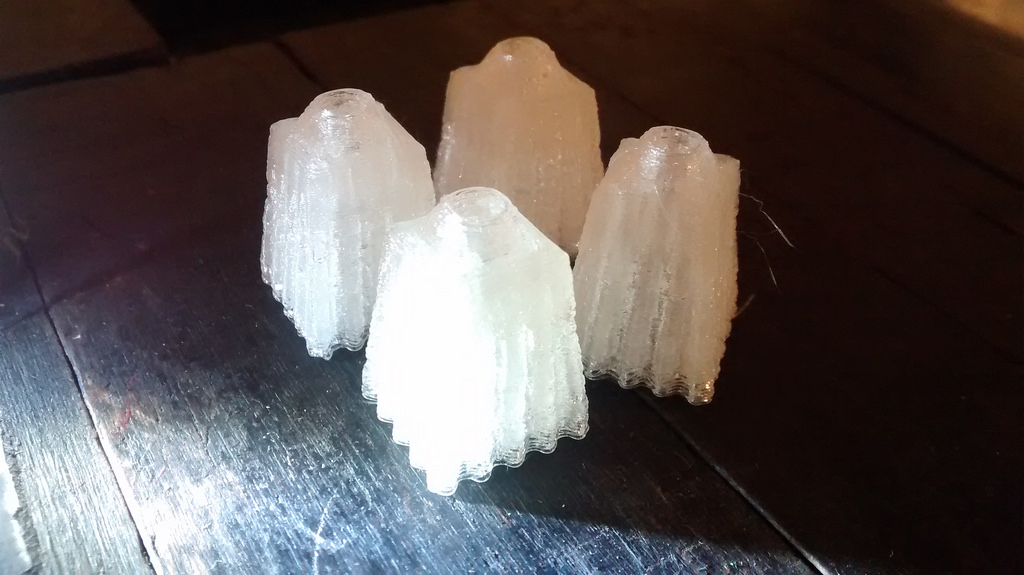
And the result, 37 minutes later:

3D Printed Window Blind Cones

Score one for the awesome power of personal fabrication!

🗓️

In my last post I documented the process of getting Node-RED up and running on a Raspberry Pi. In this post I’m going to provide complete instructions for getting a Grid Insight Ledbetter Board, which can read electricity and water meters, set up and running with a Raspberry Pi and Node-RED, uploading meter readings to a remote server.

1. Get a Raspberry Pi

There are all sort of places to get a Raspberry Pi, and any Raspberry Pi will do. But a good kit to buy, which includes everything you need, is the Cana Kit Ultimate, which, at this writing, sells for $89.00 CDN and includes the Pi, a power supply, a wifi dongle, HDMI cable, a breadboard, ribbon cable and T-connector for wiring up the Ledbetter board, and a nice plastic case.

2. Set up the Raspberry Pi

It’s easiest to get up and running if you have an HDMI-capable display, USB keyboard and mouse to connect to the Pi, as well as a wired Ethernet connection to the Internet, at least until you get it set up for wifi.

Plug the ribbon cable into the GPIO slot so that you’re ready to install the Ledbetter Board on the breadboard in a later step.

Insert the SD card into the Pi, connect the HDMI cable, the Ethernet cable, the keyboard and the mouse, and then connect the power supply.

When prompted, install the “Wheezy” distribution from the NOOBS installer.

Once this is installed, and the Pi has rebooted after installation, you’ll end up at the Linux command line, where you can then install a curses-based wifi configuration tool:

sudo apt-get install wicd-curses

You can also set the password for the “pi” user, the time zone and the hostname by running:

sudo raspi-config

Once you’ve done all that, and rebooted the Pi, you can set up wifi with:

wicd-curses

You’ll see a list of wifi SSIDs: find yours and cursor down to it and then cursor-right to set up the wifi password and any other options; be sure to check “Automatically connect to this network” so that this network is connected to automatically every time the Pi reboots. Press F10 to save your settings, then ENTER to connect to the wireless network. The result should look something like this, with your new IP address displayed at the button of the screen:
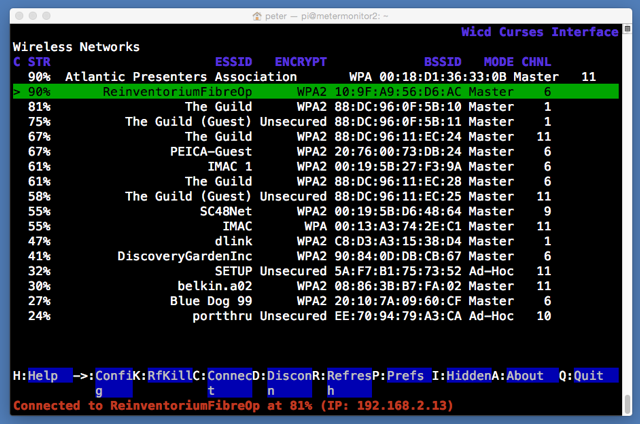
wicd-curses

Take note of the IP address your Pi was assigned (mine was 192.168.2.13), and then, from another terminal on the same network (i.e. your laptop or desktop connected to the same wireless network):

ssh -l pi 192.168.2.13

(where you substitute the IP address you were assigned for the 192.168.2.13). You’ll be prompted for the password for the “pi” user: enter the value you selected earlier.

I found the wifi to be more reliable when I modified the power-saving settings:

sudo nano /etc/modprobe.d/8192cu.conf

and paste in:

# Disable power saving
options 8192cu rtw_power_mgnt=0 rtw_enusbss=1 rtw_ips_mode=1

I also found that I needed to disable the ability to login to the Pi via the serial port to get the GPIO connection to the Ledbetter Board working:

sudo nano /etc/inittab

and then comment out the line:

T0:23:respawn:/sbin/getty -L ttyAMA0 115200 vt100

3. Install Node-RED

From the command line of your Pi, once you’ve done all of the above and are logged in, you’re ready to install Node-RED:

wget http://node-arm.herokuapp.com/node_latest_armhf.deb
sudo dpkg -i node_latest_armhf.deb
wget https://github.com/node-red/node-red/archive/0.9.1.zip
unzip 0.9.1.zip
mv node-red-0.9.1 node-red
cd node-red/
npm install --production

The last step will take a while to complete; be patient.

Next install the serial port node for Node-RED:

npm install serialport

And then configure Node-RED to automatically start on bootup:

wget https://gist.githubusercontent.com/Belphemur/cf91100f81f2b37b3e94/raw/72e9a7e779ae343121ce535e312a9872fc9d5fb6/node-red -O /etc/init.d/node-red
sudo chmod +x /etc/init.d/node-red
sudo update-rc.d node-red defaults

Finally, reboot the Pi so that all of the settings take effect:

sudo reboot

4. Install the Node-RED Workflow

Once the Pi has rebooted, you should be able to visit this address in a web browser on a device connected to the same wireless network (substitute the IP address of your Pi for the 192.168.2.13):

http://192.168.2.13:1880

Click on the “hamburger” icon in the top-right of the display, select Import and then Clipboard and paste in the following, substituting the path to a remote REST interface URL for PATH-TO-WEBSERVER-SCRIPT. Place the workflow on the Node-RED canvas with a click, and click DEPLOY to save the workflow.

[
   {
      "id":"e046421c.7b0da",
      "type":"serial-port",
      "serialport":"/dev/ttyAMA0",
      "serialbaud":"9600",
      "databits":"8",
      "parity":"none",
      "stopbits":"1",
      "newline":"\\n",
      "bin":"false",
      "out":"char",
      "addchar":"false"
   },
   {
      "id":"b0910fee.8b01a",
      "type":"csv",
      "name":"parse scm messages",
      "sep":",",
      "hdrin":"",
      "hdrout":"",
      "multi":"one",
      "ret":"\\n",
      "temp":"messagetype,serialnumber,reading,metertype,tampercode,signalstrength",
      "x":500,
      "y":460,
      "z":"5d86b745.52bdc8",
      "wires":[
         [
            "544f7094.a3211"
         ]
      ]
   },
   {
      "id":"544f7094.a3211",
      "type":"function",
      "name":"make url for posting to database",
      "func":"msg.url = \"https://PATH-TO-WEBSERVER-SCRIPT\";\nmsg.url += \"?serialnumber=\" + msg.payload.serialnumber;\nmsg.url += \"&metertype=\" + msg.payload.metertype;\nmsg.url += \"&reading=\" + msg.payload.reading;\nreturn msg;\n",
      "outputs":1,
      "x":638,
      "y":613,
      "z":"5d86b745.52bdc8",
      "wires":[
         [
            "1683d875.a08e3"
         ]
      ]
   },
   {
      "id":"17af58a5.200097",
      "type":"switch",
      "name":"route on message type",
      "property":"payload",
      "rules":[
         {
            "t":"cont",
            "v":"UMSCM"
         },
         {
            "t":"cont",
            "v":"UMIDM"
         }
      ],
      "checkall":"false",
      "outputs":2,
      "x":493,
      "y":363,
      "z":"5d86b745.52bdc8",
      "wires":[
         [
            "b0910fee.8b01a"
         ],
         [

         ]
      ]
   },
   {
      "id":"1683d875.a08e3",
      "type":"http request",
      "name":"post to remote mysql database",
      "method":"GET",
      "url":"PATH-TO-WEBSERVER-SCRIPT",
      "x":618,
      "y":722,
      "z":"5d86b745.52bdc8",
      "wires":[
         [

         ]
      ]
   },
   {
      "id":"8622d22d.68ea8",
      "type":"serial in",
      "name":"Ledbetter Board",
      "serial":"e046421c.7b0da",
      "x":291,
      "y":261,
      "z":"5d86b745.52bdc8",
      "wires":[
         [
            "17af58a5.200097",
            "b262de18.43cc38"
         ]
      ]
   },
   {
      "id":"b262de18.43cc38",
      "type":"debug",
      "name":"",
      "active":true,
      "console":"false",
      "complete":"false",
      "x":604,
      "y":212,
      "z":"5d86b745.52bdc8",
      "wires":[

      ]
   }
]

Here’s a little PHP script that you can use as an starting point for your own archiving of data to a MySQL database:

<?php

if ($_GET) {

    $db = new mysqli("HOST", "USER", "PASSWORD", "DATABASE");

    /* check connection */
    if ($db->connect_errno) {
        printf("Connect failed: %s\n", $db->connect_error);
        exit();
    }

	$query = sprintf("INSERT into readings (serialnumber,datestamp,metertype,reading) values ('%s','%s','%s','%s')",
				mysqli_real_escape_string($db,$_GET['serialnumber']),
				strftime("%Y-%m-%d %H:%M:%S"),
				mysqli_real_escape_string($db,$_GET['metertype']),
				mysqli_real_escape_string($db,$_GET['reading']));
				
	if (mysqli_query($db, $query) === TRUE) {
		header("HTTP/1.1 201 OK");
	}
	else {
		printf("INSERT failed: %s\n", $db->connect_error);
		exit();
	}
}

5. Set up the Ledbetter Board

Plug your GPIO ribbon cable adapter into your breadboard as in the photo below.

Snap the pigtail connector for the antenna into the Ledbetter Board, and the slide the board into the breadboard, noting which side is “up” (you can tell by reading the label screen-printed onto the board)

The Ledbetter Board has 4 pins, only 3 of which are used: you need to wired up:

  • Pin 1 on the Ledbetter connects to the 3V3 power pin on the Pi
  • Pin 2 on the Ledbetter connects to GND (ground) on the Pi
  • Pin 4 on the Ledbetter connects to RXD on the Pi

Here’s what my setup looks like when it’s wired up:
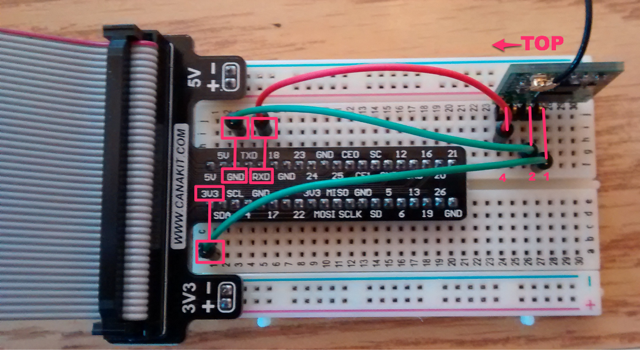
Ledbetter Board Setup

6. Watch it Work

Power off the Pi from the terminal:

sudo shutdown now

Then plug the ribbon cable from the Pi into the breadboard connector, and power the Pi back on.

Visit Node-RED in your web browser as above, and click on the Debug tab in your workflow, and you should start to see SCM messages flowing in:
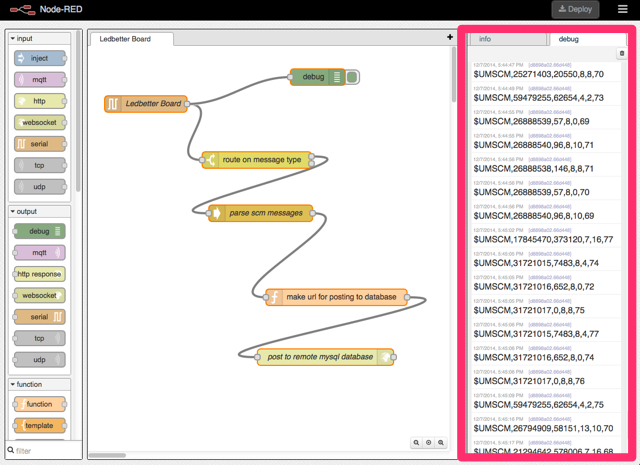
Node-RED working with Ledbetter Board

You should also see your database back end filling up with reports.

Troubleshooting

There are many moving parts in this setup, so many opportunities for things that could go slightly wrong. Things that went wrong for me in my various setups that you might want to check:

  1. Are the proper Ledbetter Board pins wired to the proper GPIO pins? Make sure you’ve got “top” and “bottom” on the board properly oriented: the “top” is the side that has “Ledbetter Board” stencilled on it.
  2. Are you lined up with the proper GPIO pins on the breadboard?
  3. Check the “Debug” window in Node-RED: errors in the workflow nodes might be causing problems. Especially check your server-side script to see if it’s receiving messages properly and without generating errors.

🗓️

I have a general policy of donating to any project that Gary Schneider, coordinator of the Macphail Woods Ecological Forestry Project, is behind; the latest is the Restore An Acre initiative. It’s a sensible project, that connects a donation of $200 with the restoration of an acre of the Selkirk Road Public Forest. I’ve just made a donation; I’d ask you to do the same.

Restore an Acre from Macphail Woods on Vimeo.

🗓️

In the fall of 1992 I was living in Peterborough, Ontario doing freelance design work after almost 2 years spent in the composing room of the Peterborough Examiner newspaper. Catherine and I were living in a spacious apartment on Hunter Street. A few months later we’d leave Peterborough and relocate to Prince Edward Island, so what ended-up being my last design job was to design a season poster for Artspace, the artist-run centre that, at the time, was based in the Market Hall downtown.

It was a happy accident that I got the job: Artspace was in transition that year and, if memory serves, had no staff for a time. So I could get away with a lot, and had no “branding guidelines” to stick to. Nor, indeed, any oversight at all, excepting the very flexible, accepting imagination of board member Lynn Cummings, whose responsibility it was to have a season poster designed.

By lucky happenstance, I happened to be browsing a book in the Peterborough Public Library that week about the history of the city, and I came across a photo of the central block around the Market Hall being redeveloped into Peterborough Square, one of the many downtown-redevelopment projects that afflicted (or saved, depending on your point of view) urban cores in small-town Ontario in the 1970s. All of the buildings on the block, save the Market Hall, which was to remain, had been torn down. The site was empty. The block, for some rare months, was free of any business activity.

And thus was born “Mystery Virus Destroy Capitalism.”

Mystery Virus Destroys Capitalism

I figured if I was being irreverent, I might as well go all the way, so I took the opportunity to design a new logo for Artspace while I was at it. The new logo didn’t take – as far as I know, this was the first and only time it every appeared in print.

The poster was printed on glossy 11” x 17” card stock and distributed liberally about the city.

It was the most fun I ever had doing graphic design, and the only time I think I ever managed to capture a small slice of the zeitgeist in my work.

🗓️
Artspace  •  Peterborough  •  Design

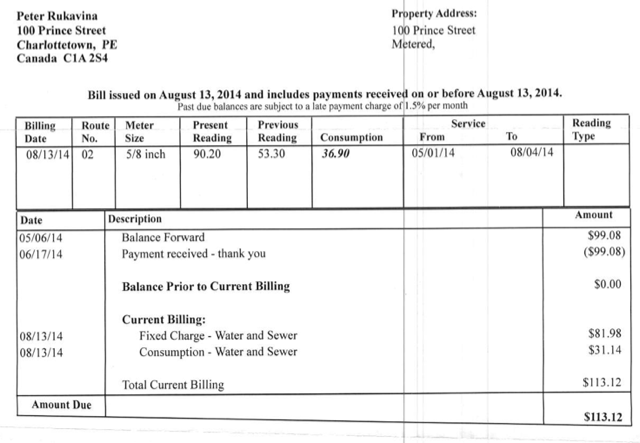
We’ve now had a water meter in our house at 100 Prince Street for almost a year, so it’s a good time to look at what it’s costing us for water with a meter vs. what it was costing us under the old “all you can eat” plan.

Our 2013 annual bill was $510.88, payable in four installments of $127.72.

We’ve received three bills under the new metered regime that reflect full quarters: May’s bill was $99.08, August’s bill was $113.12 and November’s bill was $112.40, for an average of $108.20, or about 15% less than what we were paying before.

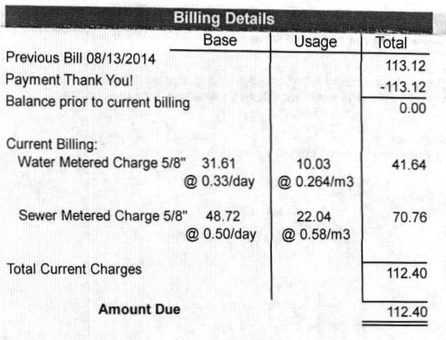
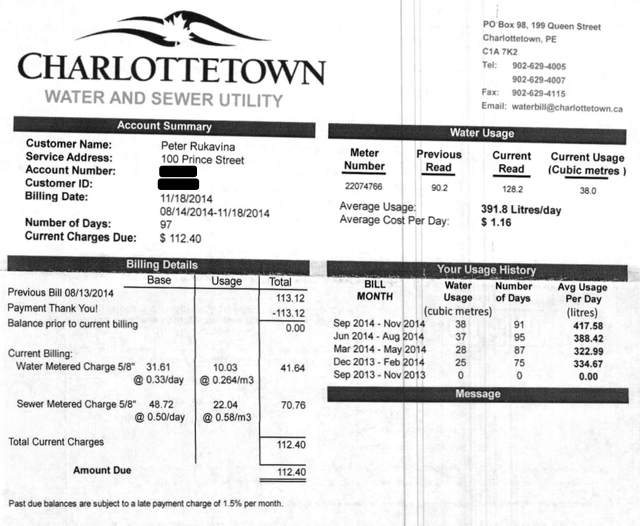
Charlottetown Sewer and Water redesigned it’s bills this fall, and the new bills provide much more detail about usage and billing. Here’s a snippet from our November bill:

Water bill excerpt, November 2014, 100 Prince Street

A couple of things jump out on that bill.

First – and this is something that was never broken out before in the old bills – is that we are billed for both water coming in (“water”) and water going out (“sewer”) and we pay more than twice as much per cubic meter for sewer than we do for water. This used to be ganged together under “water and sewer” on the bill, and it’s nice to see it broken out as it reinforces the fact that water used is water that needs to be disposed of, and that costs a lot of money.

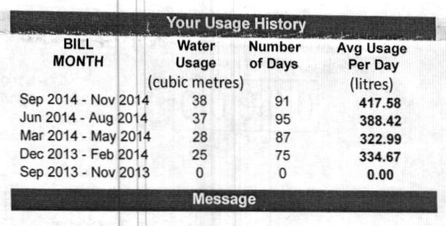
Second is that the “base” rate, which isn’t affected by consumption, is a significant part of the bill – about 70%. That means that even if we used no water at all we’d still pay $80.33 a quarter just to be connected to water and sewer. I don’t begrudge that, as there’s obviously a liability to the utility as I could use water at any time. But it does dampen the incentive to conserve, and it dulls the financial feedback one gets from conserving or consuming more. For example, here’s our consumption history for the past five quarters:

Water Usage History, 100 Prince Street

Our consumption from last quarter increased 7%, and yet our daily cost for water went from $1.19/day to $1.23/day, an increase of only 3%; the fixed base charge made the perceived cost of our increase in consumption less than half as “impactful” as it would have been without the base charge.

All that said, the new water bill is a huge improvement over the old design: here’s a comparison of old vs. new.

Here’s our bill, in the old format, for August 2014:

Old Water Bill

And here’s our bill, in the new format, for November:

New Water Bill

The new format is clearer, exposes considerably more detail, and provides consumption history information that was never aggregated together before.

🗓️

It’s been a stormy day here in Prince Edward Island, most especially on the western end. We had a PEI Home and School Federation board meeting scheduled for this evening, but the bad weather put having a quorum at risk.

So we looked to Skype to pull the meeting off.

We tried this on a smaller scale last year for a subcommittee meeting, and it worked relatively well, and since that time Skype has made “Group Video Chat” free for all users (it was a paid subscription service until recently), so it seemed like a viable option. But we’d also tried to Skype a single director into a meeting earlier this year, and he got lost in the shuffle, so I was cautious.

In the end we had 12 of our directors who could make the meeting: 4 attended in person, in the board room at Casa Mia Café (generously donated to the cause at the last minute) and 8 people attended via Skype.

Of those eight, we called one person on the phone (with Skype), and one person was on an iPad, which only supports audio for group chat, so we had 6 people with video and audio, and 2 people with only audio.

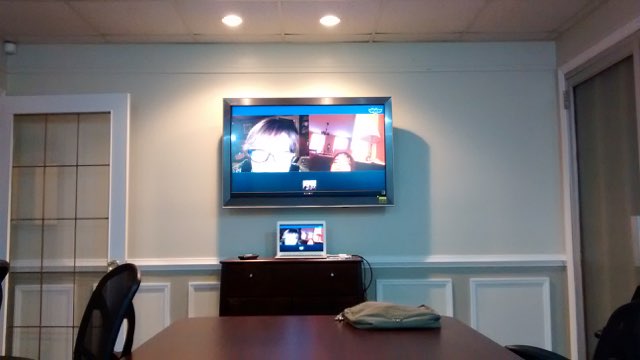
The Casa Mia board room has a large 1080p Sony television mounted on the wall at one end of a board table; here’s what it looked like when I was testing the setup with Catherine and Oliver via Skype:

I used my MacBook Air, plugged into the TV via a VGA connector, to display Skype, and used the MacBook’s internal microphone to pick up sound in the room (arguably the weak link in the system, as it was sometimes difficult for Skypers to here people in the room).

And it worked!

We held the meeting, which took about 90 minutes, and every one stuck in and it went, for most intents and purposes, like a regular board meeting.

Some lessons learned:

  1. Leaving time for “rehearsal” before the meeting started was a good idea. 15 minutes before we were scheduled to start I called each Skype participant to verify that their setup was working, that we could see and hear each other. Now that those 8 people have done it once, we’re better prepared for the next time.
  2. It really helps to be “Skype contacts” with everyone that’s going to be participating by Skype before the meeting starts because Skype appears to require that you’re a contact before you can be added to a
    Group Video Chat.” This was a stumbling block getting started for a couple of people I’d sent contact requests to who hadn’t acknowledged them: I had to re-send the contact request to get things rolling.
  3. Skype isn’t as good as Google Hangouts and GoToMeeting at showing the person who’s talking in a larger video window: this “highlighted person” in Skype seemed to be selected at random and/or perhaps affected by the background noise in the remote locations. This wasn’t a big deal, but if it had worked better we sometimes would have been clearer who was speaking at any given point.
  4. If someone on Skype starts speaking, it’s hard for them to hear anyone else speaking, which makes “are there any other questions about this” style requests for comment a little more difficult to handle because people end up talking over each other.
  5. The single best thing we did was to make sure that everyone in the room talked toward the MacBook, and spoke loudly and clearly.
  6. I was chairing the meeting, and stopped twice just to check in and make sure that everyone on Skype could still see us and hear us and to take a “roll call” of sorts to make sure nobody had dropped out.
  7. Having the large TV was a big help: if everyone in the room had to gather around a tiny laptop screen it wouldn’t have worked.

By holding the meeting via Skype we were able to avoid 3 people driving from Summerside, one person driving from Souris, one person driving from Crapaud and one person driving from up west, so in addition to making the meeting possible, we also saved a lot of driving and a lot of people’s time.

It all worked well enough that we might consider making the option a regular part of our board meeting routine.

🗓️

Couples never kiss in Aaron Sorkin television dramas.

They argue.

They argue epically, eloquently, passionately.

In Aaron Sorkin’s made-up world, argument is the currency of love.

Lt. Daniel Kaffee argues with Lt. Cdr. JoAnne Galloway. President Andrew Shepherd argues with Sydney Ellen Wade. CJ Cregg argues with Danny Concannon. Danny Tripp argues with Jordan McDeere. Will McAvoy argues with MacKenzie McHale.

And, in this week’s episode of Sorkin’s The Newroom, Jim Harper (John Gallagher, Jr.) argues with Hallie Shea (Grace Gummer). The entire scene runs just over four minutes; here’s the last 38 seconds:

Surely this must rank as one of the most compelling couple-arguments in modern television.

🗓️

About This Blog

Photo of Peter RukavinaI am . I am a writer, letterpress printer, and a curious person.

To learn more about me, read my /now, look at my bio, listen to audio I’ve posted, read presentations and speeches I’ve written, see things I’ve favourited elsewhere, or get in touch (peter@rukavina.net is the quickest way).

I have been writing here since May 1999: you can explore the 25+ years of blog posts in the archive.

You can subscribe to an RSS feed of posts, an RSS feed of comments, an RSS feed of favourites elsewhere, or a podcast RSS feed that just contains audio posts. You can also receive a daily digests of posts by email. I also publish an OPML blogroll.

Instagram • YouTube • Vimeo • ORCID • OpenStreetMap • Internet Archive • PEI.art • Drupal • Github.