A friend recommended Grant Matheson’s book The Golden Boy to me a few weeks ago. All of the copies at the public library were on hold, so I purchased a copy from Amazon for the Kindle, and read it, in one sitting, on the tiny screen of my phone.

It’s a gripping tale, well-told, of personal tragedy and personal triumph: I learned a tremendous amount about addictions and treatment and recovery that I didn’t know; perhaps most prominently, that addiction doesn’t discriminate, and can affect anyone, of any stature or income or life situation.

The greatest lesson from the book, however, is that it demonstrates the redemptive power of what I’ve long-termed “the obligation to explain.” Matheson took his personal story, which otherwise would have remained the stuff of rumour and innuendo, and laid it bare for all to read about, and to learn from. In doing so, he’s provided a valuable gift to us all, and one that might end up changing more lives for the better than he ever would have as a family doctor.

🗓️
Grant Matheson  •  Books  •  Addiction

I’ve been a longtime user of the excellent Elastics utility for the Mac for managing connections to Amazon Web Services EC2 instances: it provides a handy menu bar item with a drop-down list of running instances, with a link to connect to each via SSH.

Unfortunately Elastics has been slowly dying on the vine with each new version of Mac OS, and with recent updates to High Sierra it’s stopped working completely for me so I needed a replacement. While there have been various attempts to build alternative “manage your AWS instances in a GUI” utilities, none has the elegance of Elastics, and many of the features are overkill for me: all I really need is a quick way of SSHing to an instance by instance name.

Here’s what I built.

First, I made a shell script call aws-connect.sh that looks like this:

#!/bin/sh
aws ec2 describe-instances --filters "Name=tag:Name,Values=$1" --query "Reservations[0].Instances[0].PublicDnsName"

It uses the AWS command line utility aws to return the public DNS name of the instance I pass it on the command line. So if I do:

./aws-connect.sh slave

it will return the public DNS of an instance I’ve named “slave,” like this:

"ec2-164-71-182-18.compute-1.amazonaws.com"

I then created a workflow, another shell script, in Alfred that looks like this:

export EC2HOST=`~/bin/aws-connect.sh {query} | tr -d '"'`
ssh -t -p 22 -i 'keypair.pem' ec2-user@$EC2HOST 

This script puts the public DNS of the named instance (passed from Alfred as {query}), with the quotes stripped out, into the EC2HOST shell variable, and then SSHes to that instance using my AWS keypair.

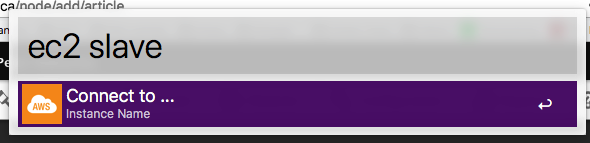
When this is all glued together, connecting to an AWS instance, assuming I know the name, is as simple as invoking Alfred (with Control + Space in my setup) and typing ec2 [instance name]: a Terminal window opens, and I’m connected to the instance. It doesn’t replace everything that I used Elastics for, but it does replace the most important thing, and that’s a big help.

Screen shot of Alfred using my utility to connect to an EC2 instance.

🗓️

From our eagle-eyed brother on the ground in Montreal, a pointer to Improbable Habitat - Montréal vs, an exhibition on display in a park in Mont-Royal. The Google-translated description:

Begun in the fall of 2013, following a trip to Paris, the series Improbable Habitat is a project that is enriched over the years by new paintings. It explores the contrasts created by the connection of typical dwellings of different cities to that of Montreal.

As Charlottetown is a major world capital, it’s one of the cities experimented with, imagining a typical Montreal duplex transplanted into Bayfield Street, and vice-versa.

You can purchase prints.

Photo of Montreal exhibit

🗓️

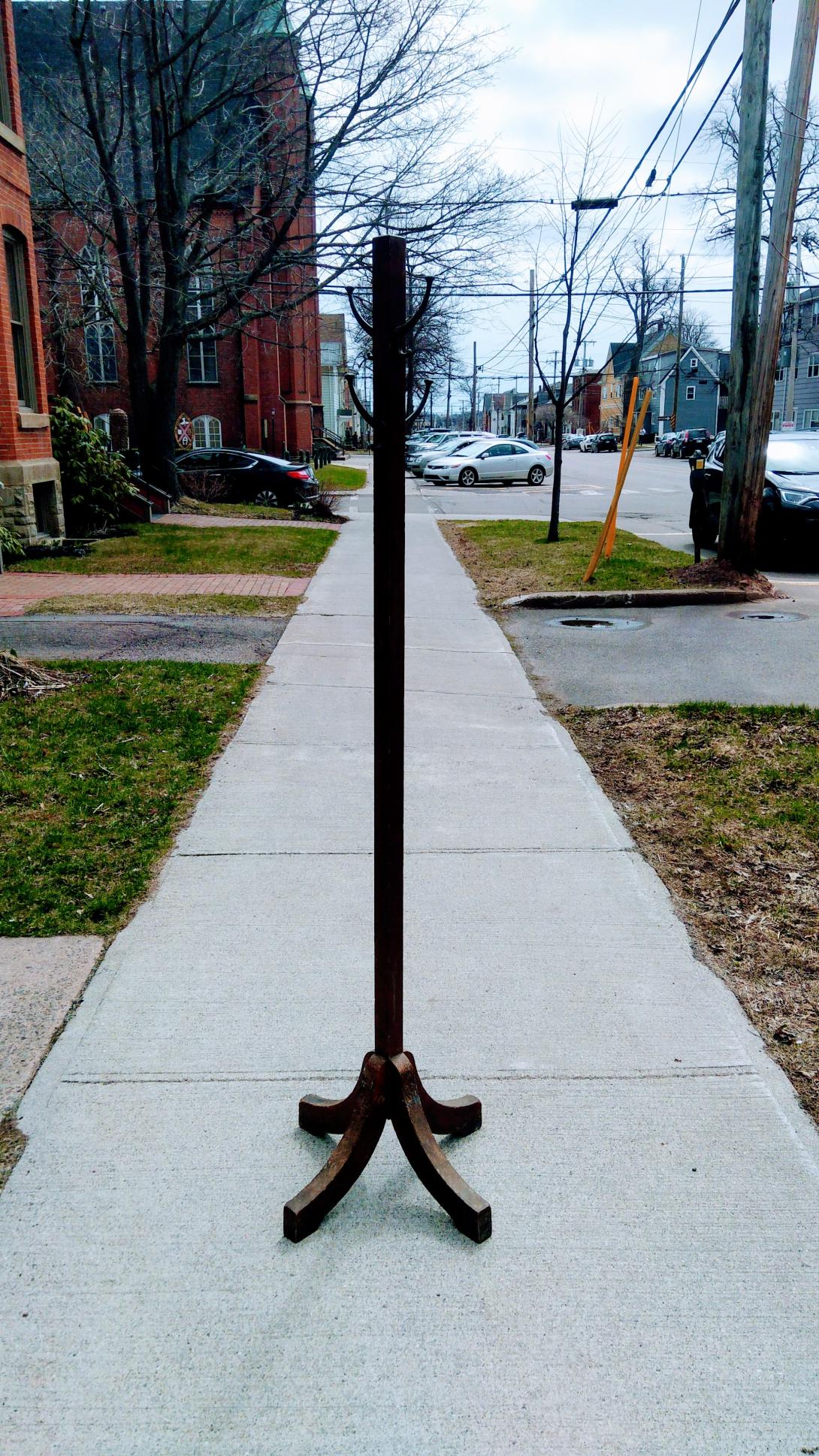
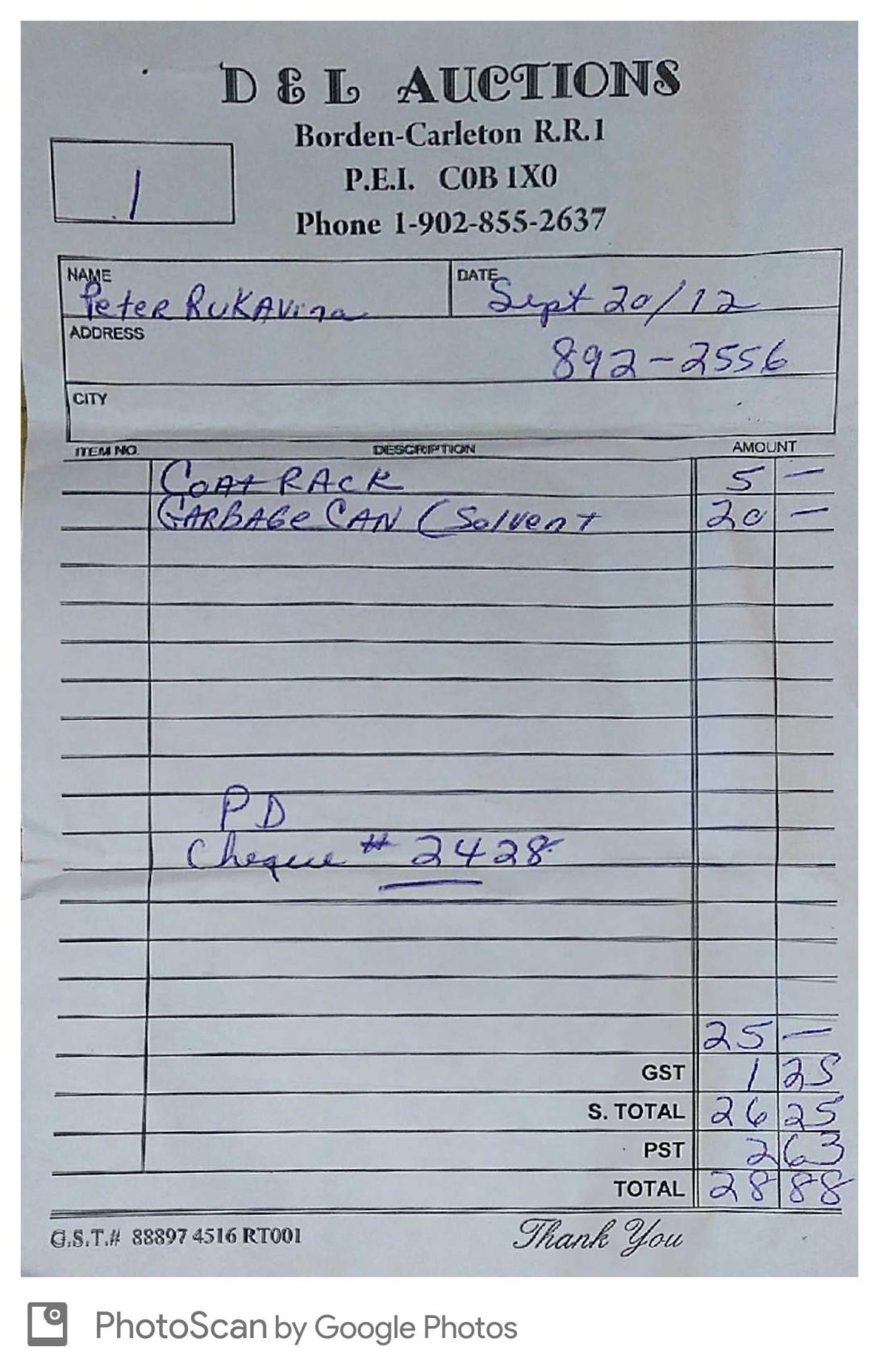
I purchased this coat rack in 2012 when the Queen’s Printer held an auction upon getting out of the business of printing.

When I purchased it, for $5, the legs were held together with duct tape and thus my coats were always in danger of plummeting to the ground.

On moving into the new office, I decided to address this, and dropped the coat rack at McAskill’s to be repaired. A couple of weeks and $60 later, it’s as good as new.

Queens Printer Coat Rack (on the street) , Receipt for Queens Printer Auction
🗓️

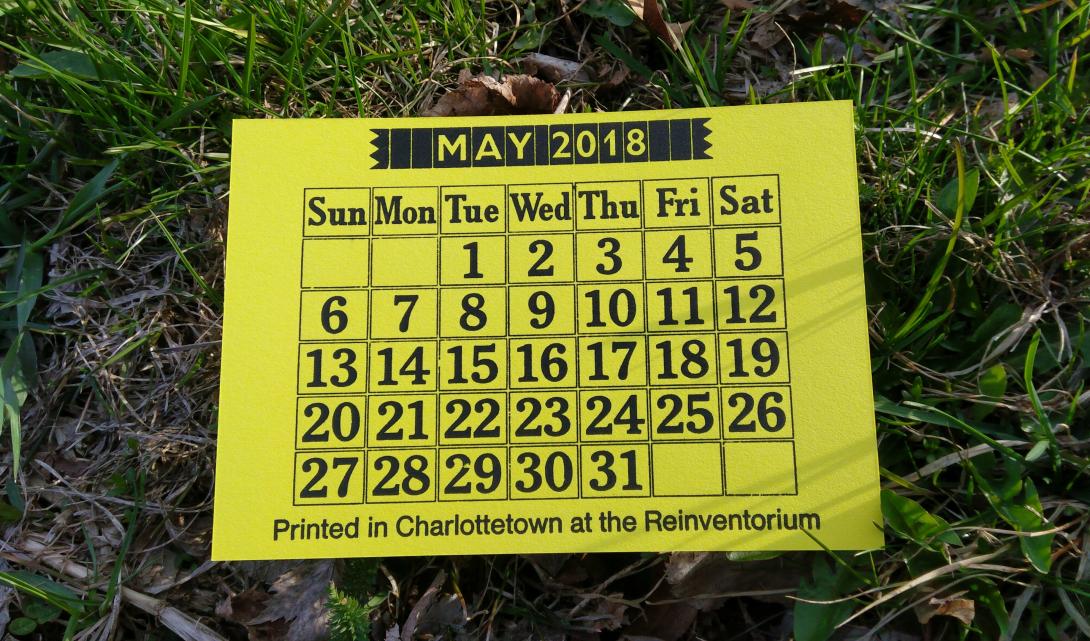
I finally took the calendar type I purchased in 2016 from The Printing Museum in New Zealand out of its box and used it to create a May 2018 calendar.

My “29” has a dimple in it; I’ve written to see if I can secure a replacement.

🗓️

Since I relocated my office, my commute to work has been cut down from a 5 minute walk up Richmond Street down to a 1 minute walk across the street. House door to office door takes 1:15. Here’s a short video to illustrate.

My comm

🗓️

As Burger Love draws to a close, Oliver weighs in.

🗓️

One of the unexpected benefits of taking up residence in the St. Paul’s Parish Hall basement is getting to know more about the parish that’s been our neighbour for the 17 years we’ve lived across the street.

Archdeacon John Clarke, who leads the parish, maintains a blog, and I’ve been an enthusiastic reader of it for the last few months. More often than not I find useful insight in what he writes, even if I need to translate into my decidedly more secular frame of reference.

In today’s post, he describes his upcoming sabbatical:

I could have taken all sorts of courses and studied lots of subjects that would have added nothing useful to my ministry or my sermons. Instead, I will try and learn how to play the guitar. It too may prove to be useless or futile, but I remain hopeful. I may never haul out the guitar in public or you may come to dread seeing me pick it up during a sermon.

By way of reassuring parishioners concerned about his absence, he adds:

So, to the point of what will be different, my hope is that you’ll will hardly know I’m gone. As one person put it, “the parish got along just fine for 235 years before you, we can do 3 months easily.”

I am proud to be an ex officio member of the parish community, a parish led by someone with good humour and the courage to take on a new challenge like this.

🗓️

When I stepped out of the shower this morning I was overcome by a sudden realization that my only job–my only job–for the two or three hours to follow was to stay calm. This realization proved very helpful, both because staying calm is always helpful, and because it made me realize that there was little else for me to do. “Accept and release,” as Catherine always says.

Oliver needed to have blood drawn this morning, part of a regular diagnostic test. Although he’s made strides in overcoming his adversity to needles in recent years, it remains a challenging thing to confront for him, so he did not greet this prospect warmly.

If we’ve learned anything about the health system as parents it’s that often tremendous help is waiting if you remember to ask; to this end, in advance of the blood test, I contacted the pediatric clinic at the Queen Elizabeth Hospital for advice, and they put us in touch with a fantastic person, Shira Zipursky, their “child life specialist,” who became a sort of specimen-collecting-concierge and spirit-guide for us.

Last night Oliver and I purchased some “numbing cream,” which Shira suggested as a way of mitigating the pain of the needle (and perhaps, in addition, numbing the prospect of the pain of the needle); we ran a beta test before bed, and it all worked out well, so when Oliver got up this morning the first thing we did was to apply the cream, along with air-tight dressing, to three sites on his right arm (hand, elbow crease, shoulder). By the time we arrived at the hospital, the cream was in full effect, and numbing was happening.

Oliver, to his enormous credit, held things together really well as we arrived at the hospital; he knew he was nervous, and we knew he was nervous, but he maintained control.

Shira met us at admitting, greeted Oliver by name, ushered us to the admitting desk, and made sure everything was in order. Once Oliver was admitted, she suggested that, rather than going into the crowded waiting room, we hang about in the lobby, which was helpful, as Oliver, empathetic as he is, sponges up the anxiety of others, and one can only imagine that a Specimen Collection waiting room held a lot of it.

Just as things seemed to be rolling along smoothly, “Code Purple, Specimen Collection” came over the public address system, and a shard of tension sliced through the air as concerned-looking security staff and others converged on the room we were about to enter, and “pause” was pressed on our progress (the Internet is inconclusive on what a Code Purple is: options range from hostage situation to gang activity).

Fortunately, Oliver was oblivious to this, as the skillful Shira had brought along an iPad loaded with all manner of fun video games and he and Catherine were engrossed in one involving trains and police officers and jumping.

After just a few minutes it seemed like the Code Purple dimmed and things returned to normal; the head of the Specimen Collection department came out to fetch us, and ushered us into a room where a couple of additional staff were primed and ready.

To say that things went smoothly from there would be an overstatement, as Oliver, self-contained until this point, was overtaken by a flood of anxiety, and we all–himself included–had to work really hard to calm him down. All of the Strongest Families tools in our toolbox got put to use: belly breathing, muscle relaxation, shoulder rolling, positive self-talk. The staff were patient, helpful, and didn’t rush things along (which would have made things worse). And they knew enough to know when Oliver’s stress had subsided just enough to allow them to make their move.

The blood draw went quickly, Oliver remained as calm as he could, and before we knew it everything was over.

I almost exploded in tears of joy at this point, as of course I’d been stressed out too, despite my goal of remaining calm, and there’s nothing like seeing your child under duress to tear at the very fabric of your soul, especially when it’s because of events you orchestrated.

We gathered ourselves together, thanked everyone, and headed out to a well-deserved breakfast at Receiver Coffee before dropping Oliver at school.

We owe Shira and her specimen-collecting colleagues at the Queen Elizabeth Hospital a great debt of gratitude for making what could have been a dreadful, negative experience into one that, while still stressful, was well-managed, safe for all concerned, positive, and efficient. Thank you.

🗓️

Earlier this month, Ton mused about whether it was time to return to the blogroll (and, yes, it may seem like recently my blog has turned into musing about Ton musing about things I’ve mused about; you can join in, though!).

One of the things I found when I was poking around inside Tiny Tiny RSS, which I use to consume RSS feeds, is that it provides a public URL for an OPML file that contains all of the feeds I subscribe to. So I’ve stuck that in the footer of this site (as “OPML (Blogroll)”) and you can grab it right now if you like.

Update: I switched to using FreshRSS as my RSS reader, and it only supports exporting my OPML, so I’ve manually uploaded it, and you can grab it here.

For the uninitiated, let me unpack this:

I read a bunch of websites.

These websites get updated, all on different schedules.

Some update every day. Some every hour. Some one every six months.

I don’t want to have to open up my web browser and type www.zylstra.org every morning on the off chance that Ton has written something: I want a robot to do that for me.

That’s what RSS is all about: I give my RSS reader a list of websites that have RSS feeds (a list of things that have been written, sorted by date, in a way that is easy for a robot to consume), and the RSS reader goes off, every 15 minutes, all on its own, and looks to see if there’s anything new. If there is, the new items show up in my RSS reader, where I read them.

An OPML file adds one more level of abstraction: an OPML file is a machine-readable list of RSS feeds themselves, a list that I can pass around to other people, sort of like a reading list or list of references. Ideally, they can import the OPML file into their RSS reader, and, presto!, they can subscribe to the same things I subscribe to.

Here’s what an OPML file look like under the hood:

<?xml version="1.0" encoding="utf-8"?>
<opml version="1.0">
  <head>
    <dateCreated>Thu, 26 Apr 2018 20:54:02 +0000</dateCreated>
    <title>Tiny Tiny RSS Feed Export</title>
  </head>
  <body>
    <outline text="Friends">
      <outline type="rss" text="Edward Hasbrouck" xmlUrl="https://hasbrouck.org/blog/index.xml" htmlUrl="https://hasbrouck.org/blog/"/>
      <outline type="rss" text="Elmine Wijnia" xmlUrl="http://storymin.es/feed/" htmlUrl="http://storymin.es"/>
      <outline type="rss" text="Olle Jonsson" xmlUrl="http://ollehost.dk/blog/feed/" htmlUrl="http://ollehost.dk/blog"/>
      <outline type="rss" text="Parker Higgins" xmlUrl="https://parkerhiggins.net/feed/" htmlUrl="https://parkerhiggins.net"/>
      <outline type="rss" text="Peter Bihr" xmlUrl="http://www.thewavingcat.com/feed/rss/" htmlUrl="http://www.thewavingcat.com"/>
      <outline type="rss" text="Steven Garrity" xmlUrl="http://www.actsofvolition.com/feed" htmlUrl="http://www.actsofvolition.com/"/>
      <outline type="rss" text="Ton Zijlstra" xmlUrl="https://www.zylstra.org/blog/feed/" htmlUrl="https://www.zylstra.org/blog"/>
    </outline>
  </body>
</opml>

That’s just a slice of my OPML file, and it lists the RSS feeds of my friends.

Like RSS, OPML never really went away. But it feels good to be talking about it again, as, like RSS, it’s one of those very useful bits of plumbing that makes the social web work.

🗓️
OPML  •  Weblogs

About This Blog

Photo of Peter RukavinaI am . I am a writer, letterpress printer, and a curious person.

To learn more about me, read my /now, look at my bio, listen to audio I’ve posted, read presentations and speeches I’ve written, see things I’ve favourited elsewhere, or get in touch (peter@rukavina.net is the quickest way).

I have been writing here since May 1999: you can explore the 25+ years of blog posts in the archive.

You can subscribe to an RSS feed of posts, an RSS feed of comments, an RSS feed of favourites elsewhere, or a podcast RSS feed that just contains audio posts. You can also receive a daily digests of posts by email. I also publish an OPML blogroll.

Instagram • YouTube • Vimeo • ORCID • OpenStreetMap • Internet Archive • PEI.art • Drupal • Github.