
There is a lot of snow where we are.
The first time my late grandmother Nettie Rukavina visited us on Prince Edward Island — I think it was in 1997 — we took her to North Rustico for a lobster supper.
At the entrance to Fisherman’s Wharf Lobster Suppers in North Rustico you select three or four entree options — lobsters of several sizes, scallops, steak and so on — and pay for your supper in advance, as most everything else is included in one price.
When Nettie saw that I was about to hand over $20.00 a person to eat supper, she was shocked: “$20.00 each for supper,” she exclaimed. And then she told us the story about how when she was a waitress at the Hoito in 1937 you could get a complete meal for 25 cents.
Once we got inside and seated, Nettie ate like a wolf, especially when it came to the desserts. If memory serves, she had a rum ball, a piece of pie, some squares and some ice cream. And perhaps a piece of black forest cake. There was no way, with $20.00 already spent and an “open bar,” so to speak, that she was going to leave food left uneaten.
There are many theories for why we North Americans are, as a group, so overweight. You hear talk of the transition from nomadic hunter-gather to sedentary suburbanite and how it’s changed our digestive system. You hear about the rice diet of our foreign cousins. Or the how the french drink so much wine.
But what seldom gets mentioned is the affect that the Great Depression of the 1930s had on our food consciousness.
Nettie wasn’t packing away the desserts at the Lobster Supper because she was hungry; she was eating because there was food on the table, and when there’s food on the table, you don’t walk away. Like squirrels in the fall, you gorge in times of plenty so that, in theory, you’ll be carried through times of scarcity.
This doesn’t play out in nutritional reality, I don’t think. But some lessons are very hard to unlearn. And those same lessons do pretty well at leaping through the generation gaps too.
This morning, having half a day to kill while waiting for brother Johnny to arrive and having lots of work to do, I ordered breakfast in at the hotel. As is the case at most hotels anywhere, the breakfast was horribly over-priced — $15 for some granola, a fresh fruit plate, a couple of sticky buns, and a glass of apple juice.
I’ve been eating very conservatively for the past month, battling a gastric ulcer in a toe to toe death match every day. So I knew enough to know that eating a sticky bun would probably be a Bad Thing on several fronts. Besides which, after fruit and granola and juice, I wasn’t actually hungry.
Nonetheless, it took considerable effort to leave the five dollar sticky buns on the plate. This wasn’t about sugar craving, or a need for carbohydrates. It was about feeling bad about food “going to waste.”
The irony in this is that as part a family that has, due in no small part to the sacrifices of my grandmother, achieved the sort of wealth that allows one to order over-priced sticky buns in the first place, could there be any greater statement that “the depression is over” than simply walking away?
Which is what I did.
I’m sending that sticky bun up to heaven, Nettie. Enjoy it.
🗓️
The bagel business is crowded, so to stand out you need to either make better bagels, or you need a gimic. Finagle a Bagle has both. When you order a bagel, it’s placed on a conveyor belt that carries it towards a table saw blade spinning at high speed where it is cut in half and then hurtled towards the opposite end of the room where it’s toasted, buttered and dressed. It’s the bagel equivalent of the Krispy Kreme donut system. And the bagels are pretty good too.
🗓️
By quirk of fate, brother Johnny is flying from Vancouver to Boston today on Alaska Airlines. While I’ll have to wait until Johnny lands to see what the service was like, there are several neat things about Alaska Airlines.
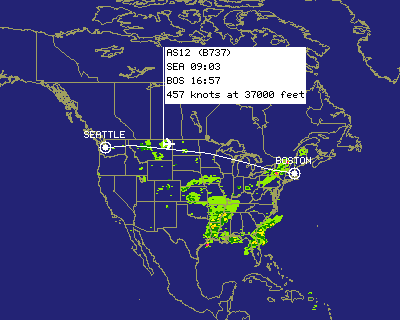
First is that in addition to looking up flight status on their website, you can also see the actual position of the plane. This is not only nifty, but also helps to prevent that Air Canada trick of “oh, we just learned the incoming flight will be delayed” when the plane actually hasn’t left the originating city yet. Here’s Johnny’s plane at 37,000 feet over Montana this afternoon:
Second is that you can print your own boarding pass from their website, up to 24 hours in advance of your flight. Of course you need a printer, which is something Johnny lacks, so he had to revert to old-style check-in.
More news when Johnny arrives at Logan.
🗓️
Proof that the web is stickier than we think: this page on CBC.ca is almost 8 years old. For eight years, it’s contained the misinformation that I am “Peter Rukavina, owner of Island Media.” I have no idea where they got that. This was one of the first pages on CBC’s website to include RealAudio content.
🗓️
I’ve always known that airplanes are noisy places. No more so, perhaps, than the trusty Dash 8’s that ferry we eastern Canadians around. And I’d read about how it’s the noise of flying that’s one of the bigger contributors to the stress of flying.
But I didn’t realize how true this was until we flew to Thailand a year ago this week. By chance, I bought a pair of disposable earplugs at the airport gift shop at Chicago O’Hare. I used them, on and off, for the seemingly endless flight to Tokyo, and then had them in for the entire flight from Tokyo to Bangkok, during which I was exhausted to a degree I’d never experienced before.
They helped. A lot. And if you’re flying somewhere, I heartily recommend that you invest a couple of dollars in a pair; you can get them at Shopper’s Drug Mart if you can’t find them elsewhere.
For the flight to Boston today, I moved things up a notch, and invested in a pair of Shure “in ear” earphones. These are earphones that you literally “stick in your ear,” and they come with a variety of sizes of foamy sleeves to allow you to find the size right for your ears.
Wow!
The flight from Halifax to Boston was unlike any flight I’d ever experienced. The earphones cut out, I’d hazard a guess, about 85% of the annoying sound in the airplane, and that’s even before you press “play” on whatever you’ve got them plugged into.
Unlike “noise cancelling” headphones, which I’d experimented with before, these earphones prevent sound from reaching your ears by simply blocking the way. Noise cancelling headphones, which try to achieve the same effect by generating a sound wave “opposite” to the ambient noise around you, are, in my experience, bulkier and more cumbersome.
The earphones I bought — they’re Shure’s e2c model — are not cheap. But they come highly recommended. You can order them in Canada from SFM Marketing in Montreal. I ordered a pair on Thursday afternoon and they were in my hands on Friday morning.
🗓️
All of the propoganda for the Confederation Bridge talks about how it has a “unique S-shaped design.” This design, it is said, helps to prevent drivers from falling asleep. I’ve never heard anyone question this logic, but doesn’t it seem somewhat absurd? If straight roads cause fatigue, then why don’t we build our highways shaped like S’s too?
In this same vein, I find the following fact (from this story) about the Big Dig seems a little bit too much like “a marketing answer to a design question:”
Motorists might also notice the accent tiles are terra cotta, rather than blue, signifying that the tunnel goes underground, rather than underwater.
I can just imagine some future tunnel accident — crazy masses of people rushing around, worrying about drowning in an impending onrush of Boston Harbor water. “But wait,” cries one plucky fellow, “the tiles are terra cotta, signifying that the tunnel goes underground, rather than underwater.” The panic subsides, order returns, and terra cotta tiles save the day.
I propose that we mark the next 10 years as a “bullshit free decade” — no S-shaped bridges or terra cotta tiles, just unvarnished truth. I am so naive.
🗓️
Enter KING HENRY, EXETER, BEDFORD, GLOUCESTER, and Soldiers, with scaling ladders.
Once more unto the breach, dear friends, once more, Or close the wall up with our English dead! In peace there ‘s nothing so becomes a man As modest stillness and humility; But when the blast of war blows in our ears, Then imitate the action of the tiger: Stiffen the sinews, summon up the blood.
And so off I go into the dead of the New England winter to rendezvous with brother Johnny and make assault upon the house of Yankee.
To Boston today, Jaffrey Center tomorrow, Dublin on Monday. We’ll be at Yankee until Friday, with a brief sojourn into Harvard for DaveNet Live on Tuesday. It’s 18 degrees F in Boston this morning, and 10 degrees F in Dublin. So we’re not going for the weather.
More reports from the road as the week progresses.
🗓️
Here’s today’s concise quote from the Island Peace MovementTM. Jane Dunphy, commenting on Colin Powell’s speech to the Security Council, is quoted by CBC Prince Edward Island as saying:
“What I saw of the dialogue, I really couldn’t understand. As far as the pictures were concerned, there was a whole lot of interpretation there… and it was straight interpretation.”
Can someone explain to me what this actually means?
Here, as an antidote, is a well worded commentary in the Times of London.
🗓️
Audio file
Some families pray to God. In our family, we prayed to Mongo Santamaria.
When you grow up in a religiously and politically agnostic household like we did, you take your icons where you can get them. And the biggest of ours was Santamaria. Every Christmas morning my father would wake up before any of us, go to the living room, and put the 1965 Columbia album El Pussy Cat on the turntable, crank up the volume to “full blast” and the house would rock with the latin rhythms of the title track, a song the AMG calls “delightfully absurd”. I can think of no better way to start Christmas Day, and this is a tradition we’ll keep alive for generations.
Mongo Santamaria died Saturday at age 85 of a stroke. Rolling Stone says he was considered”one of the most influential percussionists of his generation.” PopMatters calls him “Cuba’s conguero extraordinaire.” On Christmas mornings we didn’t know any of that, of course; we just knew that our eccentric father with broad musical tastes was up to his hijinks again. And we revelled in it.
Mongo Santamaria will be missed.
🗓️
About This Blog
 I am Peter Rukavina and this is my blog. I am a writer, letterpress printer, and a curious person.
To learn more about me, read my /now, look at my bio, listen to audio I’ve posted, read presentations and speeches I’ve written, see things I’ve favourited elsewhere, or get in touch (peter@rukavina.net is the quickest way).
I have been writing here since May 1999: you can explore the 25+ years of blog posts in the archive.
 You can subscribe to an RSS feed of posts, an RSS feed of comments, an RSS feed of favourites elsewhere, or a podcast RSS feed that just contains audio posts. You can also receive a daily digests of posts by email. I also publish an OPML blogroll.
Instagram • YouTube • Vimeo • ORCID • OpenStreetMap • Internet Archive • PEI.art • Drupal • Github.