Okay, I’ve decided that today will be the day I stop pining for pain au chocolate and the gentle winds of France and return my head back to Prince Edward Island. Apologies to friends and family for three weeks of plaintive moaning.

To go with the return to home I’ve got a new morning routine worked out that involves a sesame bagel with cream cheese and tomato and a pot of English Breakfast tea at Timothy’s. For $3.38 I figure I can’t go wrong.

Just to confuse my newfound sense of familiarity, my friend in the aubergine jacket has mixed up his morning routine, diverting to the under-new-management café in the Polyclinic. This means that our paths now cross at the corner of Prince and Grafton. Very confusing, but not unwelcome.

I picked up the National Post after my encounter with DJM (they sell it at the Guardian office), and noticed the following example of “corporate synergy” (red arrow is mine):

(I got the front page snap from this helpful page at the Newseum). The complete story is here (behind a fee gateway), but you can rest easy that it’s a corporate sister puff piece that extolls the totally excellent shows on Global this fall.

And finally, I noticed yesterday that Fido’s network has expanded and seems, at least from their tiny map of Atlantic Canada, to now include most of Prince Edward Island. Johnny and Jodi had abysmal service from Fido, so I’m not eager to jump ship to them, but then again they do have the cool Danger Hiptop.

🗓️

Apparently there’s an Amazing Race DVD on the way. No release date yet, and you can’t place an order, but word is it’s in development.

🗓️

Through the magic of BitTorrent and UKNova we’ve been able to watch a lot of BBC and ITV television recently. Here’s what I liked:

  • A Short History of Tall Buildings, a series on the Imagine programme hosted by Alan Yentob, is a series of vingettes on skyscrapers and other tall buildings all around the world.
  • Horizon is the BBC’s science programme, a British Nature of Things. We enjoyed a couple of episodes: An Experiment to Save the World about the search for workable nuclear fusion, and The Day the Earth Almost Died about the mass extinction of 95% of all life on the planet 250 million years ago.
  • Martin Bashir, famous over here for his Michael Jackson programmes, hosted a programme in 2003 called Major Fraud: Charles Ingram’s Millionaire ‘win’ that examines how Charles Ingram cheated on the British version of the Who Wants to be a Millionaire show. The show is somewhat over-produced, but it’s an interesting tale nonetheless.
  • A series called The Tube does for the London subway system what the ITV show Airline does for easyJet: it’s a “day in the life” sort of show, going behind the scenes into various aspects of the Tube’s operations.

If you use the BitTorrent search engine, searching for “BBC” or “ITV” to find British TV works well; UKNova has only British TV (although it does require registration).

🗓️

Remember that School Trustee Elections are this Monday, May 30, 2005. You can find you school district, a list of candidates, and the your local polling location on the Elections PEI website.

🗓️

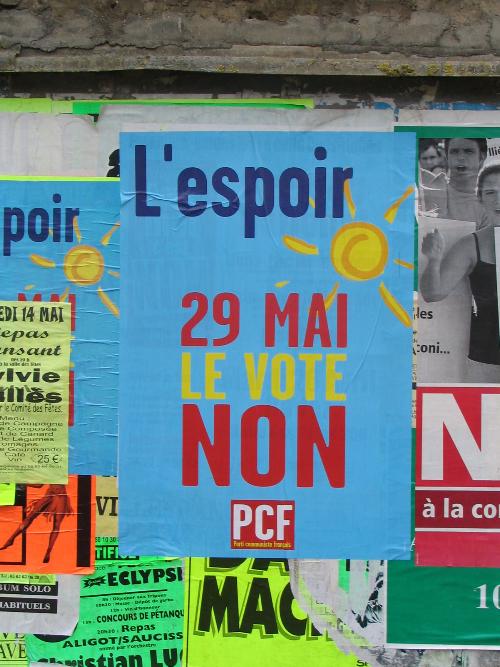
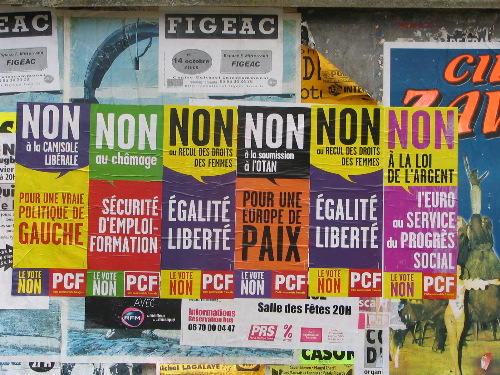
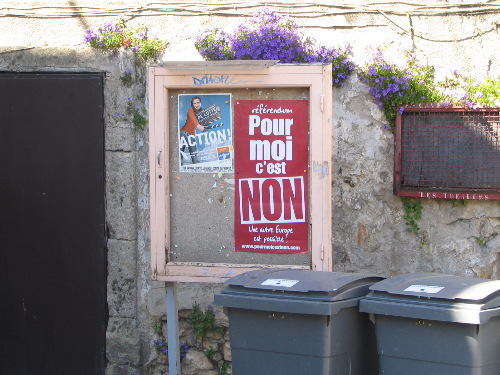
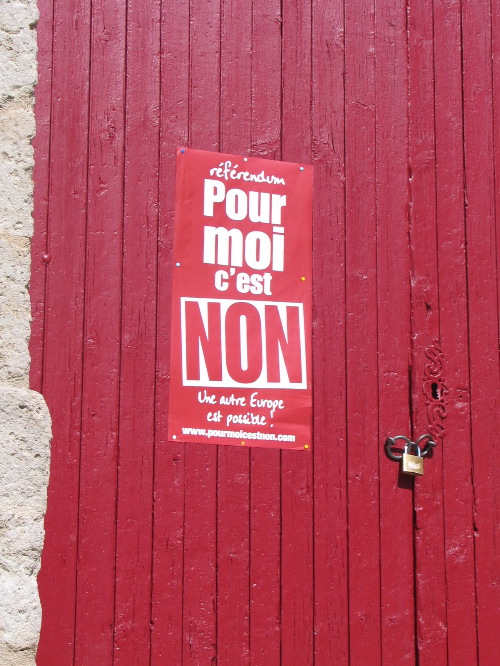
France votes today on the European Union constitution. Here’s a sampling of the “Non” posters we saw there earlier in the month:

🗓️

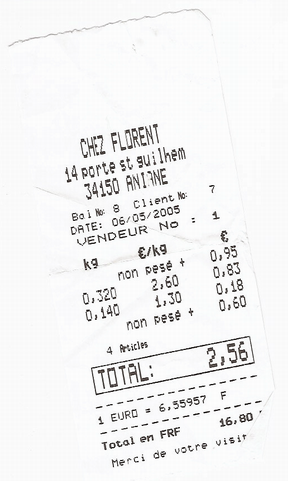
One small orange, one large orange, a Kinder Surprise Egg and a bottle of mineral water:

Receipt from Chez Florent, Aniane, France
🗓️

France Loisirs bagThere is a store we saw many times in France called France Loisirs that sells books, CDs, DVDs and develops film. Oliver and I went into the branch in Limoges in search of a colouring book; we found a good one, but when we went to pay we were told we had to be a “member” to purchase. While I wasn’t entirely clear on the details, it seems as though you must be a resident of France to qualify. Fortunately, the kind clerk let us proceed without membership, although she made it perfectly clear with her body language that we shouldn’t return.

If anyone knows more about France Loisirs and how its works — perhaps it’s a coop like Mountain Equipment Coop? — let me know.

🗓️

Today is the late Bob Hope’s birthday. Turns out he was born in 1903, the same year as my grandfather. Bob was two months older. I don’t believe they ever met.

🗓️

From Doug Kaye comes a pointer to Freesound, which:

…aims to create a huge collaborative database of audio snippets, samples, recordings, bleeps, … released under the Creative Commons Sampling Plus License.
🗓️

It’s Sunday morning and I’m sitting here in Timothy’s Coffee in downtown Charlottetown. My friends Rob and Cynthia are having a high-powered meeting over in the corner. On his way in I mentioned to Rob that I was here making a podcast (more on that in the next post, once I’ve made it!); when Rob expressed interest in podcasting himself, I promised to blog the “how to make a podcast” process. Read on to learn how to make your first podcast, with your Mac, in a few easy steps.

Recording. You’ll need a piece of software that lets you record sound with your Mac. I suggest, at least to start, a surprisingly capable piece of open source software called Audacity (it’s available for many platforms, not just the Mac). So to start, go to the Mac download page for Audacity and download and install the program. Because you probably want to save your podcast as an MP3, take the extra step of installing the the LAME MP3 encoder.

Microphone. Although there are many better alternatives, the easiest microphone to use is the one built into your Mac. That’s assuming you have a relatively new Mac that actually has a built-in microphone (I’ll assume you do). You might not even know you have a microphone; here’s mine:
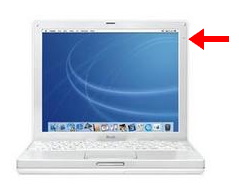
iBook G3 microphone

It’s that little dot on the upper right corner of the screen. My 17” iMac has a microphone in the bottom right-hand corner of the screen; it’s even more subtle. The sound isn’t “studio quality,” but it’s better than you might think.

Go. Fire up Audacity. It will look like this:
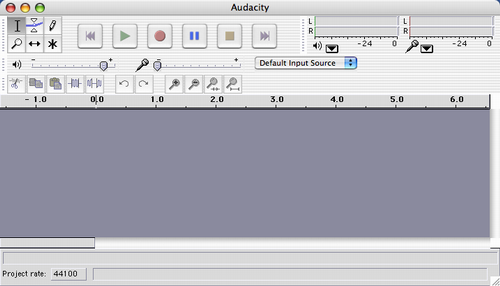
Audacity

Audacity has lots of bells and whistles that you can ignore to begin with. All you need to focus on is the “record” and “stop” buttons:
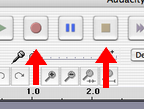
Audacity Record and Stop Buttons

Press the “record” button and start talking, singing, dancing, or whatever else you want to do in your podcast. When you’re done, press the “stop” button. You’ll see that Audacity displays the “sounds waves” of your audio:
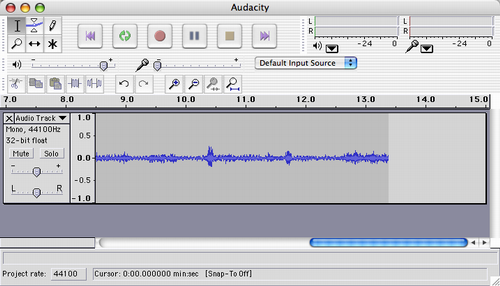
Audacity after recording

To save the audio, select “File,” then “Export as MP3” from the Audacity menu:
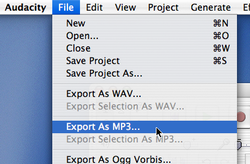
Export as an MP3 from Audacity

Give your audio file a name — like “MyFirstPodcast.mp3” — and save it somewhere you’ll remember, like your desktop. Audacity will prompt you to enter “ID3 tags” for the audio file: enter appropriate information, as below; this is the information that will be displayed in your listeners’ audio players while their listening:
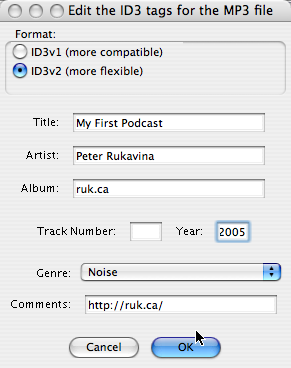
Export as an MP3 from Audacity: Adding ID3 tags

Listening. That’s it: you’ve now recorded your podcast. Drag and drop the audio file you saved into iTunes to see how it looks and sounds:
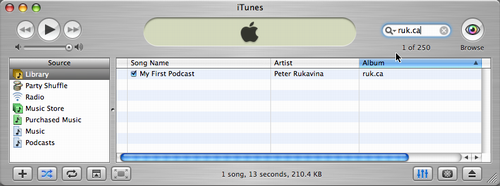
My First Podcast in iTunes

Uploading. Turning your audio file into a “podcast” is the most cumbersome part of the process, mostly because there isn’t a standard way to do this, and it’s supported by some blogging platforms/software and not others. Best solution: look in the help or user support section of your blogging system for references to either “podcasting” or “RSS enclosures.” If you’ve got more information on this process, or links to helpful sites, please post them in the comments to this post.

Done. I’ve gone through this process, uploaded the MP3 file to my home-brew blogging system, and that little audio file is now a bona fide “podcast.”

So here you go, Rob: podcast on!

🗓️

About This Blog

Photo of Peter RukavinaI am . I am a writer, letterpress printer, and a curious person.

To learn more about me, read my /now, look at my bio, listen to audio I’ve posted, read presentations and speeches I’ve written, see things I’ve favourited elsewhere, or get in touch (peter@rukavina.net is the quickest way).

I have been writing here since May 1999: you can explore the 25+ years of blog posts in the archive.

You can subscribe to an RSS feed of posts, an RSS feed of comments, an RSS feed of favourites elsewhere, or a podcast RSS feed that just contains audio posts. You can also receive a daily digests of posts by email. I also publish an OPML blogroll.

Instagram • YouTube • Vimeo • ORCID • OpenStreetMap • Internet Archive • PEI.art • Drupal • Github.