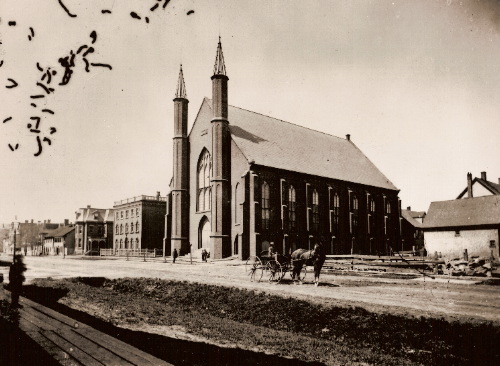
Here’s an undated photo of Prince Street in Charlottetown, near the corner of Richmond. Trinity United Church is front and center; our house is 3 doors north.
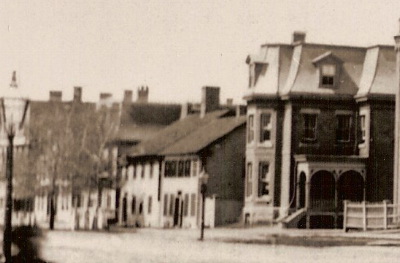
Here’s an expanded detail from the photo, showing our house:

Here’s an undated photo of Prince Street in Charlottetown, near the corner of Richmond. Trinity United Church is front and center; our house is 3 doors north.
Here’s an expanded detail from the photo, showing our house:
VISA has a very helpful guide to Collision Loss Damage Insurance on rental cars. It answered a lot of questions I had about what is covered and what isn’t.
On the wall of my parents basement is a large map that charts the progress of my father’s surveys of the sediments in the Great Lakes. It’s also a map showing where we spent our summers in the late 1960s and early 1970s because the whole family used to travel with Dad, camping in the nearest provincial park to where he was working. We watched the moon landing on a small black and white television in the back of a VW microbus on one such expedition.
Two new web resources, the NWRI Sediment Archive and the Great Lakes’ Shoreline Photos collection are another two artifacts of those summers; together they are, in a sense, the raw materials of Dad’s entire working life.
The other constant in those provincial parks those summers was the showing of Bill Mason’s film The Rise and Fall of the Great Lakes. I must have seen this film a hundred times by now, and I enjoy it every time; it’s a 16 minute journey through the history of the Great Lakes from the eyes of a man in a time-traveling canoe.
As Oliver has been on the mend, and I’ve been getting gradually more congested, I’ve been bogarting his Children’s Triaminic and Children’s Tylenol. Both are bubble-gum flavoured. Both claim to address cough, fever, congestion and aches. They seem to be about equally successful at this — a couple of tablespoons does indeed take the edge off. Victory goes to Children’s Tylenol, however: it flows out of the medicine cup much more fluidly, doesn’t stain the pyjamas if spilled, and its fake bubble-gum flavour is much more subtle, and doesn’t have the acrid aftertaste that the Triaminic does.
Although we are both ravaged by sickness to some degree (Oliver is almost over his cold, I’m in the thick of a low grade version of it), we decided that today, the final day of our extended stay in Ontario, we had to have something of a father-son adventure.
So, with no notion of our final destination, we set off in Mom’s Honda Civic for parts unknown. In the back of my head I thought we might end up at Ikea again, or maybe down on the lakefront. But as we were driving by the Burlington GO Train station, we spotted the eastbound train approaching, and, in the blink of an eye, decided that Toronto was to be our destination.
We found a miracle parking space about 15 feet from the ticket booth, quickly bought tickets, and ran down the tunnel to Track #2, hopping into the train about a minute before its departure at 12:14 p.m.
It was a nostalgia-filled train trip for me, as this was the journey I took every weekday during the summer of ‘85. When I mentioned this to Oliver, he insisted on pointing out every landmark we saw — factory, cell tower, Leon’s store — and asking me “you go there little boy?”
After Oakville, Clarkson, Long Branch, Mimico, and Exhibition, we pulled in to Union Station at about 1:10 p.m.
We headed out of the station and into Toronto’s retail catacombs, and managed to get all the way to Adelaide and Yonge before we had to surface. From there it was a quick walk to Open Air Books and Maps on Toronto Street. This turned out to be one of the best stocked travel bookshops I’ve visited; where Indigo in Burlington had, say, 25 books on France, I’d guess Open Air had over 200. As the closely-packed terrain inside the store was not conducive to toddler play, I quickly purchased several guides to the south of France (including the excellent Take the Kids: South of France from Cadogan) and several French phrase books.
We headed back out into the city, down Yonge to King, and then hopped on the King street car, westbound to Peter Street where we disembarked near the entrance to Mountain Equipment Coop. As neither Oliver nor I are into grappling hooks and rock delinters, we were happy to simply browse and ogle the well-fed urbanites outfitting themselves in lush fleece. MEC has a very nice children’s playground, and an even better family washroom (with free diapers, a change table, and a “put your kid here so they don’t lick the floor while you pee” restraining chair that terrified me and delighted Oliver).
Spying a Thai restaurant across the street, we jaywalked over and shared a very, very tasty meal of red curry chicken and rice (although Oliver, newly outfitted with language, complained that the sauce was “too spicy”).
Next door to the restaurant, and directly across from MEC, we found Europe Bound, which is to the raucous and eccentric adventurer what MEC is to the fit and well-groomed. They carry an odd mix of the same sort of grappling hooks that MEC does, but with a greater emphasis on travel: they’ve got the complete Lonely Planet and Michelin oeuvres, along with a good collection of other travel books and accessories (flashlights, money wallets, firstaid kits, etc.). Although I found myself more Europe Bound than MEC, we left empty-handed, as I’m already more accessorized for travel than is healthy.
Down King St. to Spadina, up Spadina to Queen, and then east on Queen, past the old offices of Robinovitch Tchobanian and Barr to Pages books where we acquired a very nice set of dragon stickers at Oliver’s insistence.
Back onto the street car to Yonge and then into the Eaton’s Center (is it still called that?) to the super Indigo where we found the Michelin map of France I’d forgotten to buy earlier, along with a set of educational flash cards we’d been looking for all week.
Down into the Yonge subway south to Union Station and we caught the 4:47 p.m. GO Train going west to Burlington.
We were in the Big City for less than four hours. It seemed like the perfect amount of time: just enough to be drawn to the alluring light of urbanity, not enough time to get burned up in its heady flame.
We were back in Carlisle shortly after six, where Oliver wolfed down and entire order of sushi, half a bagel, a bowl of chocolate ice cream, and assorted chocolate eggs leftover from Sunday, a combination that induced a weird post-exhaustion sugar high. He didn’t get to bed until 10.
Tomorrow we’re back to Charlottetown via Hamilton and Moncton; we shall set up our bench on the corner of Queen and Grafton and tell tales of the wonders we have seen here in Upper Canada to all who will listen.
While Oliver and I have been out of town, one of our favourite restaurants, The Noodle House, has become the focus of teen anger. The mayor claims that these attacks are not racially motivated, but surely this reflects some sort of very limited view of racism: the teen gangs aren’t attacking Swiss Chalet or the Dairy Queen, after all, and whether they have choosen their target because the of the race of the management, or because The Noodle House is a small, independent business that they don’t understand, the ignorance is the same.
Many of the more important events in my life in the last 13 years have happened at The Noodle House.
Catherine and I had our first big argument there; an argument big enough that whenever we were in sight of arguing again, one of us (usually me) would suggest that we retire to The Noodle House to continue.
Island Services Network was conceived in The Noodle House (it was born, several years later, in Pat’s Rose and Grey). A much younger Peter and Kevin, working for others at the time and frustrated by the dearth of affortable Internet, mused together over several orders of samosas and Kung Pao Gar Ding how things could be different. We called it “Noodle Net” at the time. And sometimes we still do.
Oliver had his first meal out at The Noodle House. He was in a car seat. We were with my parents. We got to sit at the coveted “lazy susan table.” We’ve been back many times since.
As any regular patron of The Noodle House will know, the service is among the best in the world: after several visits, your regular order is memorized and offered to you as a starting place. Catherine asked for chopsticks once, 10 years ago. She has received them, and the hot sauce she asked for, every order since.
And yet, despite all this, it has taken teen attacks for me to learn that the names of the owners are Tommy and Lina Ko. Short of chit-chat at the cash register on the way out, I’ve never inquired about their names. Or their life. Or stopped to consider their important role in my life. I’ve been happy to eat their tasty food, benefit from their warm service, and then leave to return two or three weeks later.
And it’s taken the teen attacks for the community to be forced to confront the racism that lurks within us. That is us.
While I laud efforts, like this one from Zach Stephens, and am proud of the fact that Mayor Lee and the Chief of Police were so quick to react to the immediate situation, I fear that, even if the Kos are convinced to keep The Noodle House and stay in Charlottetown, we’ll all be too quick to take this incident as an aberration rather than as an important sign that deep within the Island soul is a tremendous, powerful fear of the strange, new and unknown.
When this fear leads Islanders to value and honour the past, to conserve a special way of life, to resist the senseless modernities of the big city, and to bond together in strong and powerful families and communities, it can be a positive, attractive, life-affirming force. The kind of force that brings people like us to the Island as refugees from urban life.
When this fear leads Islanders to reject the foreign, to stay too close to home to much of the time, to resist adopting new attitudes and new approaches, and to consider everyone new and different as a potential threat to the established and known, we see it manifest in disturbing, frightening, hateful ways.
As much as it’s important not to lose sight of the immediate need to quell the teen violence, perhaps we should also take the opportunity to consider our own part in building the foundation that allowed it to manifest against something that perhaps only now we realize we hold so dear.
Proof that my work teaches me new things every day: I spent an hour this morning learning about The Equation of Time. Neato.
K. has the GSM phone I took to Croatia with him somewhere in the wilds of Mexico. We’re spending 30 days in France in April and May, and I needed a GSM phone to replace it.
There are various companies that offer unlocked GSM phones at retail, but I didn’t want to pay the $300 or so that this would cost. So I clenched my teeth and made my first jump into eBay since buying a set of German-language lobby cards for Heaven Can Wait five years ago.
Much to my surprise, 21 hours later I was the nominal owner of an unlocked Sony Ericsson T610 phone for $150. Turned out the seller is in Bradford, which is a hop skip and a jump from one of my ancestral stomping grounds in Brantford, and just 30 minutes or so from where I sit here in Carlisle. Phone should be in the mail to Charlottetown shortly.
On a trip into Burlington today to visit Indigo for some France-book browsing, I noticed a Rogers Wireless depot in the same plaza. I went in to inquire, and found that I could purchase a Rogers “pay as you go” SIM card for only $25 (they tried to get $50 from me for the same thing at the Rogers outlet in Moncton back in mid-winter). So I bought one.
In theory, once the phone arrives, I can pop in the Rogers SIM, connect up to the Rogers website to activate the phone and get a Charlottetown number, and I’ll be off to the races, and will officially become a part of the problem.
Next challenge: figure out which of the three French GSM providers is best, and try to dig up a North American source for a SIM, or decent instructions for locating same once overseas.
Rebecca Miller and Daniel Day-Lewis from the film The Ballad of Jack and Rose (formerly known as “Rose and the Snake”), which was filmed a couple of years ago on Prince Edward Island’s north shore, are guests on Charlie Rose today.
The Island stands in for a “secluded Pacific Northwest island commune” in the film. Apple has the trailer in QuickTime.
 I am Peter Rukavina and this is my blog. I am a writer, letterpress printer, and a curious person.
To learn more about me, read my /now, look at my bio, listen to audio I’ve posted, read presentations and speeches I’ve written, see things I’ve favourited elsewhere, or get in touch (peter@rukavina.net is the quickest way).
I have been writing here since May 1999: you can explore the 25+ years of blog posts in the archive.
 You can subscribe to an RSS feed of posts, an RSS feed of comments, an RSS feed of favourites elsewhere, or a podcast RSS feed that just contains audio posts. You can also receive a daily digests of posts by email. I also publish an OPML blogroll.
Instagram • YouTube • Vimeo • ORCID • OpenStreetMap • Internet Archive • PEI.art • Drupal • Github.