The Island Fringe Festival LogoOn a cool summer night last year I joined a couple of dozen other people in Kings Square in Charlottetown to watch WOLVES > BOYS, one of the shows the 2012 edition of The Island Fringe Festival. It was a witty little play, well-acted, and the venue couldn’t be beat.

As such, I was well-primed when a request appeared in my email box last week, through a carefully-choosen intermediary, asking me to be a sponsor of this year’s festival. I wrote a cheque – a modest $200 cheque, mind you, not a life-changing Tim Banks-style cheque – on the spot. As such I become a “Community Sponsor” of this year’s fringe. Or rather Reinvented does.

The sad irony is that I’ll be away in Ontario for the duration of this year’s festival – August 29 to 31, 2013 – and so I won’t get a chance to enjoy the walk-on roles, skyboxes, VIP lounge access, extravagant afterparties, and other perks that such sponsorship affords1.

If you happen to have a few hundred dollars kicking around and an urge to support independent theatre in unusual venues, perhaps you could become a sponsor too? Just go here and follow the links.

1. I exaggerate: the perks of “Community Sponsorship” are a more modest “logo on Island Fringe Festival website, recognition of your business on Island Fringe’s Facebook and flyer included in welcome packet for Island Fringe Festival artists and volunteers.”

2. Post title courtesy of Rogers & Hammerstein’s “Oklahoma,” The Surrey With The Fringe On Top.

🗓️

I was searching about yesterday looking for some information about the DRM system that Overdrive uses to lock up ebooks it makes available to public libraries (including Prince Edward Island’s Library Service, which is a customer).

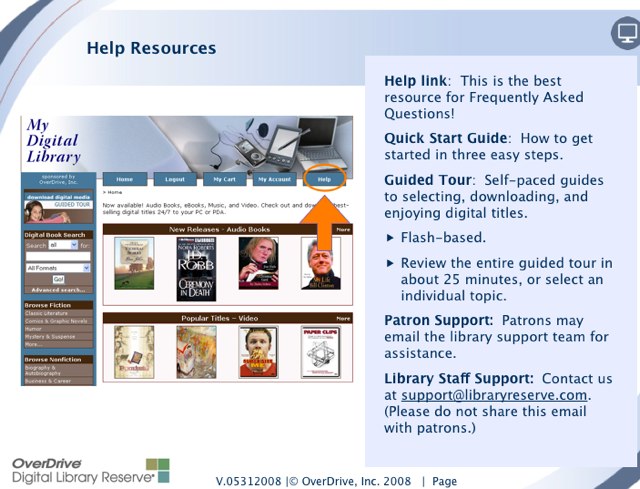
One of my searches was “how to share Overdrive books” and this search led me to an intriguing-looking slide in a PowerPoint presentation for client libraries:

Anything labelled “please do not share this email with patrons” is prone to make my eyes perk up, and so I read the PowerPoint presentation from beginning to end. It turns out to be a good overview of Overdrive’s offerings for libraries (which, regular readers may recall, I likened to “crazytown” on national radio).

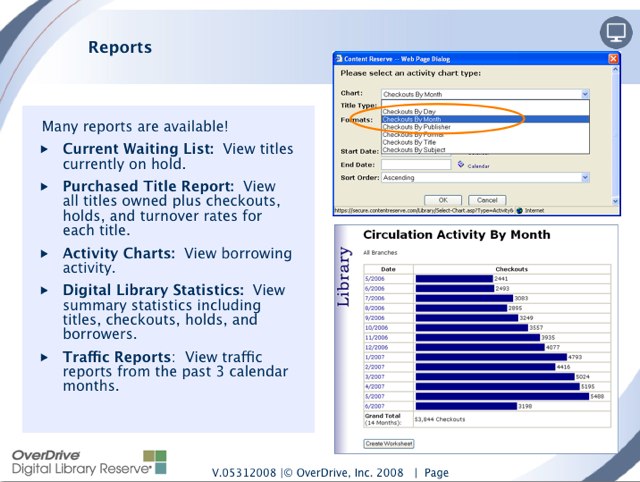
The next slide in the deck was even more interesting than the eyes-only email address; it concerned the reports available to client libraries:

“Cool!”, I thought to myself as I fired off an email to the always-helpful librarians at the Provincial Library’s Fortress of Solitude in remotest Morell. I quickly got a reply. Here’s what I learned:

  • Separate and apart from Overdrive, currently there are 48,751 adult library cards and 17,876 children’s library cards for a grand total of 66,627 library cards in service. (By my own calculation, that’s almost exactly 50% of the adult population holding a library card).
  • The Provincial Library Service subscribes to Overdrive’s “One Copy/One User” product – this is the aspect of the service that meant that while I had “checked out” a Teach Yourself Norwegian book nobody else in PEI could borrow it.
  • The Library Service has 5,246 digital items in its collection (read “licenses 5,246 items for one-at-at-time circulation to PEI patrons”): 1,309 audiobooks, 3,931 ebooks and 6 music items.
  • Since May 2011, 3,847 patrons have checked out a digital title (about 8% of total patrons if you only count adults, 6% if you include children).
  • Those patrons have “borrowed” a total of 9,581 audiobooks and 42,268 ebooks for a total of 51,849 digital items borrowed.
  • Today (August 8, 2013) there are 546 patrons with digital items checked out and 587 items on hold.
  • The PEI-branded Overdrive.com site has been receiving an average of about 5,000 unique “active visits” (not sure what distinguishes that from “unique visits”) a month over the last three months (May to July of 2013).

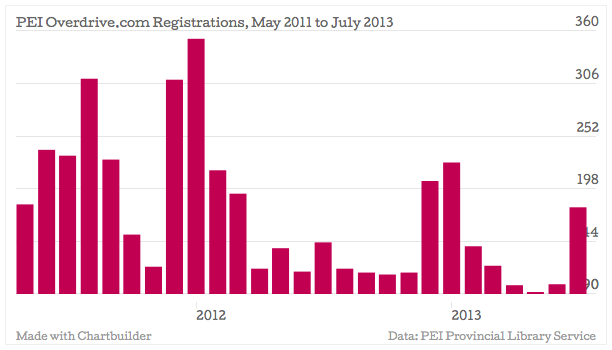
Here’s what the Overdrive.com registrations-per-month look like (patrons must register with Overdrive.com to “check out” items):

(That chart was made with the really-easy-to-use Chartbulder, which I recommend for all your spur-of-the-moment chart-making needs).

So, it would seem, ebooks and audiobooks are popular with we Islanders; what we need to work on next is making the experience of borrowing digital content less 1955-like.

🗓️

Pan Wendt, Curator at the Confederation Centre Art Gallery, tumbled into me at Youngfolk & The Kettle Black the other day and introduced me to Eric Moschopedis and Mia Rushton, current Artists-in-Residence at the gallery.

Eric and Mia are presenting an Art Talk tonight in the gallery. The official announcement of their talk describes their work as follows:

Their work involves public engagement, and the pair will be a regular sight in downtown Charlottetown as they interact with residents and visitors as part of their project to collect vegetation from the capital city’s nooks and crannies and turn it into edible-art in the form of popsicles. Yes, popsicles!

Popsicles aside, this doesn’t jump off the screen as a “summertime must-see,” so I want to encourage you all to come to their talk anyway, as I found Mia and Eric, in the few minutes I met them over coffee, far more interesting than their PR would suggest.

Tonight (August 8, 2013) at 7:00 p.m. at Confederation Centre Art Gallery.

🗓️

I built a cool little app called PirateFox that knits together my two digital distractions of the moment, Firefox OS and PirateBox.

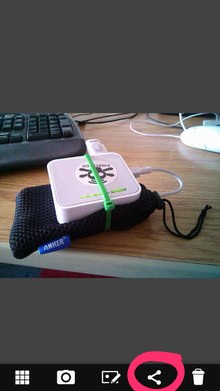
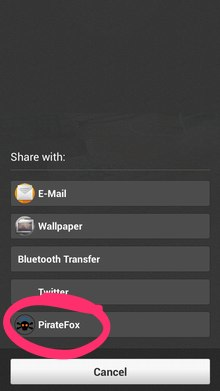
The app has a simple function: to share images, audio and video from a mobile phone to a nearby PirateBox. Firefox OS has an API called Web Activities than make this relatively easy to implement; it looks like this when it’s in action:

That’s a screen shot of my Firefox OS phone’s gallery app: I tap on the “share” icon and up pops a menu of sharing options, including, once my app is installed, “PirateFox.”  I tap PirateFox and the image gets automagically sent to the PirateBox I’m connected to.

You can grab the source for PirateFox and install it on your Firefox OS phone; if you don’t have a Firefox OS phone, you might look at the code anyway as an example of how to upload a file through a handcrafted XMLHttpRequest of multipart/form-data, something that works around an issue with the current version of Firefox OS that’s eventually going to be fixed.

🗓️
PirateFox  •  PirateBox  •  Firefox OS

The great Canadian actor Billy Van died 11 years ago; the blog post I wrote to mark his passing continues to get traffic and comments, and I think of Billy often.

I knew Billy for two things: appearances on Party Game and his co-starring role, with Luba Goy, in the TV Ontario series Bits and Bytes. When I wrote that original memorial post in 2002 it seemed that Bits and Bytes, save for a few YouTube videos, was lost to time. But today I stumbled across the entire series in the collection of Archive.org. 

I was 17 years old when Bits and Bytes ran on TV Ontario originally. I was your nerd’s nerd: I had a TRS-80 Model One, a 300 baud modem and printer that printed only in UPPER CASE. The show was, among many things, a sort of vindication of the new world that I’d stumbled into.

🗓️
Television  •  Ontario  •  History  •  Computers

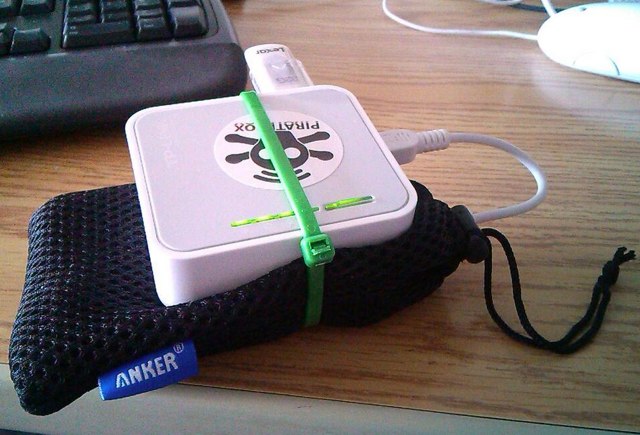
I took delivery on Friday of a Anker Astro2 Dual USB Output 8400mAh External Battery, ordered a few days earlier from Amazon.ca. It’s a box about the size of a 1994 mobile phone with two full-size USB ports capable of powering portable devices, like an iPad or a phone or, in my case, a PirateBox. Tests by others suggest it will keep my PirateBox going for 19 hours; I’ve been running it for 8 hours and its battery is at 75%, so signs are that could be true.

Here’s what PirateBox + external battery looks like (I zip-tied them together to mitigate the possibility of them becoming detached from each other):

PirateBox + External Battery

I put the combined “Portable PirateBox” into my new Pod Sling Pack; it added something akin to the weight of a short hardback book to the pack, and I didn’t really notice it was there. Then Oliver and I headed out on the town.

Our first stop was Youngfolk & the Kettle Black where we dined on lobster roll and grilled cheese and happenstancely ran into Dan and Becky. So Dan got a chance to take the box for a ride, uploading a photo of their dog:

Gilbert the Dog

As I needed some office supplies, our next stop was Staples, where we had great fun switching the store’s tablets and PCs (temporarily – we’re not evil) to use the PirateBox for wifi, and then experimenting with their “select a file and upload” capabilities.  We grabbed an MP3, made a video, made a podcast and took lots of crazy pictures.

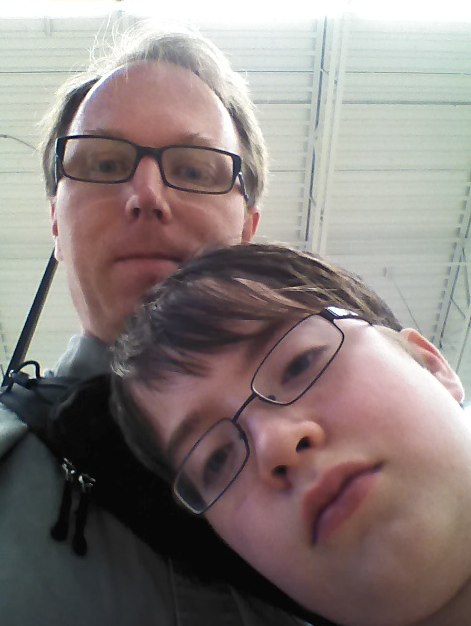
Peter and Oliver in Staples

Everything we made we uploaded to the PirateBox on my back.

Finally we ended up at Robertson Library at the University of PEI where I scanned the microfiche of an 1818 pamphlet called A Description of Prince Edward Island in the Gulph of Saint Laurence, North America with A Map of the Island and a few Cursory Observations Respecting the Climate, Natural Productions and Advantages of its Situation in regard to Agriculture and Commerce together with Some Remarks as Instruction to New Settlers by a Person Many Years Resident There (our ancestors enjoyed more freedom with name-length). Also uploaded to the PirateBox.

I make no claims that this is anything more than somewhat cool and vaguely utilitarian, but it’s an interesting mind-shift to have a server on your person in a sea of people carrying only clients.

Of course the cloud-adherents would claim that everyone has a server in their pocket, but that’s not the same: not only does the server on my back simply accept files, no questions asked, but those files are then immediately available to anyone within about 15 metres of me (and to nobody else in the world, at least until they’re grabbed, like I did with those above, and shared more widely). It’s sort of the opposite of the Internet, and, to me at least, that’s a notion worth exploring.

If you see me over the next while with a pod-pack slung on my back it’s likely that the SSID “PirateBox@Backpack” will show up on your wireless device if you look; send me a file, or grab one. Or just use the chat to say hello.

🗓️

I’m hosting a Make Your Own PirateBox workshop on August 18, 2013 from 10:00 a.m. to 1:00 p.m. at Confederation Landing Park (where better to host a pirate-themed workshop than on the wharf!). Details and registration are over here.

🗓️

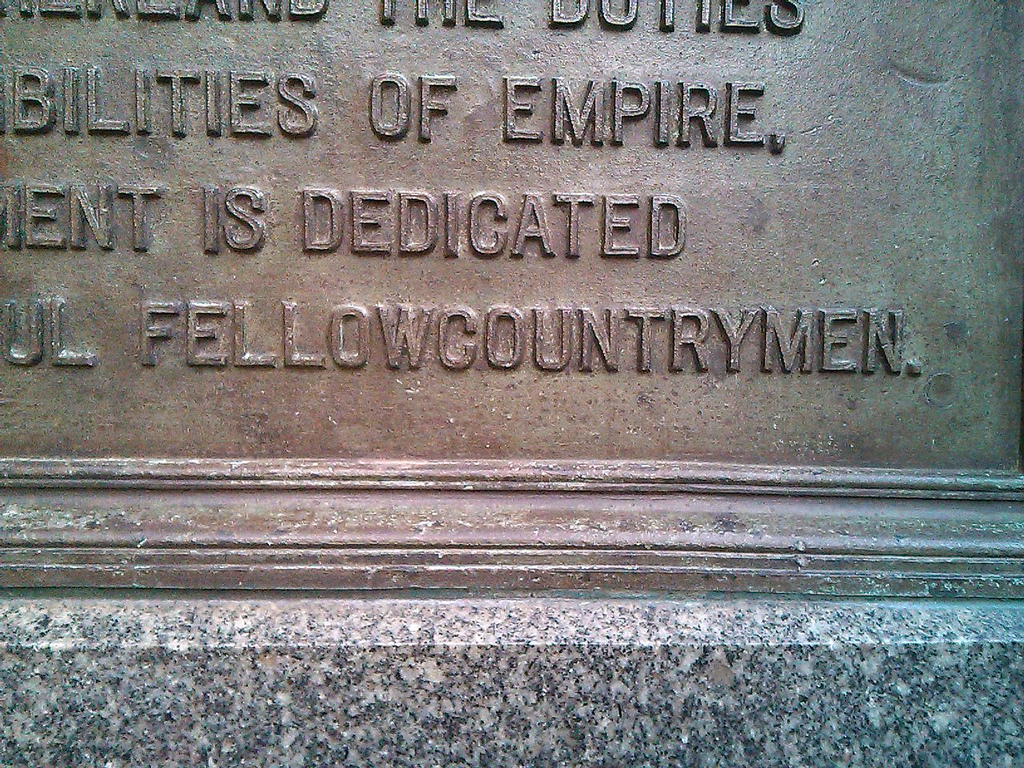
Oliver and I walked through Queens Square in Charlottetown early one evening last week and stopped to read the Boer War memorial. I noticed that it used the word “fellowcountrymen” as a single word, and was curious: it’s something that, if used at all, would be “fellow countrymen” today.

Was this a typo or common usage of the day?

Fellowcountrymen

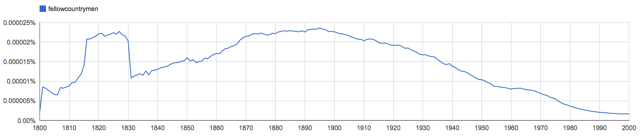
To find out, I turned to the Google Ngram Viewer, which shows frequency in a corpus (a “big collection of books” in library-speak) of a word or phrase.

From 1800 to 2000 in Google’s English corpus, “fellowcountrymen” is a phrase that peaked in about 1895 (the Boer War memorial was constructed in 1903) and has been on the decline ever since:

Fellowcountrymen in Google Ngram Viewer

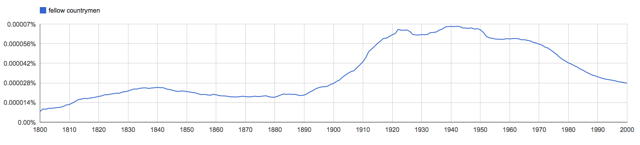
Compare this to “fellow countrymen” as two words and you see what it gave way to:

Fellow countrymen, as two words in Google Ngram viewer.

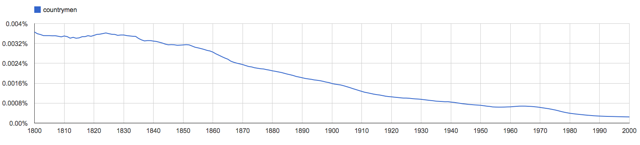
Meanwhile, “countrymen” itself is falling more out of favour every day:

What word or phrase has replaced “countrymen” today? Or perhaps none has? Makes me want to become a linguist to find out.

🗓️
Language  •  History

This video was shown at PirateBox Camp earlier in the month; it describes a “3-Day Masterclass during Dutch Technology Week” held last summer in the Netherlands and it’s a good review of the state of the art.

🗓️

I’m holding free, informal “Make Your Own PirateBox” workshop on Sunday, August 18 from 10:00 a.m. to 1:00 p.m. at Confederation Landing Park in Charlottetown.

If you’d just like to go ahead and register, see the registration form down below.

I’ll help you take a TP-LINK MR3020 – $38 from Amazon.ca – and turn it into a PirateBox, a small self-contained fileserver that allows you to easily share files (music, books, movies, whatever) with those around you.

Why Would I Want a PirateBox?

Some possible reasons:

  1. You want to share files in a classroom or workshop where there’s no access to wireless Internet but people are carrying wireless devices (iPods, iPads, laptops, mobile phones).
  2. You want to share files with your family or friends or neighbours, but not using the Internet.
  3. You want to create a system for people to anonymously share information with you; perhaps you’re a journalist, for example, and want sources to be able to share with you anonymously.
  4. You run a resource library and want a simple way of providing access to digital resources without the complexity of a website, Internet access, etc.
  5. You maintain a small remote cabin on a mountaintop and want to be able to provide instructions, maps, and other resources to visitors digitally.
  6. You’re interested in the notion of a $38 wireless computer.

There are myriad other uses that a PirateBox can be put to.  Take note, however, that it’s not a device that solves any sort of “I need to connect to the Internet” kind of problem: it’s a standalone, disconnected from the Internet device that is designed to share information with those that are within a 15 metre radius.

What You Need to Bring

  1. A TP-LINK MR3020 (not available, as far as I know, locally, but available from Amazon.ca, Staples.ca and TheSource.ca online; if you need to order one, make sure the shipping option you select will get it here in time for August 18th!)
  2. A USB stick. These are available almost everywhere; I recommend you get an 8GB one or larger. Shop around because prices vary and these often go on sale.
  3. A Windows, Linux or Mac laptop that is wifi-capable and has a (a) USB port (looks like this) and (b) an Ethernet port (looks like this). It doesn’t have to be super-powerful, it just has to work. We may or may not have electricity in the park, so make sure your battery is fully charged before you come!
  4. An Ethernet cable (one comes in the box with the TP-LINK MR3020, so you should be set if you’ve just bought one).
  5. A willingness to learn and share with others.
  6. A chair.

If you’re interested in coming, but are missing any of the above, please drop me a line and I’ll see if I can help connect you with what you need.

What You Need to Know

This is a workshop for everyone, regardless of experience. We’ll go slowly, and I’ll walk you through the process step-by-step.

My hope is that you’ll then be able to show others, so if you’re a good “explainer” you’re especially welcome.

What You Could Read Beforehand

David Dart’s explanation of the past, present and future of PirateBox is a good place to start. Don’t get bogged down in technical details: just read it for the spirit.

There’s also the explanation of how to install PirateBox, but you don’t need to read it in advance if you don’t want to.

When and Where

Sunday, August 18, 2013 at 10:00 a.m. Please be on time as we’ll walk through things together so it’s better we all start together.

At the end of Confederation Landing Park in Charlottetown (PirateBox, on the wharf, get it!). Plenty of parking (you might have to pay for parking; you can enter from Prince Street or Great George Street). Follow the boardwalk to the gazebo at far end of the park by the water. It’s wheelchair accessible – no barriers from the parking lot to the gazebo – and there are washrooms at Peake’s Quay down the boardwalk.

Registration

Please pre-register for this workshop. I’ve limited registration to 20 people, simply because that’s about the maximum number of people I think I can project my voice to.

If you’re registering more than one person at the same time, please select the number of “slots” you’re using (i.e. two people coming = two slots).

🗓️

About This Blog

Photo of Peter RukavinaI am . I am a writer, letterpress printer, and a curious person.

To learn more about me, read my /now, look at my bio, listen to audio I’ve posted, read presentations and speeches I’ve written, see things I’ve favourited elsewhere, or get in touch (peter@rukavina.net is the quickest way).

I have been writing here since May 1999: you can explore the 25+ years of blog posts in the archive.

You can subscribe to an RSS feed of posts, an RSS feed of comments, an RSS feed of favourites elsewhere, or a podcast RSS feed that just contains audio posts. You can also receive a daily digests of posts by email. I also publish an OPML blogroll.

Instagram • YouTube • Vimeo • ORCID • OpenStreetMap • Internet Archive • PEI.art • Drupal • Github.