
Last week I wrote about contacting AVShop, an Indiana-based retailer of pilot supplies, to suggest they release new product information via RSS.
Over the weekend I heard back from Jerry Richardson in their marketing department:
Thank you for your kind note. We are RSS believers. We’ve been blogging major product news and aviation news since last March. Our atom feed is available at:
http://www.avshop.com/blog/avshopatom.xml
I have plans to develop a pilot logbook application that would integrate RSS feeds later this year.
I think the idea of blogging all new products as they are activated would be a real enhancement to our offerings — I will start doing that immediately. I think that would be a valuable resource for our most loyal customers and for our suppliers and media contacts, as well. With the ease of subscribing and unsubscribing to a feed, you have the opportunity to be a “completionist” with the data you are trying to communicate, unlike email, where the opportunity to make an impression is very limited.
Kudos to Jerry for the response, and for preaching in the church of RSS.
Now all I need to do is become a pilot so I can take real advantage of the new feed.
I’ve spent the evening doing some more hacking with the way the blog uses taxonomy. Notice a “Details” link at the bottom of every post that pops out details of the post: date and time the post was made, and a list of categories (aka tags), with links to tag searches on taggy websites like Technorati and Flickr.
All of this is experimental, may not work, and probably looks uglier than it will as it matures.
Under the hood, I’ve moved further towards a tag-based method for classifying posts:
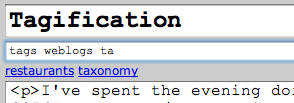
I haven’t abandoned the hierarchy, just hidden it under the surface.
Much of my work over the past 15 years has concerned fitting bits of knowledge into one taxonomy or another.
What I was working with the PEI Crafts Council on creating a database of crafts supply sources, I had to come up with a taxonomy of crafts — stained glass, weaving, pottery, and so on — to organize my suppliers.
The InfoPEI project on the Province of PEI’s website, is really just a home-brew taxonomy used to organize information about the province (and we had many debates during its development about what the taxonomy should look like).
Working with Yankee we face challenges like “astrology really isn’t astronomy, but should it go on the astronomy page?”
Here on the weblog the question is to how to best organize the 2,955 posts I’ve made. For the longest time my answer was “not at all.” Or at least “in reverse chronological order.” With RSS feeds, it became possible (and expected) to assign categories to blog posts, so I dreamed up a set of categories — my own private taxonomy. It looks like this, in part, in my weblog editor:
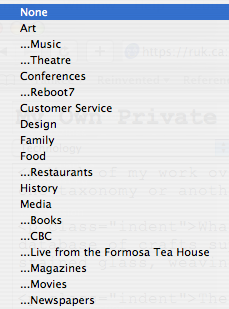
With my new set of categories I could select a place in my taxonomy for my new posts (and I went back and categorized a good chunk of the archival posts too).
That worked well for a while.
Now I’m running into a new problem: as the weblog world adopts tags, I’m finding my category system too limiting. I want to tag a post “davidletterman”, not just “television.” But I don’t want to lose the hierarchy of the taxonomy because I use this to organize my blog archives and the category-specific RSS feeds.
So I’ve modified the home-brew blog editor to make my category system far more flexible. For any given post I can now select an existing category for the post, or it one doesn’t exist, I can enter a new one (both a “plain english” field and a “tag” version). For example:

In this case I want the new “David Letterman” category to be a subcategory of “Television,” so I select that, enter the new category information, and the new category gets created as a child of “Television.”
The danger, of course, is that my taxonomy will lose value once it becomes a tree with hundreds of branches. But, for the time being, I have a lot more granularity at my fingertips, which is, I think, a Good Thing.
I’m filing this under “Taxonomy,” a sub-category of “Weblogs.”
Now that we’re all getting over the shock of having to travel through Montreal when flying from Charlottetown to pretty well anywhere (with Montreal replacing Halifax in this role), Air Canada’s taken it up a notch, with the cheapest fares to the U.S. now routing through Montreal and Ottawa:
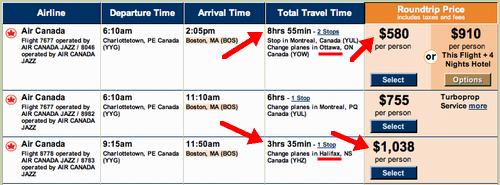
Is it worth $500 to day 5 hours of flying time? Probably.
Google Maps can be very, very tiny. And the still work — zoom, pan, etc. — just fine. This demo shows my current Plazes location (or returns “offline” if there isn’t one).
LAMP is an acronym that, in technology circles, stands for Linux, Apache, MySQL and PHP. It describes a set of four open source applications that together form a powerful web applications development toolkit.
Before LAMP, however, there was LAMPS: Literature, Architecture, Music, Painting and Stage. This is the “long-cherished acronym” of the The Arts and Letters Club in Toronto.
I’ve stopped caring about noise in downtown Charlottetown. But what the hell is this (from here) about:
The city plans to buy a noise meter to make sure everyone is staying under the acceptable noise levels. However, it may take up to a year to make the purchase.
Emphasis is mine. A year?!
Food Network Canada has been airing Channel 4’s Jamie’s School Dinners series this month. The series cover’s Oliver’s efforts to get junk food — french fries, turkey twizzlers, chicken nuggets and the like — out of British schools, replaced with freshly prepared, healthy food.
The programmes are interesting and well-produced, and Oliver’s campaign is brilliant. If you’re in a position where you want to influence kids’ eating habits — or, indeed, anyone’s eating habits — you should watch this.
You can order a Feed Me Better Starter Pack from the show’s website, or download a sample; the campaign itself has a website too.
If you are a regular viewer of “Fox Rochester” — it’s our Fox affiliate on cable television here in Prince Edward Island even though it’s a thousand miles away — you’ll recognize the name of the law firm Cellino & Barnes as they have been heavy advertisers. A “personal injury” law firm, their ads were of the “you’ve been run over by a bus — we’ll help you get your money” variety.
And if you’ve really been paying attention, you’ll have noticed that in recent days the ads have changed: gone are “Cellino & Barnes,” replaced by “The Barnes Firm.” Cellino is nowhere to be seen.
What happened?
Business First of Buffalo reports:
The decision of the Appellate Division, 4th Department, of New York State Supreme Court confirmed widespread speculation that the two personal-injury attorneys, partners in Cellino & Barnes PC, were the subject of a disciplinary investigation brought by the 8th Judicial District Attorney Grievance Committee.
The big news was that Cellino has had his legal license suspended for six months and Barnes was censured by the court - serious, public consequences for the two lawyers but a far cry from the disbarment that many observers, casual and otherwise, were predicting for one or both of them.
And later in the same story:
The most immediate impact of the court’s decision to temporarily revoke Cellino’s license is the removal of Cellino’s name and image from all firm communications, including its letterhead and the more than 100 Cellino & Barnes billboard ads that line roadways around Buffalo, Rochester and Erie, Pa. As of Wednesday, radio ads for newly christened The Barnes Firm were running in place of Cellino & Barnes spots.
So now you know.
It figures: after stumbling through the unofficial hack method of using Google Maps earlier in the week, today Google released a Google Maps API. It’s so much easier to implement Google Maps when you have real documentation!
So here’s take two at making Google Maps of my Plazes.
As before, I used XSLT to transform the Plazes “traces” file into a format suitable for Google Maps. There’s a new, much simpler format that’s documented here. On first blush it looks like more of the heavy lifting is left to we the API users: no more automatic pop-ups from data baked into XML. Here’s the result of my first go:
- XML locations file (from Plazes)
- XSLT file (transforms the XML file)
- XML file for Google Maps (in the new ‘markers’ format)
The result of the demo, which you can see live here, looks like this:
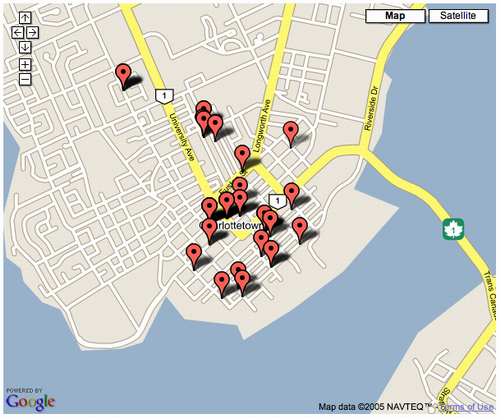
A click of the “Satellite” link and I get this:
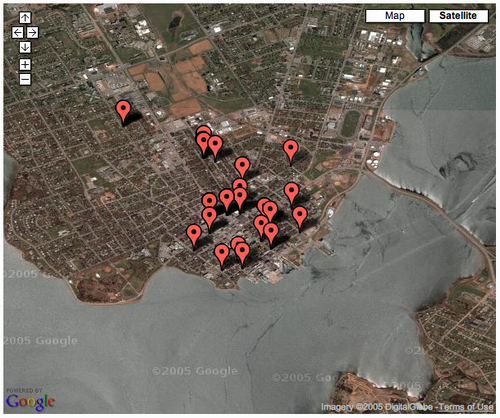
The work to be done now — and there’s the API to support this, thank goodness — is to make the Plazes clickable.
About This Blog
 I am Peter Rukavina and this is my blog. I am a writer, letterpress printer, and a curious person.
To learn more about me, read my /now, look at my bio, listen to audio I’ve posted, read presentations and speeches I’ve written, or get in touch (peter@rukavina.net is the quickest way).
I have been writing here since May 1999: you can explore the 25+ years of blog posts in the archive.
You can subscribe to an RSS feed of posts, an RSS feed of comments, or a podcast RSS feed that just contains audio posts. You can also receive a daily digests of posts by email.