
I got another “I’ve switched Internet providers so here’s my new address” email from a friend today. I get several of them every month.
Which prompts me to make a very basic suggestion: I recommend that everyone register their own domain name and use that domain to receive their email. When you do this — and it’s really very simple — then you’re no longer tied to a particular Internet provider or web mail service, freeing you to decide the best way of receiving your Internet and decoupling your Internet service from your email.
Now this used to be something that was very complicated: drenched with arcane rules, complex to set up, and really only possible if you had your own hardware and dedicated Internet connection.
This is no longer the case: it’s now possible to get up and running in minutes.
Here’s what you need to do.
First, go to a “domain name registrar” website — we use both Webnames.ca and GoDaddy.com — and use the prominently-placed domain search box you’ll almost certainly find there to search for possible domains to register. You’ll likely find that almost any common name is already taken, so you have to be creative: if “johnsmith.com” doesn’t work, try “johnsmithrocks.com”.
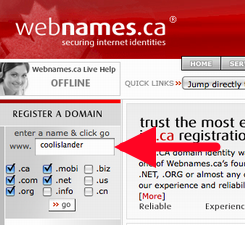
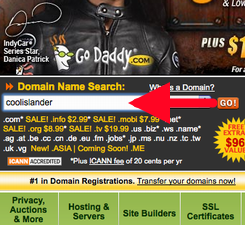
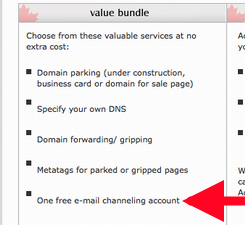
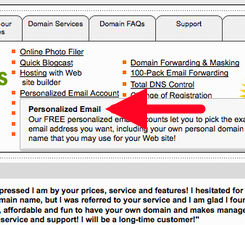
Once you find a domain that’s available, proceed with the registration and watch out for a feature called, variously, “email forwarding” or “email channeling” and make sure you opt for it (it’s usually free, at least for the first email address associated with your new domain).
Proceed through the purchase process (this is where you’ll find the biggest difference between Webnames.ca, which is more expensive but less drenched in confusing up-sell messages, and GoDaddy.com, which is much cheaper, but mind-numbingly overwhelmed with “hey, why not add this special domain security protection deactivation feature” offers). You’ll have to spend anywhere from $1.99 to $35 a year for the registration depending on where you do the deal; ask your geeky friend who they deal with if you need advice.
Once your domain name is registered you’ll have access to some sort of “domain configuration tool” that will let you set up email forwarding. The idea here is that you’re going to set up your permanent, this-will-never-change email address — say “jorge@johnsmithrocks.com” — to forward any email that’s sent to that email address somewhere else. That somewhere else can be any of:
- The email address that comes with your Internet service — jorge@pei.sympatico.ca, jorge@eastlink.ca, whatever, or
- A free webmail account, like the ones you can set up at Yahoo, GMail, Hotmail, etc., or
- Your work email address.
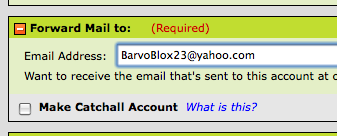
So, in other words, you’re not setting up a “new place to get your email” — that can stay the same as what you’re using right now — you’re setting up a new way for people to email you there. So you can still login to Yahoo, let’s say, and use your “BarvoBlox23@yahoo.com” address like you always have, but you can give out your cool new “doug@barvoblox.com” address to your friends, and set that address up to simply forward your email onto Yahoo.
They key here is that you can always change where your email gets forwarded by going back to the place you registered the domain and pointing your email elsewhere.
So if Yahoo gets purchased by Microsoft and you don’t like their new privacy policy, you can get a Gmail account, and just point your permanent, this-will-never-change email at your personal domain at your new account. That’s all you’ll need to do, and you don’t have to tell anyone that you’ve done it.

Comments
Nicely explained. I would only add the following: If you’re forwarding to a free ISP email account or a webmail account, you should consider changing the “Reply To” address in the account setup to your custom domain address. That way your contacts will reply directly to the custom address and won’t collect your various “other” addresses where you actually receive your email. If your old, obsolete addresses get saved in your contacts’ address books they may send mail to those addresses after you’ve stopped using them. This may not be possible, or even a good idea, if you forward to a work address.
Good point, Rob.
On Rob’s point, you probably should avoid using your work email address anyway, since there are so many free webmail accounts available, and also to avoid bumping into any Acceptable Use Policies about using email for work-related activities only.
One other thing I do is to give out specific addresses for specific purposes. Most email forwarding systems allow you to set things up so that any userid at your domain name will forward to your designated account. For example, when I am off work I put an auto- message on my work account telling anyone who wants to contact me for personal reasons to email me at “fromwork@derekmacewen.com”. This lets me know quickly that the message I receive was from someone who first tried to contact me through my work account.
Hint: be sure to show the “To” column in your email system to see what address was on the message. It’s not displayed by default by default on Windows email.
You can also make people feel really special by giving them their own “private” email account to contact you e.g. “frompeter@derekmacewen.com”.
One thing I have discovered recently is that you can add “+anything” to your Gmail address and create arbitrary email address any time you like.
For example, “peter+weblog@gmail.com” or “peter+goodfriend@gmail.com”. You don’t have to register these addresses anywhere, you can just use them at will. And then apply Gmail filters to magically deal with the mail that comes into them if you like.
Thanks for this handy guide.
The up-sell attempts on Godaddy is legendary.
PS: I want DNS to get to phone systems, and soon. phone@ollehost.dk would be nice.
There is DNS for phone systems. Here’s mine.
I felt inspired after hearing your Spark interview on CBC. I had one question: What about privacy? How does one avoid showing up in those whois searches with your full address, without paying the domain registrar a small fortune? I love that this isn’t necessary with .ca domains.
This is a nice article — but what if email forwarding is not freely given, or if you wish for several emails to be used (i.e. both john@smith.ca and jane@smith.ca). Is there an ultra cheap-o method to set up forwarding of multiple addresses? This would be a nice additional piece of info…
I’m also concerned about what Michelle above said: keeping invisible on Whois searches; I didn’t know that about .ca domains. I’m not sure if this is silly, but another puzzle for me is US vs. Canadian (or other) servers. If I reserve at Godaddy—an American site—are there any issues with who owns what? Is that crazy? I’m actually trying to buy my domain as I type, after having spent intense time a year ago, but not finishing thinking these things through. I’d been heartily advised by someone I can’t remember to use Godaddy back then, but held back because I wish to ‘buy Canadian.’ Does it make any difference? Is gmail less honourable than Hotmail, which I after all use daily? (I had a gmail user show me the code and I found my other Hotmail account thereon, which gmail had no reason to know.) How much more will webnames.ca cost than Godaddy?
Buy Canadian? go to
http://baremetal.com/
to register your domain and they send a % of your fee to a charity as well.
Can anyone direct me to reference material where can I get up to speed on all of this domain stuff?
i.e. I didn’t know that .ca domains offered privacy from the whois searches.
I assume that I need to get hosting if I want to do anything with the domain name?
cooooooooool
I found a very easy way that could answer most of the questions above. I purchased a hosting account with Host Papa, a CANADIAN company, for about 6$ a month. Once you purchase a package with them they will buy the domain for free and manage it for you. Since it’s them that actually purchase the domain in your behalf you personal info will never show anywhere. Furthermore you can have any number of e-mail accounts that you manage yourself. You acces e-mails directly from you hosting account or you can set them up with Outlook or any mail softwear. I have one e-mail account that I set up on my home pc, my work pc, my IPhone and on my partner’s blackberry. Whenever I receive, read, delete or send an e-mail all 4 devices syncronize. The IT at Host Papa can help you set these up if you are not sure how to do it. For those that already purchased their domain you can just have it point to your account it’s very easy. There are other great benefits to have a hosting account… So you go Canadian, keep your privacy, get a cool e-mail and all this for 6$/month. I hope this helps!
I found a very easy way that could answer most of the questions above. I purchased a hosting account with Host Papa, a CANADIAN company, for about 6$ a month. Once you purchase a package with them they will buy the domain for free and manage it for you. Since it’s them that actually purchase the domain in your behalf you personal info will never show anywhere. Furthermore you can have any number of e-mail accounts that you manage yourself. You acces e-mails directly from you hosting account or you can set them up with Outlook or any mail softwear. I have one e-mail account that I set up on my home pc, my work pc, my IPhone and on my partner’s blackberry. Whenever I receive, read, delete or send an e-mail all 4 devices syncronize. The IT at Host Papa can help you set these up if you are not sure how to do it. For those that already purchased their domain you can just have it point to your account it’s very easy. There are other great benefits to have a hosting account… So you go Canadian, keep your privacy, get a cool e-mail and all this for 6$/month. I hope this helps!
I have used the Godaddy domain email in the past. The domain email cost is in addition to the domain cost.
I set up a Godaddy reseller site and give free basic domain email with a domain purchase at http://internetdirectsolutions…. Just skip all the upsells when purchasing your domain and your free email will be available for configuration after your domain purchase. The domain email on internetdirectsolutions.com works the same as Godaddy, but at the best possible price-free with domain purchase. I also give step by step instructions for creating you domain and configuring your domain email account at http://ownemaildomain.net.
I would like to know what people think.
You may email me at ownemaildomainfeedback at dnh7 dot org.
Hope it’s ok to post these links here.
Regards,
David
Thanks a lot for a great article like this. This is very helpful for a newbie like me.
I am a novice trying to reestablish an email service for a NFP organization, which has minimal $ resources. It has a domain @ GoDaddy, so what is the next step to having an info@.... email.
Thank you.