
After toying with Google Tasks as a way of managing my life (or at least the parts of my life not already managed by Trac), today I’m experimenting with Remember the Milk, with hopes of finding, in its single-minded focus on task management, a more fulfilling solution.
After getting the iPad and iPod apps set up, getting the email-to-tasks chain flowing, the next task is getting (the excellent) Alfred app up and running for easy task entry from anywhere.
Here’s how I did it.
Step One: Install rumember
This is a handy command line Remember the Milk utility. Install as follows, from the command line:
git clone https://github.com/tpope/rumember.git
cd rumember
sudo gem build rumember.gemspec
sudo gem install rumember-1.0.0.gem
Run ru from the command line the first time and a browser will open Remember the Milk requesting permission to access the application; one you grant this once you don’t need to do it again. Once you’ve done this, you can test the utility from the command line like:
ru Setup Alfred for Remember the Milk
Step Two: Setup for Alfred
Open the Alfred Preferences window and click on the Terminal section:
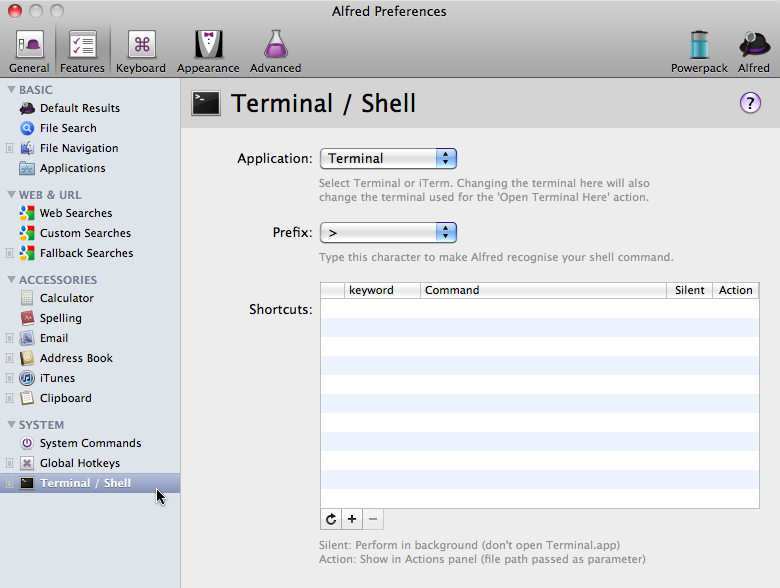
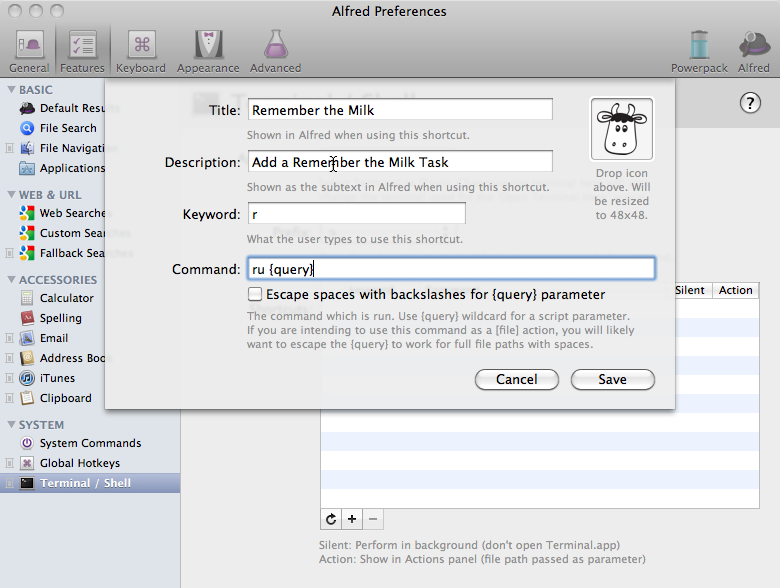
Click on the + at the bottom of the list to add a new command, and enter the following:
- Title: Remember the Milk
- Description: Add a Remember the Milk Task
- Keyword: r (this can be anything you like – rtm or task… anything)
- Command: ru {query}
- Optionally, grab this official icon and drag it into the icon field.
And click Save:
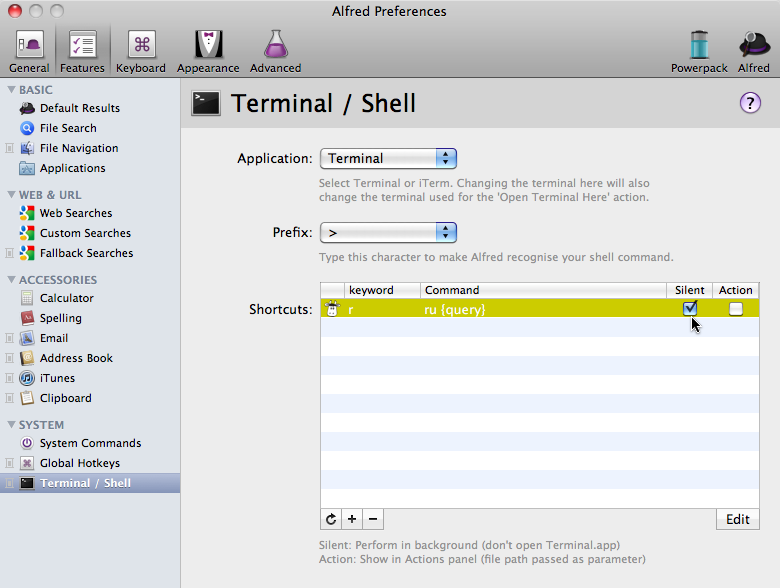
Make sure you check the Silent checkbox beside your new command to prevent a Terminal window from opening when you access the command:
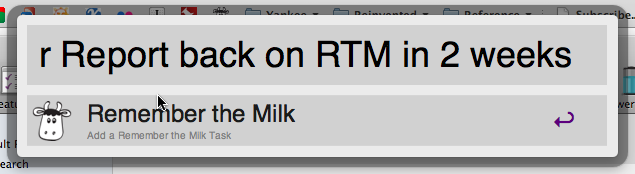
Step Three: Use It!
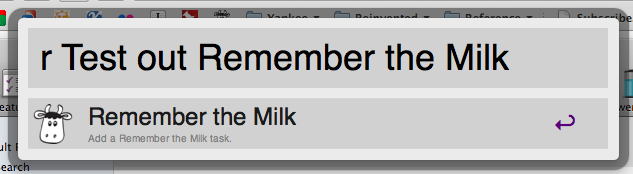
…results in:
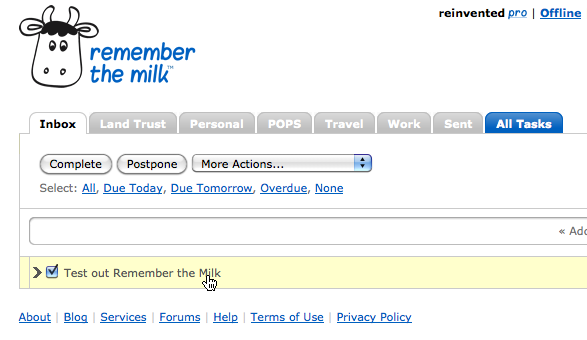
I’ve only been a Remember the Milk user for a few hours now, but I’ve already upgraded to the $25/year “pro” level – partly just because I admired the gentle on-ramp provided for this, where everything works fine and dandy at the “free” level, but just works better once you pay up. I’ll report back in a few weeks on how I make out with it…
Comments
I love this method for adding to RTM. Two questions:
1. With terminal closed, I can’t seem to get the silent option to work. the tasks only add to RTM when I have terminal launched.
2. Do you know how to add tasks to smartlists using this method? The due date works like a charm, but when I add, say, “#Work” it’s not filing the task like RTM normally would.
1. With terminal closed, I can’t seem to get the silent option to work. the tasks only add to RTM when I have terminal launched
I don’t seem to have this issue: with Terminal.app closed I can successfully add a task via this method without Terminal opening (or needing to be open).
2. Do you know how to add tasks to smartlists using this method? The due date works like a charm, but when I add, say, “#Work” it’s not filing the task like RTM normally would.
If you check the “Escape spaces with backslashes” checkbox this appears to work properly:
<img src=”http://media.ruk.ca/images/RTM…” alt=”“/>
 
Got the same problem with 2. Adding spaces helped.
I do not have the first problem, but it happened to me with the google CLI. Try giving the full path for rumemeber (/usr/bin/ru on my system).
I haven’t tried RTM, but only because I’d already been seduced by Toodledo. It’s not the prettiest website, but it keeps surprising me by making features available when and as I need them. I’ll think “Wow, it would be nice if I could forward emails with tokens in the subject line for Folder, Context, Due Date, etc.” and, oh look — I can.
I’ll be interested to hear how you fare with RTM.
Love the idea, but not sure how to make installation work for me. After some trial and error I did manage to install Rumember, but not to “run [it] from the command line” in a way that resulted in the browser opening. Needless to say this is my first time messing with Terminal; of course I don’t expect you to write a full tutorial, but if you have any pointers for how to make this work I’d really appreciate it.
To “Run ru from the command line,” once you’ve installed Rumember, just open the Terminal application and type ru. Your browser should open and you’ll either be asked to login to Remember the Milk or, if you’re already logged in, you’ll have automatically authorized Rumember. That’s it!
<iframe width=”550” height=”442” frameborder=”0” src=”http://www.youtube.com/embed/Z…” allowfullscreen=”“></iframe>
I can’t seem to get it to work on silent mode, nor does the fix above make it work…any ideas?
I set this up and it works great
EXCEPT
that the tasks I add don’t alert me. I made a bunch of tasks yesterday and didn’t get alerts for any - each had their due date and time set.
I did a test today:
made “Task A” with alfred, due at 9am
and “Task B” on the website, due at 9:05am
Alfred’s task did not get a reminder, but Task B did. Retried this several times over the last hour and still the same issue.
Any idea why?
I get regular alerts on my iphone and ipad, as well as an email alert to all devices. None responded to the alfred tasks.
I’m having exactly the same problem as this, using a variety of other methods I always get my alert reminders, it’s only when using this method that the reminders don’t come through. It really is quite puzzling, any ideas on how to fix it?
I had the same silent issue as many others. I tracked it down to using the full path to ru.
In your terminal run the command `which ru`. You’ll get something like /path/to/ru.
Change your alfred RTM script to read /path/to/rtm {query} (please use the actual path) instead of rtm {query}.
I also forked and published rumember to rubygems. Do a `gem install ryansch-rumember` to skip the manual building step.
Even better, tpope just released 1.0.0 of rumember proper to rubygems. Go get it.
I can’t install rumember. I copy and paste the text from step one, but i keep getting an error message. Terminal says that it cannot find gem rumember.gemspec locally or in a repository.
Anyone have any ideas? Thanks.
Just so you know, using the toodledo gem, you can basically do the same thing for toodledo. :) Here’s my final script. It sticks a task in my Inbox folder due today with top priority.
toodledo add ‘{query} *[Inbox] !top #[today]’
I had the problem where it worked in the terminal but not in silent mode.
The issue was that the environment settings were different (in my case because rvm was loading a different ruby). Installing ru to system ruby (sudo /usr/bin/gem install ru) and using a path that executable (/usr/bin/ru) fixed that.
After running: sudo gem install rumember-1.0.0.gem
I get this error message:
ERROR: Error installing rumember-1.0.0.gem:
ERROR: Failed to build gem native extension.
/System/Library/Frameworks/Ruby.framework/Versions/1.8/usr/bin/ruby extconf.rb
mkmf.rb can’t find header files for ruby at /System/Library/Frameworks/Ruby.framework/Versions/1.8/usr/lib/ruby/ruby.h
I am running a fresh install of Lion, which I believe ships with Ruby 1.8.7.
After copying the command lines I get this error:
ERROR: Error installing rumember-1.0.0.gem:
<div>
ERROR: Failed to build gem native extension.</div>
<div>
</div>
<div>
<div>
/System/Library/Frameworks/Ruby.framework/Versions/1.8/usr/bin/ruby extconf.rb</div>
<div>
mkmf.rb can't find header files for ruby at /System/Library/Frameworks/Ruby.framework/Versions/1.8/usr/lib/ruby/ruby.h</div>
</div>
Can anyone help?
Me four. Uggggh. I've tried the rvm route, but I'm not too familiar with Ruby installation/setup. I'll just wait for a solution to be posted here… :(
gem worked for me:
sudo gem install rumember
Password:
Building native extensions. This could take a while…
Successfully installed json-1.4.6
Successfully installed configuration-1.3.1
Successfully installed launchy-0.3.7
Successfully installed rumember-1.0.0
4 gems installed
Installing ri documentation for json-1.4.6…
Installing ri documentation for configuration-1.3.1…
Installing ri documentation for launchy-0.3.7…
Installing ri documentation for rumember-1.0.0…
Installing RDoc documentation for json-1.4.6…
Installing RDoc documentation for configuration-1.3.1…
Installing RDoc documentation for launchy-0.3.7…
Installing RDoc documentation for rumember-1.0.0…
Hello,
I have a quick question running the script within alfred. Is it possible to add your todo item and set the day? for example I want go ahead and use “r get some milk” and set the date for tomorrow instead of today! Is this possible?
Regards,
Deniz
You’re just sending regular Remember the Milk strings via the API, so anything you can enter in the app you can enter via this interface. So, to your example, “r get some milk tomorrow” should work just fine.
Installation seemed to go just fine, but when I try to authorize I get
ru: command not found
“which ru” results in a bash prompt only. Any ideas? Thanks!
Also getting the ‘Failed to build gem native extension.’ error message. Anyone know how to solve this?
I have the same issue on Lion, It appears for lion you need to install xcode (free from mac appstore). I am in the process of downloading it now and will report back the results.
For all having issue on Lion, I can confirm that downloading and installing xcode, free from the Mac App Store and then running:-
sudo gem install rumember-1.0.0.gem
Works perfectly and will install rumember.
I’m sure deleting xcode after should cause no issues.
Your solution didn’t work for me as ruby-gem was still calling the dependencies from the RVM gem binary.
I found that adding pushd <path to="" rvm="" bin="" folder=""> above the ru {query} actually let me run it through the RVM version :)
Actually that didn’t work, once I closed my iTerm session it didn’t work.
But i did figure it out without the terminal open: [[ -s "/Users/YOUR_USERNAME_HERE/.rvm/scripts/rvm" ]];source "/Users/YOUR_USERNAME_HERE/.rvm/scripts/rvm";ru {query} made it work for me. This is only applicable if you installed ru with RVM.
I am on Lion 10.7.3 …I have XCode installed.
But I still cannot get it to install on my laptop.
I get this message:
could not find gem rumember-1.0.0.gem locally or in a repository
I have successfully installed this (weeks ago) on my desktop computer. So I don’t understand why it isn’t working now.
I am not that familiar with the terminal and commands.
Any help is greatly appreciated.
Thanks!
Yes, this is the problem I’m now getting also, with Xcode installed. Argh, it’s so cool and I really want to use it!
If you are receiving this error and already have XCode installed try this: Open XCode->Preferences->Downloads->Components->Command Line Tools->Install
This seemed to fix it for me.
I’m having a strange issue where all of my tasks added through this method are one day earlier than I specify.
For example, if I send “r Pick up Milk”, it sets the due date as Today.
If I send “r Pick up Bread tomorrow” it sets the due date as TODAY.
If I type “r Pick up Butter today”, it sets the due date as YESTERDAY (overdue).
If I send “r Pick up Eggs Friday”, it sets the due date as Thursday.
Anybody have any suggestions? I don’t have this problem from the website or the mobile app, it’s specific to rumember + alfred.
(And other than this date thing, this is a great method! Thanks!)
I’m currently running Mountain Lion and having some problems with dates. In particular, ^tomorrow results in no task being added. Is this standard behavior?
This helpful tip got a bit garbled by the commenting system’s auto formatting, sadly. To get Alfred & RtM to work nicely with rvm, the command should be:
source “/Users/YOUR_USERNAME_HERE/.rvm/scripts/rvm”; ru {query}
Anyone still having trouble making rumember work, I wrote a little tutorial for another not-so-elegant solution http://www.kimkorte.de/2012/10…
Still, if anyone figures out why some people can’t install rumember please tell me, I prefer the solution on this site.
I was able to use this with Alfred a while back but I’m having a hard time building it with mountain lion. Has something changed in ML to keep this from working?
If you’re using rbenv, you’ll need to get the full path by using “which rbenv ru” - just putting “which ru” will lead you to the shim and you’ll still be stuck. Thanks for getting me on the right track though!
If you’re using rbenv, you’ll need to get the full path by using “which rbenv ru” - just putting “which ru” will lead you to the shim and you’ll still be stuck. Thanks for getting me on the right track though!
I used this excellent guide a year ago with no problem on my Macbook running Lion. Only recently I tried to follow the steps above again to setup the very same thing with my new computer running Mountain Lion. With no success. :(
After some time (and reading many how-to and other help-articles), I found a brief article that resolved the issues described above for me: https://gist.github.com/thelib…
As the author writes, there were a “couple of oversights on Apple’s part”. And so it seems.
PS: Please also note the “Credit Where Credit Is Due” on the above mentioned article.
PSS: I created a Diigo bundle that includes both this tutorial here plus the brief article summarising the necessary modifications for future reference: http://bit.ly/17BkFvZ
 I am
I am  You can subscribe to an