
Okay, I’ve figured out the key combination in FCKeditor that’s causing me grief: I’m used to typing Command + Left Arrow to go to the start of the current line in an editor. While this works as expected in a normal input field, if I do this in FCKEditor it’s interpreted as “back” by the Firefox and takes me back to the previous page, therein losing everything I’ve typed into the editor.
Apparently this is a Mac Firefox-only issue, and is discussed in this blog post and this Firefox bug report.
While some recommend Keyfixer as a Firefox add-on that fixes this issue, I couldn’t get it to work, and opted, instead, for keyconfig.
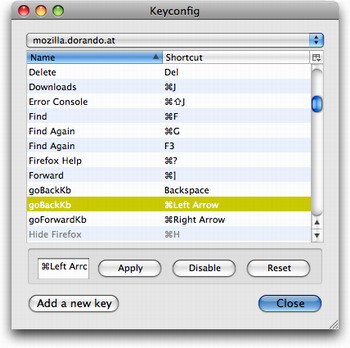 To install keyconfig, just visit this page, click on the link to the latest keyconfig.xpi file, and install the add-on. Once it’s installed and Firefox has restarted, select Tools > Keyconfig in Firefox, select the row named goBackKb that’s set to ⌘Left Arrow and click Disable.
Once I did this, using FCKeditor in Firefox on my Mac became a much more pleasurable experience, what with the whole “you could lost everything with one careless keystroke” somewhat removed.
Comments
Seems that losing the form contents by navigating away from the page is a bug as well - a good form should still maintain the contents if you navigate away from, and then back to, the page. Probably FCKeditor’s fault?
Thanks Peter - look like a must have. There is also a Drupal module that displays a dialogue box when you stray from an edit page without saving. It allows you to confirm or return, effectively doing away with this problem in most circumstances. Unfortunately I can’t remember the name of the module :-( I will check with our Drupal team and let you know.
 I am
I am  You can subscribe to an