I’ve been doing a lot of talking about podcasting recently: explaining to people what it is, and how they can do it, and how they can listen, and how it works. I thought it might be useful to provide a very simple step by step illustration of how to “subscribe to a podcast.”
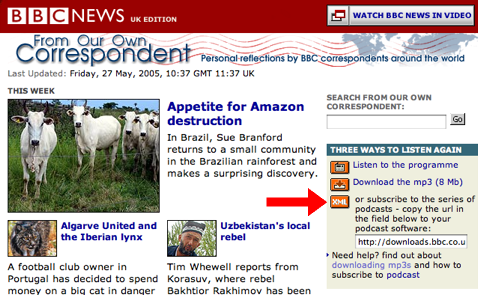
I’ll use the podcast for BBC’s From Our Own Correspondent as an example. If you visit the show’s website, you’ll see a new “XML” button labelled “subscribe to the series of podcasts” and providing a URL for the “podcast feed:”
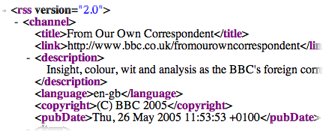
The “podcast feed” URL is the address of a specially encoded page on the BBC’s server that contains information about the podcast. If you look at it in a web browser, it will look confusing
But you’re not meant to look at this “raw” data; instead you copy the URL into a piece of “podcatching” software — a sort of “radio” to podcasting’s “transmitter.” There are many different podcatching applications available, and there’s something for you no matter what sort of computer you have.
I use NetNewsWire myself: it’s a very well-designed and mature application that exists primarily as a “newsreader” tool for reading weblogs, but has recently been extended with “podcatching” capabilities. So I start up NetNewsWire and then click its Subscribe icon, paste in the “podcast feed” URL I got from the BBC website, and click the Subscribe button:
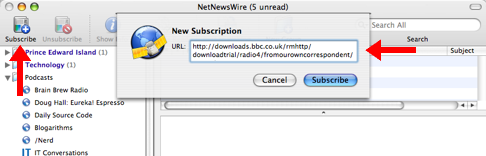
The result? Following the arrows I’ve added in the screen shot below clockwise from the top-left, you’ll see an entry for the From Our Own Correspondent in the list of podcasts I’ve subscribed to, a list of the recent “episodes,” with the “publication date” for each, and, because I’ve selected the Thursday, May 26 episode, the details about the episode below, along with a link to download the audio into my iTunes:
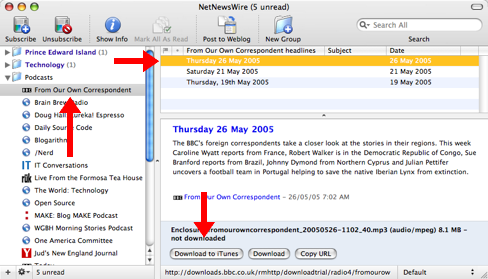
In the case of NetNewsWire, the program doesn’t automatically go out and fetch the audio for existing programs (this prevents it from downloading hundreds of megabytes of old shows); however the next time the BBC updates the From Our Own Correspondent podcast, NetNewsWire, because of the way I’ve got it set up…
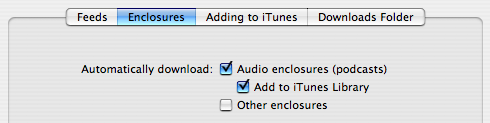
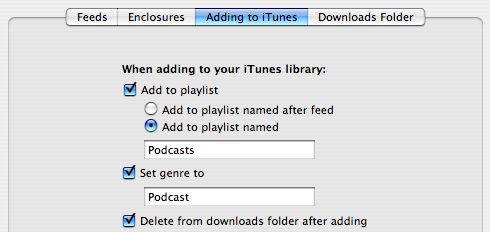
…will automatically download the audio, transfer it to my iTunes, put it in a playlist called “Podcast” and set the genre to “Podcast.” Here what my iTunes “Podcast” playlist looks like after NetNewsWire has been running for a while and a bunch of new podcasts have flowed in, including, highlighted at the top, a new From Our Own Correspondent:
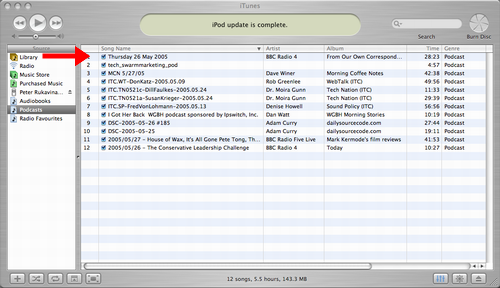
And that’s it. The whole idea is that I subscribe to a podcast and from then on the audio for each new episode automatically shows up on my iPod.
Although the process above is certainly more complex than it will eventually be, it’s become easy enough to grasp that most anyone can become a podcast listener without much effort.
If you have any questions about how to do this yourself, feel free to ask in the comments to this post.

Comments
Well, you inspired me to invest a couple hours into this, after which I still haven’t heard anything, but I’m sure I’ll figure it out eventually and be grateful.
Well, that was very useful. Thank you for taking the time and effort to put that down. I’ve been reading about podcasting for weeks, but every other writer assumes that we all know everything about it (but then why would we read the article? duh).
Very thoughtful and informatived tutorial, well done. I often find myself unable to explain how to understand the basic principles of podcast subscription to new listeners. Your visual guide will aid many newbies. I will be sending people here if they want to learn how to do it.
Many thanks.
As someone who liked NetNewsWire enough to purchase the full version, they really need to get on the ball and add functionality to work with BitTorrent Podcasts such as the one TWiT (This Week in Tech) offers — see http://thisweekintech.com/podc… for more info. This is one feature NNW can’t compete with iPodderX on currently, and it bugs me.
Other than that, I love the thing and I’m really digging some of the better Podcasts out there. A lot of these people need to invest in some higher-quality recording equipment ;)
SK
I have iTunes 4.9, I have my audio file, I have my RSS 2.0 for my blog. But when I subscribe my audio to podcast in iTunes, it dosent works it says : The url might be pointing at text — only episodes, or the file contains file types that iTunes cannot support. I am struggling with it, my head this days is just podcasting podcasting podcasting, I am really looking to make it work..
Any help will be so great for me,. I would be really grateful ..
cheers
When I first got into podcasting I found it more than a little confusing- producing the material was no problem, getting it to potential subscribers was. It was my belief that this confusion was probably commonplace so I began what is now ‘phpFM’, a simple script users can upload to their websites which automatically produces and edits their podcast feeds for them. Its free and very easy to use if you’re interested goto phpfm.com to find out more. Its a lot simpler than manually getting into the feed, editing the XML and uploading it to the web every time you produce a new episode, so hopefully it’ll help a lot more people get more involved with podcasting.
Being a beginner in HTML in the first place, this was very helpful. I call into many podcasts that I listen to in hopes to share my thoughts on certain subjects. I have been trying to add a podcast to my website recently so, this will be a great source. I also just go to WIKI.
http://en.wikipedia.fifth gearorg/wiki/Podcast